Display and interact with JSON in a dashboard
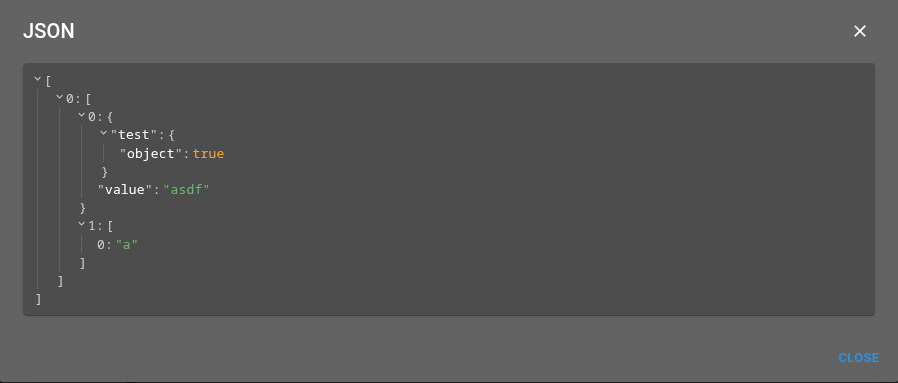
This tutorial shows how to render JSON in the front-end and how the shared JSON viewer is reused across a dashboard. It combines the four surfaces of the feature on a single dashboard: a Json widget, a JSON table render, a Json form component and a JSON menu output. It also binds a Json widget to a subscribed value to show live, escaped-JSON content.
Add a
Jsonwidget to display a JSON value, and update it at runtime from a menu (or aMenuActionprompt) through thesetJsonwidget-context action.Add a
JSONrender column to an alarm table to inspect a structured field in a modal.Add a
Jsonform component to display a bound property, with and without ascope.Add a
jsonmenu output to open a JSON payload in a modal.Bind a
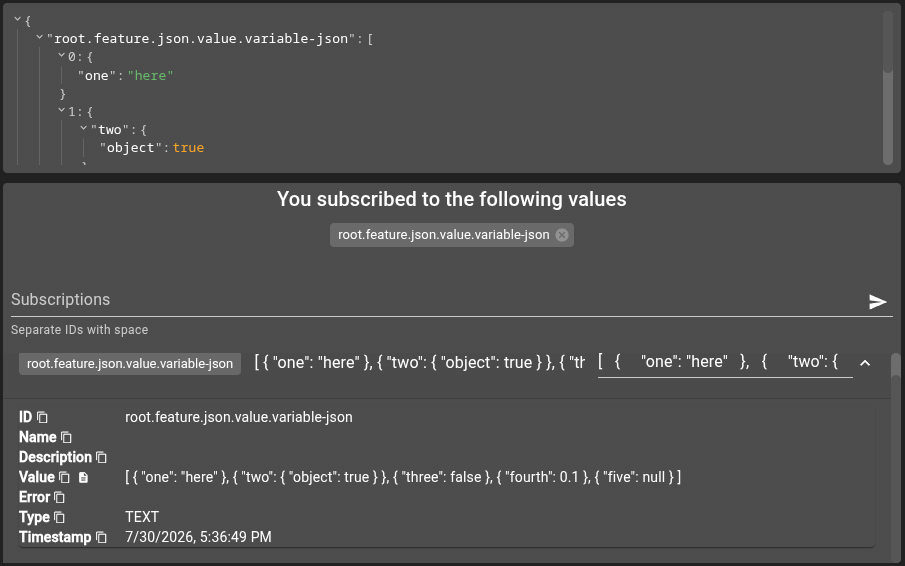
Jsonwidget to a subscribed value whose escaped-JSON content is expanded automatically.
git checkout origin/osp-web-configuration .
git checkout origin/osp-alarms-configuration .
git checkout origin/osp-variables-configuration .
git checkout origin/example-dashboard-json .
Prerequisites
Steps
Add a Json widget to the dashboard
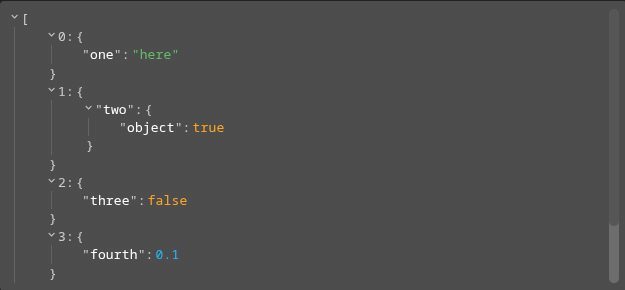
Add a widget with type set to Json. Its jsonWidgetSettings.content holds the JSON value to display (any object, array or scalar), while options control how the viewer renders it. In the dashboard below this widget has the id json-content.
The dashboard also wires every other surface used in this tutorial so they can be tried out together: an AlarmTable and a MenuAction widget (both referencing the menu configured further down), a Form, a ValueSubscription widget and a second Json widget (json-values) bound to a subscribed value.
root/feature/json/dashboard/dashboard.view
{
  "configuration": [
    {
      "type": "Json",
      "id": "json-content",
      "jsonWidgetSettings": {
        "content": [
          {
            "one": "here"
          },
          {
            "two": {
              "object": true
            }
          },
          {
            "three": false
          },
          {
            "fourth": 0.1
          },
          {
            "five": null
          }
        ],
        "options": {
          "collapsed": false,
          "displayDataTypes": false,
          "displayObjectSize": false,
          "enableClipboard": true,
          "highlightUpdates": false,
          "indentWidth": 30,
          "objectSortKeys": true,
          "shortenTextAfterLength": 5
        }
      },
      "title": ""
    },
    {
      "type": "AlarmTable",
      "alarmWidgetSettings": {
        "defaultFilter": "root.alarms.filters.all",
        "defaultHierarchy": "grouped",
        "defaultView": "root.feature.json.alarms.view",
        "disableFilterUpdate": false,
        "disableResizeRowDetailHeight": false,
        "disableToolbar": false,
        "disableToolbarClearFilter": false,
        "disableToolbarClearUserUpdatedColumns": false,
        "disableToolbarColumnChooser": false,
        "disableToolbarColumnShowHide": false,
        "disableToolbarExport": false,
        "disableToolbarFilterShowHide": false,
        "disableToolbarJournal": false,
        "disableToolbarMenu": false,
        "disableToolbarSearch": false,
        "disableToolbarSummaryShowHide": false,
        "disableToolbarTableAutoRefresh": false,
        "disableToolbarTableRefresh": false,
        "disableUrlHistory": false,
        "disableUserUpdatedColumnsMemoization": false,
        "disableViewUpdate": false,
        "displayAlarmGroupsWhenShowingEveryAlarm": false,
        "enableAutomaticRefresh": true,
        "resizeMode": "widget",
        "rowDetailHeight": 250,
        "rowDetailMaxHeight": 500,
        "rowDetailMinHeight": 150,
        "shareFiltersBetweenTables": false,
        "showColumn": true,
        "showFilter": false,
        "showSummary": false
      },
      "id": "table",
      "menuReferences": [
        "root.feature.json.menus"
      ],
      "title": ""
    },
    {
      "type": "Form",
      "formWidgetSettings": {
        "form": "root.feature.json.form",
        "options": {
          "useDefault": true
        },
        "toolbar": {
          "type": "Toolbar",
          "id": "toolbar",
          "toolbarWidgetSettings": {
            "type": "Form",
            "formSelectSettings": {
              "type": "Form",
              "icon": "code"
            },
            "position": "Top",
            "submitSettings": {
              "disableAlertPreventingClosingIfFormNotSaved": true,
              "disableApply": true,
              "disableCancel": true,
              "disableClose": true,
              "disableKeyboardsShortcuts": true,
              "disableSaveFeedback": true,
              "disableSubmit": true
            }
          }
        }
      },
      "id": "form",
      "title": ""
    },
    {
      "type": "MenuAction",
      "id": "menu",
      "menuActionWidgetSettings": {
        "width": 1
      },
      "menuReferences": [
        "root.feature.json.menus"
      ],
      "title": ""
    },
    {
      "type": "ValueSubscription",
      "id": "vs",
      "title": "",
      "valueSubscriptions": {
        "values": [
          {
            "id": "root.feature.json.value.variable-json",
            "right": "READ_WRITE",
            "type": "TEXT"
          }
        ]
      }
    },
    {
      "type": "Json",
      "id": "json-values",
      "jsonWidgetSettings": {},
      "title": "",
      "valueSubscriptions": {
        "values": [
          {
            "id": "root.feature.json.value.variable-json",
            "right": "READ_WRITE",
            "type": "TEXT"
          }
        ]
      }
    }
  ],
  "layout": {
    "lg": [
      {
        "i": "json-content",
        "x": 8,
        "y": 9,
        "w": 4,
        "h": 6
      },
      {
        "i": "table",
        "x": 4,
        "y": 0,
        "w": 8,
        "h": 9
      },
      {
        "i": "form",
        "x": 0,
        "y": 2,
        "w": 4,
        "h": 13
      },
      {
        "i": "menu",
        "x": 0,
        "y": 0,
        "w": 4,
        "h": 2
      },
      {
        "i": "vs",
        "x": 0,
        "y": 15,
        "w": 12,
        "h": 22
      },
      {
        "i": "json-values",
        "x": 4,
        "y": 9,
        "w": 4,
        "h": 6
      }
    ]
  },
  "breakpoints": {
    "lg": 1200,
    "md": 996,
    "sm": 768,
    "xs": 480,
    "xxs": 0
  },
  "cols": {
    "lg": 12,
    "md": 10,
    "sm": 6,
    "xs": 4,
    "xxs": 2
  },
  "rowHeight": 20
}
root/feature/json/dashboard/dashboard.web
{
    "moduleId": "modules.web.web-1",
    "title": "JSON Widget",
    "description": "",
    "folders": ["Dev"],
    "tags": ["Dashboard", "JSON"]
}
Render JSON in the alarm table
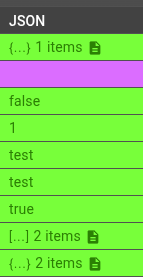
Add a column with render set to JSON to the alarm view. In the table, the value is shown as a compact summary and clicking the cell opens it in a modal. The column options.display and options.style customize the viewer used in that modal.
root/feature/json/alarms/view/view.web
{
    "moduleId": "modules.web.web-1",
    "liveColumns": [
        {
            "name": "Acknowledged",
            "display": false,
            "render": "BOOLEAN",
            "position": 0
        },
        {
            "name": "Summary",
            "position": 1,
            "aggregate": "count",
            "render": "STRING"
        },
        {
            "name": "Source",
            "position": 2,
            "render": "STRING"
        },
        {
            "name": "Location",
            "position": 3,
            "render": "STRING"
        },
        {
            "name": "Tags",
            "render": "TAGS",
            "position": 4
        },
        {
            "name": "Severity",
            "display": false,
            "render": "SEVERITY",
            "position": 5
        },
        {
            "name": "Count",
            "position": 6,
            "aggregate": "sum",
            "render": "STRING"
        },
        {
            "name": "Journal",
            "display": false,
            "render": "JOURNAL",
            "position": 7
        },
        {
            "name": "JSON",
            "display": true,
            "render": "JSON",
            "position": 8,
            "options": {
                "display": {
                    "displayDataTypes": true,
                    "displayObjectSize": true,
                    "enableClipboard": false,
                    "highlightUpdates": false,
                    "keyName": "additionalData.json"
                },
                "style": {
                    "--w-rjv-font-family": "\"Roboto Mono\", monospace",
                    "--w-rjv-line-color": "#9e9e9e",
                    "light": {
                        "--w-rjv-background-color": "#fafafa",
                        "--w-rjv-key-string": "#0d47a1",
                        "--w-rjv-type-string-color": "#1b5e20",
                        "--w-rjv-type-int-color": "#e65100",
                        "--w-rjv-type-boolean-color": "#6a1b9a"
                    },
                    "dark": {
                        "--w-rjv-background-color": "#121212",
                        "--w-rjv-key-string": "#90caf9",
                        "--w-rjv-type-string-color": "#a5d6a7",
                        "--w-rjv-type-int-color": "#ffb74d",
                        "--w-rjv-type-boolean-color": "#ce93d8"
                    }
                }
            }
        },
        {
            "name": "First occurrence",
            "display": false,
            "render": "TIMESTAMP",
            "position": 9
        },
        {
            "name": "Last occurrence",
            "render": "TIMESTAMP",
            "position": 10
        },
        {
            "name": "Serial",
            "render": "STRING",
            "display": false,
            "position": 11
        }
    ],
    "historyColumns": [
        {
            "name": "Acknowledged",
            "display": false,
            "render": "BOOLEAN",
            "position": 0
        },
        {
            "name": "Summary",
            "position": 1,
            "aggregate": "count",
            "render": "STRING"
        },
        {
            "name": "Source",
            "position": 2,
            "render": "STRING"
        },
        {
            "name": "Location",
            "position": 3,
            "render": "STRING"
        },
        {
            "name": "Tags",
            "render": "TAGS",
            "position": 4
        },
        {
            "name": "Severity",
            "display": false,
            "render": "SEVERITY",
            "position": 5
        },
        {
            "name": "Count",
            "position": 6,
            "aggregate": "sum",
            "render": "STRING"
        },
        {
            "name": "Journal",
            "display": false,
            "render": "JOURNAL",
            "position": 7
        },
        {
            "name": "JSON",
            "display": true,
            "render": "JSON",
            "position": 8
        },
        {
            "name": "First occurrence",
            "display": false,
            "render": "TIMESTAMP",
            "position": 9
        },
        {
            "name": "Last occurrence",
            "render": "TIMESTAMP",
            "position": 10
        },
        {
            "name": "Operation time",
            "render": "TIMESTAMP",
            "position": 11
        },
        {
            "name": "Operation",
            "render": "OPERATIONS",
            "position": 12
        },
        {
            "name": "Serial",
            "render": "STRING",
            "position": 13
        }
    ],
    "liveSort": [
        {
            "field": "lastTimestamp",
            "direction": "desc"
        }
    ],
    "historySort": [
        {
            "field": "operationTime",
            "direction": "desc"
        }
    ]
}
Display JSON inside a form
Add a UI element with type set to Json to the form. Without a scope it displays the whole form data; with a scope it displays the targeted property only.
root/feature/json/form/schema.ospp
{
    "schema": {
        "type": "object",
        "properties": {
            "name": {
                "type": "string"
            },
            "number": {
                "type": "number"
            },
            "sub-object": {
                "type": "object",
                "properties": {
                    "name": {
                        "type": "string"
                    },
                    "number": {
                        "type": "number"
                    }
                }
            },
            "json-string": {
                "type": "string"
            }
        },
        "required": [
            "name"
        ]
    },
    "filters": [
        {
            "id": "filter_number",
            "name": "Number greater than 0"
        }
    ]
}
root/feature/json/form/form.web
{
    "moduleId": [
        "modules.web.web-1"
    ],
    "name": "JSON display",
    "description": "",
    "bindings": {},
    "schema": "root.feature.json.form",
    "ui": {
        "type": "Categorization",
        "elements": [
            {
                "type": "Category",
                "label": "Input",
                "elements": [
                    {
                        "type": "VerticalLayout",
                        "elements": [
                            {
                                "type": "Control",
                                "label": "Name",
                                "scope": "#/properties/name"
                            },
                            {
                                "type": "Control",
                                "label": "Number",
                                "scope": "#/properties/number"
                            },
                            {
                                "type": "Control",
                                "label": "Sub-object name",
                                "scope": "#/properties/sub-object/properties/name"
                            },
                            {
                                "type": "Control",
                                "label": "Sub-object number",
                                "scope": "#/properties/sub-object/properties/number"
                            }
                        ]
                    }
                ]
            },
            {
                "type": "Category",
                "label": "JSON",
                "elements": [
                    {
                        "type": "VerticalLayout",
                        "elements": [
                            {
                                "type": "Json",
                                "label": "JSON"
                            }
                        ]
                    }
                ]
            },
            {
                "type": "Category",
                "label": "JSON scoped",
                "elements": [
                    {
                        "type": "VerticalLayout",
                        "elements": [
                            {
                                "type": "Json",
                                "label": "JSON sub object",
                                "scope": "#/properties/sub-object"
                            }
                        ]
                    }
                ]
            },
            {
                "type": "Category",
                "label": "JSON text input",
                "elements": [
                    {
                        "type": "VerticalLayout",
                        "elements": [
                            {
                                "type": "Control",
                                "scope": "#/properties/json-string",
                                "options": {
                                    "multi": true
                                }
                            },
                            {
                                "type": "Action",
                                "icon": "",
                                "label": "Afficher le contenu",
                                "options": {
                                    "output": [
                                        {
                                            "operation": "json",
                                            "input": {
                                                "content": {
                                                    "expression": "let content = {};try{content=JSON.parse(${form['json-string']})}catch{}; content;"
                                                }
                                            }
                                        }
                                    ]
                                }
                            },
                            {
                                "type": "Action",
                                "icon": "",
                                "label": "Envoyer au widget",
                                "options": {
                                    "output": [
                                        {
                                            "operation": "evaluate",
                                            "input": {
                                                "code": {
                                                    "expression": "let content = {};try{content=JSON.parse(${form['json-string']})}catch{}; osp.widgets('json-content').setJson(content)"
                                                }
                                            }
                                        }
                                    ]
                                }
                            }
                        ]
                    }
                ]
            }
        ]
    },
    "initialValue": {
        "name": "test",
        "number": 5,
        "sub-object": {
            "name": "another",
            "number": 21
        }
    }
}

Store JSON in a value and display it live
Create a variable value that holds JSON. Its default is stored as an escaped JSON string ("{\"default\":true}"); the viewer expands it automatically when displaying it.
root/feature/json/value/variable-json/value.ospp
{
    "name": "",
    "description": "",
    "type": "TEXT"
}
root/feature/json/value/variable-json/owner.variables
{
    "moduleId": "modules.variables.variables-1",
    "persistent": true,
    "default": "{\"default\":true}"
}
Back in the dashboard, the json-values Json widget declares a valueSubscriptions block pointing at this value, so it renders the value content and updates whenever it changes (see Displaying subscribed values). The ValueSubscription widget subscribes to the same value with a READ_WRITE right, letting you edit it and watch the Json widget refresh live.
Open JSON from a menu and update the widget
The menu is referenced by both the alarm table and the MenuAction widget, and defines two interactions:
JSON modal: a
jsonoutput opens a JSON payload in a modal — the selected (or clicked) alarmadditionalData.jsonfield on the alarm table, or, from theMenuActionwidget, JSON typed into anINPUTprompt.Set JSON widget: an
evaluateoutput callsosp.widgets('json-content').setJson(...)to push the extracted (or prompted) JSON into thejson-contentwidget, updating its content at runtime.
root/feature/json/menus/menu.web
{
    "moduleId": [
        "modules.web.web-1"
    ],
    "name": "JSON Menu",
    "description": "All JSON operations",
    "menus": [
        {
            "label": "JSON modal",
            "icon": "description",
            "context": [
                {
                    "type": "AlarmTable",
                    "condition": "${alarms.selected}.length > 0",
                    "output": [
                        {
                            "operation": "json",
                            "input": {
                                "content": {
                                    "extract": "alarms.selected[*].additionalData.json"
                                },
                                "title": "JSON"
                            }
                        }
                    ]
                },
                {
                    "type": "AlarmTable",
                    "condition": "${alarms.selected}.length === 0",
                    "output": [
                        {
                            "operation": "json",
                            "input": {
                                "content": {
                                    "extract": "alarms.clicked.additionalData.json"
                                },
                                "title": "JSON"
                            }
                        }
                    ]
                },
                {
                    "type": "MenuAction",
                    "input": {
                        "value": {
                            "prompt": {
                                "type": "INPUT",
                                "insert": false,
                                "unique": false,
                                "labels": {
                                    "title": "Input JSON",
                                    "message": "Please indicate input JSON",
                                    "save": "Show",
                                    "cancel": "Cancel",
                                    "placeholder": "{}"
                                }
                            }
                        }
                    },
                    "output": [
                        {
                            "operation": "json",
                            "input": {
                                "content": {
                                    "extract": "input.value",
                                    "expression": "let content = {};try{content = JSON.parse(${extraction}?.[0] ?? {})}catch{};content;"
                                }
                            }
                        }
                    ]
                }
            ]
        },
        {
            "label": "Set JSON widget",
            "icon": "airplay",
            "context": [
                {
                    "type": "AlarmTable",
                    "condition": "${alarms.selected}.length > 0",
                    "output": [
                        {
                            "operation": "evaluate",
                            "input": {
                                "code": {
                                    "extract": "alarms.selected[*].additionalData.json",
                                    "expression": "osp.widgets('json-content').setJson(${extraction}?.[0])"
                                }
                            }
                        }
                    ]
                },
                {
                    "type": "AlarmTable",
                    "condition": "${alarms.selected}.length === 0",
                    "output": [
                        {
                            "operation": "evaluate",
                            "input": {
                                "code": {
                                    "extract": "alarms.clicked.additionalData.json",
                                    "expression": "osp.widgets('json-content').setJson(${extraction}?.[0])"
                                }
                            }
                        }
                    ]
                },
                {
                    "type": "MenuAction",
                    "input": {
                        "value": {
                            "prompt": {
                                "type": "INPUT",
                                "insert": false,
                                "unique": false,
                                "labels": {
                                    "title": "Input JSON",
                                    "message": "Please indicate input JSON",
                                    "save": "Show",
                                    "cancel": "Cancel",
                                    "placeholder": "{}"
                                }
                            }
                        }
                    },
                    "output": [
                        {
                            "operation": "evaluate",
                            "input": {
                                "code": {
                                    "extract": "input.value",
                                    "expression": "let content = {};try{content = JSON.parse(${extraction}?.[0] ?? {})}catch{};osp.widgets('json-content').setJson(content)"
                                }
                            }
                        }
                    ]
                }
            ]
        }
    ]
}