Inventory with Rules
This example highlights several key capabilities of the configuration generation system Templating Generation:
git checkout origin/osp-web-configuration .
git checkout origin/example-template-gen-playbook-with-rules .
Prerequisites
Steps
1. Inventory Definition
templates/inventory/data.csv
site;specialCase
fribourg;false
lausanne;true
2. Playbook Creation
templates/playbooks/example.playbook
{
    "priority": 0,
    "environments": [
        {
            "names": ["test"],
            "tasks": [
                {
                    "type": "CSV_INVENTORY",
                    "sourceInventory": "templates/inventory/data.csv",
                    "rules": [
                        {
                            "source": {
                                "type": "RELATIVE",
                                "relativePath": "templates/sources/dashboard"
                            },
                            "destination": {
                                "type": "EVALUATION",
                                "evaluation": "root/{{site}}/"
                            },
                            "rules": [
                                {
                                    "condition": {
                                        "evaluation": "specialCase",
                                        "type": "JEXL_EVALUATION"
                                    },
                                    "rules": [
                                        {
                                            "type": "ExcludeNode",
                                            "path": {
                                                "type": "RELATIVE",
                                                "relativePath": "templates/sources/dashboard"
                                            }
                                        },
                                        {
                                            "type": "AddNode",
                                            "source": {
                                                "type": "RELATIVE",
                                                "relativePath": "templates/sources/lausanne/"
                                            },
                                            "destination": {
                                                "type": "RELATIVE",
                                                "relativePath": "root/lausanne/"
                                            }
                                        },
                                        {
                                            "type": "ExcludeFile",
                                            "path": {
                                                "type": "RELATIVE",
                                                "relativePath": "templates/sources/lausanne/readme-will-not-exist.md"
                                            }
                                        },
                                        {
                                            "type": "AddFile",
                                            "source": {
                                                "type": "RELATIVE",
                                                "relativePath": "templates/sources/readme/readme.md"
                                            },
                                            "destination": {
                                                "type": "RELATIVE",
                                                "relativePath": "root/lausanne/"
                                            }
                                        }
                                    ]
                                }
                            ]
                        }
                    ]
                }
            ]
        }
    ]
}
The playbook here introduces a more advanced logic flow:
Each CSV row results in file generation under root/{{site}}, based on a shared source at template/sources/dashboard.
Conditional logic is applied via the specialCase field. When the condition is satisfied, a rule set modifies what gets included or excluded from the output.
The expected rule chain proceeds as follows:
ExcludeNode: Removes template/sources/dashboard from the generation process.
AddNode: Introduces files from templates/sources/lausanne/.
ExcludeFile: Specifically omits readme-will-not-exist.md.
AddFile: Includes a different readme.md from templates/readme/readme.md.
3. Template Sources
Three versions of readme.md are referenced:
Source |
Destination |
Included When |
|---|---|---|
templates/sources/dashboard/readme.md |
root/Fribourg/readme.md |
Used as the default when specialCase is not set. |
templates/sources/lausanne/readme-will-not-exist.md |
Not present |
Initially included under specialCase, but later excluded via rules. |
templates/readme/readme.md |
root/lausanne/readme.md |
Explicitly added through a rule for specialCase only. |
sources/dashboard/dashboard.view.nunjucks
{
  "configuration": [
    {
      "type": "Text",
      "id": "bM8TpZoD",
      "title": "{{site}}",
      "textWidgetSettings": {
        "text": "{{site}}"
      }
    }
  ],
  "layout": {
    "lg": [
      {
        "w": 6,
        "h": 1,
        "x": 0,
        "y": 0,
        "i": "bM8TpZoD"
      }
    ]
  },
  "breakpoints": {
    "lg": 1200,
    "md": 996,
    "sm": 768,
    "xs": 480,
    "xxs": 0
  },
  "cols": {
    "lg": 12,
    "md": 10,
    "sm": 6,
    "xs": 4,
    "xxs": 2
  },
  "rowHeight": 150
}
This .nunjucks file dynamically renders a label using the site variable.
sources/lausanne/dashboard.view
{
  "configuration": [
    {
      "type": "Text",
      "id": "bM8TpZoD",
      "title": "Hardcoded Lausanne",
      "textWidgetSettings": {
        "text": "Hardcoded Lausanne"
      }
    }
  ],
  "layout": {
    "lg": [
      {
        "w": 6,
        "h": 1,
        "x": 0,
        "y": 0,
        "i": "bM8TpZoD"
      }
    ]
  },
  "breakpoints": {
    "lg": 1200,
    "md": 996,
    "sm": 768,
    "xs": 480,
    "xxs": 0
  },
  "cols": {
    "lg": 12,
    "md": 10,
    "sm": 6,
    "xs": 4,
    "xxs": 2
  },
  "rowHeight": 150
}
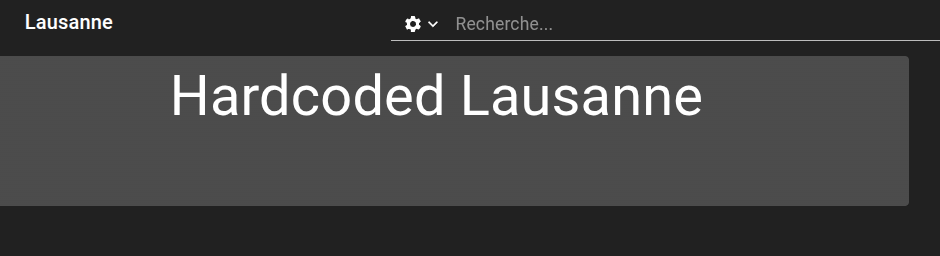
Unlike the previous file, this one contains hardcoded content—specifically the string “hardcoded Lausanne”.
4. Executing the Playbook
To trigger the template generation, either of the following Composer commands can be used:
Playbook template [execute a unique target] — select example.playbook from the list.
5. Generation Result
After execution, the generated directory structure should look like:
root
├── Fribourg
│   └── dashboard.view
│   └── dashboard.web
│   └── readme.md
│   └── .readme.md
└── lausanne
    └── dashboard.view
    └── dashboard.web
    └── readme.md
    └── .readme.md
6. Push the Configuration
Warning
Always run [execute-all] before pushing, to ensure outdated generated files are properly cleaned up (e.g., from removed CSV lines).
git add .
git commit -m "Add two example dashboards"
git push
7. Visual Review
Once generation is complete, the dashboards can be visually inspected.
In this example, the Lausanne dashboard shows the text “hardcoded Lausanne”, whereas Fribourg displays the default text rendered from the Nunjucks template.