Create an alarm with Value error handler
In this tutorial, you will learn how to use the Value error handler to automatically create an alarm whenever a value enters an error state.
Create a trigger variable that calls a script via a callback.
Write a script that throws an exception to publish an error on the target value.
Configure the alarm module error handler so that any value error automatically creates an alarm using the value ID as serial and the error message as summary.
Display the trigger and the resulting alarm on a dashboard to validate the behavior.
git checkout origin/osp-alarms-configuration .
git checkout origin/osp-web-configuration .
git checkout origin/osp-scripts-configuration .
git checkout origin/osp-variables-configuration .
git checkout origin/example-alarms-created-from-value-error-handler .
Configuration structure
![@startuml
package "root/trigger" {
[value.ospp] as trigger
}
package "root/error-generator" {
[value.ospp] as error
}
node frontend as "Front-end"
node ospalarms as "Alarms"
node ospscripts as "Scripts"
frontend -[#black]> trigger : <size:11><color:black> **Trigger the script**
trigger -[#black]> ospscripts : <size:11><color:black> **Trigger the script**
ospscripts -[#black]> error : <size:11><color:firebrick> **Generate an error**
error -[#firebrick]r-> ospalarms : <size:11><color:firebrick> **Create alarm**
@enduml](../_images/plantuml-b9bf5bc48fb7361dc068740547f3972f768c2016.png)
Steps
1. Create a variable to trigger the script
root/trigger/value.ospp
{
    "name": "Alarm trigger",
    "description" : "Trigger an alarm",
    "type": "BOOLEAN"
}
root/trigger/owner.variables
{
     "moduleId": "modules.variables.variables-1",
     "default": false,
     "persistent": false
}
root/trigger/callback.ospp
{
    "linkedOutputs": [
        {
            "outputId": "root.error-generator"
        }
    ]
}
2. Configure the alarm value error handler
This will create an alarm when a value is on error using it’s id as the serial and the error message as the summary.
modules/alarms/alarms-1/module.alarms
149    "valueErrorHandler": {
150        "alarmGenerator": {
151            "serial": {
152                "type": "FIELD",
153                "field": "ID"
154            },
155            "severity": 600,
156            "summary": {
157                "type": "FIELD",
158                "field": "ERROR"
159            },
160            "location": {
161                "type": "CONSTANT",
162                "value": "Corminboeuf"
163            },
164            "source": {
165                "type": "CONSTANT",
166                "value": "root.alarm-output"
167            }
168        },
169        "ignoreUninitializedValues": true
170    }
1. Create script to generate an error
The script will throw an exception when the value is true. This will publish the error value.
root/error-generator/value.ospp
{
    "name": "Error value",
    "description": "This value will be on error when the trigger is true",
    "type": "BOOLEAN"
}
root/error-generator/output.scripts
{
    "scriptId": "root.error-generator"
}
root/error-generator/owner.scripts
{
    "moduleId": "modules.scripts.scripts-1",
    "accessedValues": [],
    "sourceFile": "root/error-generator/source.js"
}
root/error-generator/source.js
if (trigger?.content === true) {
    log.info("Generating error");
    throw new Error("Value was true");
} else {
    log.info("Generating value");
    false
}
4. Create a dashboard to change the value and visualize the alarms
root/dashboard.view
 2    "configuration": [
 3        {
 4            "valueSubscriptions": {
 5                "values": [
 6                    {
 7                        "id": "root.trigger",
 8                        "right": "READ_WRITE",
 9                        "type": "BOOLEAN"
10                    }
11                ]
12            },
13            "basicWidgetSettings": {
14                "showTooltip": true
15            },
16            "id": "-zdb_-mh",
17            "type": "BasicInputOutputValue",
18            "title": ""
19        },
20        {
21            "alarmWidgetSettings": {
22                "defaultFilter": "root.alarms.filters.all",
23                "defaultView": "root.alarms.views.default"
24            },
25            "id": "ygpJ30cw",
26            "type": "AlarmTable",
27            "title": ""
28        }
29    ],
30    "layout": {
31        "lg": [
32            {
root/dashboard.web
{
    "moduleId": "modules.web.web-1",
    "title": "Home",
    "description": "OnSphere home",
    "tags": []
}
5. Change the value and observe the new alarm appears
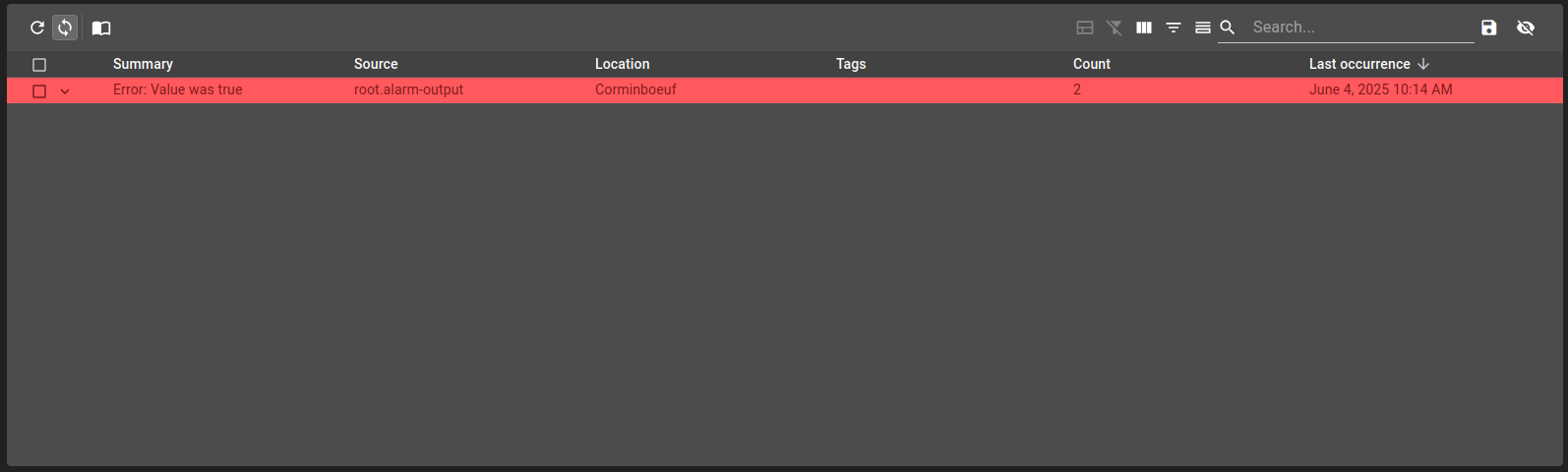
A critical alarm is created when the value is on error.