Supervision of modules
Each module sends information about its current configuration through the heartbeat, which is useful for remote configuration. This example shows how to retrieve the state, with the main use case being the monitoring of the remote module’s configuration.
Fetch the running configuration state of a module via dedicated value files.
Retrieve the version of a module using the same heartbeat mechanism.
Read the timestamp of the latest module restart.
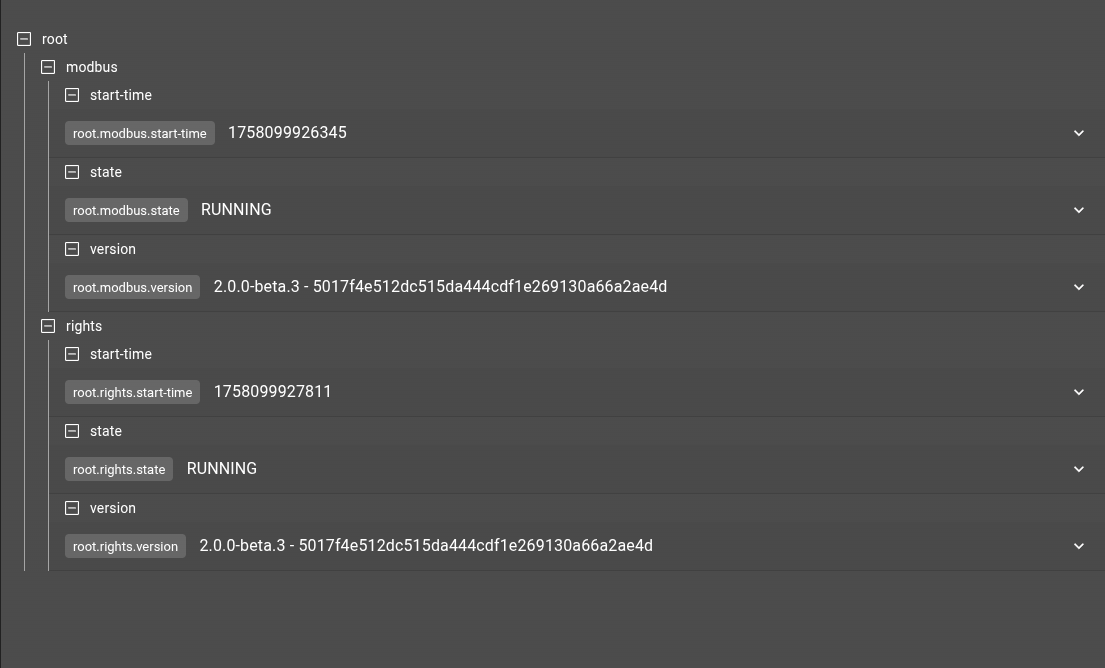
Display supervision data on a dashboard using the object-browser widget.
git checkout origin/osp-web-configuration .
git checkout origin/osp-modbus-configuration .
git checkout origin/example-supervision-modules .
Learning goals
Fetch the state of running modules configuration.
Fetch the version of the running modules
Fetch the latest restart of modules
Associated documentation
See module state
Steps
1. Configure the supervision of state
Add supervision for two modules: modbus and rights. This is achieved by introducing dedicated values, which can be placed anywhere in the hierarchy. These values represent the current running state of the modbus in textual form.
Rights
{
    "moduleId": "modules.configuration-dispatcher.main",
    "supervisedModule": "modules.rights.rights",
    "type" : "MODULE_STATE"
}
{
    "name": "rights-state",
    "description": "State between rights and dispatcher",
    "type": "TEXT"
}
Modbus
{
    "moduleId": "modules.configuration-dispatcher.main",
    "supervisedModule": "modules.modbus.modbus-1",
    "type" : "MODULE_STATE"
}
{
    "name": "modbus-state",
    "description": "State between modbus and dispatcher",
    "type": "TEXT"
}
2. Fetch the version of the module
By changing the type, we can achieve another feature: retrieving the version of the module. This is particularly useful for remote-connectors, where this information is not available through the orchestrator.
Rights
{
    "moduleId": "modules.configuration-dispatcher.main",
    "supervisedModule": "modules.rights.rights",
    "type" : "RUNNING_VERSION"
}
{
    "name": "Rights version",
    "description": "The running version of the rights",
    "type": "TEXT"
}
Modbus
{
    "moduleId": "modules.configuration-dispatcher.main",
    "supervisedModule": "modules.modbus.modbus-1",
    "type" : "RUNNING_VERSION"
}
{
    "name": "Modbus version",
    "description": "The running version",
    "type": "TEXT"
}
3. Finally fetch the latest time the module has restarted
By changing the type, we can achieve another feature: retrieving the timestamp of the latest restart of the module. This is particularly useful for remote-connectors, where this information is not available through the orchestrator.
Rights
{
    "moduleId": "modules.configuration-dispatcher.main",
    "supervisedModule": "modules.rights.rights",
    "type" : "MODULE_STARTED_TIMESTAMP"
}
{
    "name": "Last startup rights",
    "description": "The timestamp (ms) of the last restart of the rights module",
    "type": "INTEGER"
}
Modbus
{
    "moduleId": "modules.configuration-dispatcher.main",
    "supervisedModule": "modules.modbus.modbus-1",
    "type" : "MODULE_STARTED_TIMESTAMP"
}
{
    "name": "Last startup modbus",
    "description": "The timestamp (ms) of the last restart of the modbus module",
    "type": "INTEGER"
}
4. Integrate the value inside a dashboard
Add this information on a dashboard, reflecting the state of the given element. This is done with the object-browser widget.
{
  "configuration": [
    {
      "id": "_wYkcQy4",
      "type": "ObjectBrowser",
      "title": "ObjectBrowser"
    }
  ],
  "layout": {
    "lg": [
      {
        "w": 8,
        "h": 5,
        "x": 0,
        "y": 0,
        "i": "_wYkcQy4"
      }
    ]
  },
  "breakpoints": {
    "lg": 1200,
    "md": 996,
    "sm": 768,
    "xs": 480,
    "xxs": 0
  },
  "cols": {
    "lg": 12,
    "md": 10,
    "sm": 6,
    "xs": 4,
    "xxs": 2
  },
  "rowHeight": 150
}