Insert audit logs from scripts
This example shows how to insert audit log entries from scripts running concurrently across two script modules.
Create a variable triggered from a dashboard widget and link it to two
output.scriptscallbacks.Run two separate script modules in parallel to demonstrate concurrent audit log insertion.
Each script inserts 100 entries into the audit log file upon each trigger.
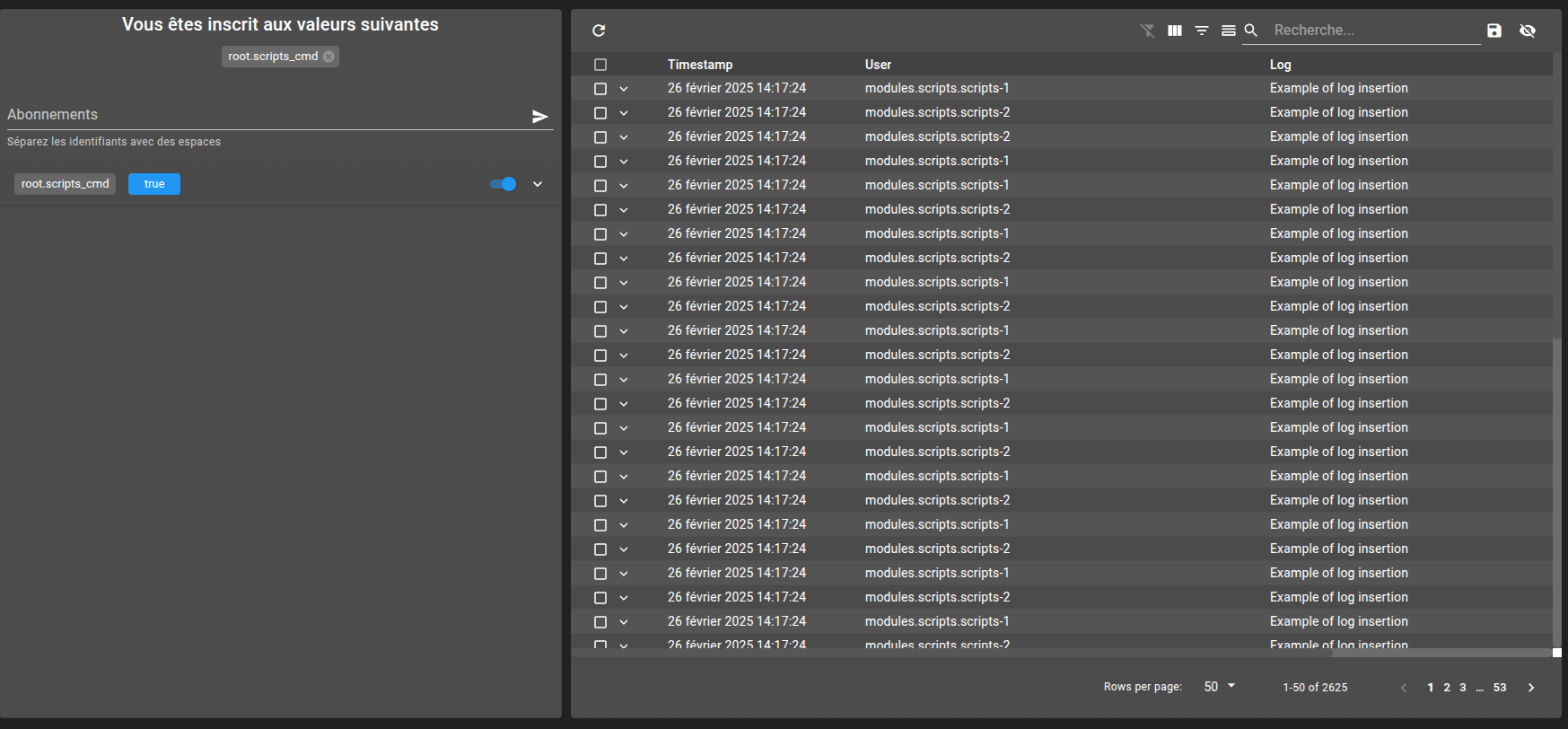
Observe interleaved execution in the audit log to confirm concurrent script behavior.
git checkout origin/osp-collections-configuration .
git checkout origin/osp-scripts-configuration .
git checkout origin/osp-variables-configuration .
git checkout origin/osp-web-configuration .
git checkout origin/example-scripts-insert-audit-logs .
Prerequisites
None
Checkout the audit feature
Steps
1. Declare two modules scripts
Copy the directory modules.scripts.scripts-1 to modules.scripts.scripts-2
cp -rf modules/scripts/scripts-1 modules/scripts/scripts-2
2. Create a value owned by osp-variables
This value will be used further to be triggered by a Value Subscription widget.
Hint
The value must be initialized before it can be edited from the Value Subscription, so a default value is set.
root/scripts_cmd/value.ospp
{
  "name": "script test",
  "description": "The controller of scripts",
  "type": "BOOLEAN"

}
Then a callback linked to two different outputs (to show the concurrency execution)
root/scripts_cmd/callback.ospp
{
  "linkedOutputs": [
    {
      "outputId": "root.scripts-trigger-1"
    },
    {
      "outputId": "root.scripts-trigger-2"
    },
    {
      "outputId": "root.scripts-trigger-3"
    },
    {
      "outputId": "root.scripts-trigger-4"
    }
  ]
}
And finally the owner from variables
root/scripts_cmd/owner.variables
{
  "moduleId": "modules.variables.variables-1",
  "default": false
}
3. Create two output.scripts to handle changes
The callback will be trigger on the both output.scripts in the same time.
root/scripts-trigger-1/output.scripts
{
  "scriptId": "root.scripts-1"
}
root/scripts-trigger-2/output.scripts
{
  "scriptId": "root.scripts-2"
}
4. Link output to scripts
In this case, the scripts are duplicated because the execution must be trigger in the same time, but if there is no need for this feature the same script can be used.
root/scripts-trigger-1/output.scripts
{
  "scriptId": "root.scripts-1"
}
root/scripts-trigger-2/output.scripts
{
  "scriptId": "root.scripts-2"
}
5. Create a simple scripts
This script insert 100 entries in the audit log file.
root/scripts-1/detached.scripts
{
  "moduleId": "modules.scripts.scripts-1",
  "sourceFile": "root/scripts-1/scripts.js"
}
root/scripts-1/script.js
function main() {
    log.info(`Executing script 1 trigger by ${trigger.id}`);
    for (let i = 0; i < 100; i++) {
        const auditLog = {
            username: "modules.scripts.scripts-1",
            log: "Example of log insertion",
            timestamp: Number(Date.now()) * 1000000
        };
        const result = collections.insert("root.audit-log", auditLog);
        if (!result.success) {
            log.warn(`Fail to insert audit with error ${result.message}`);
        }
    }
}

main()
And duplicate to link to module 2.
root/scripts-2/detached.scripts
{
  "moduleId": "modules.scripts.scripts-2",
  "sourceFile": "root/scripts-2/scripts.js"
}
root/scripts-2/script.js
function main() {
    log.info(`Executing script 2 trigger by ${trigger.id}`);
    for (let i = 0; i < 100; i++) {
        const auditLog = {
            username: "modules.scripts.scripts-2",
            log: "Example of log insertion",
            timestamp: Number(Date.now()) * 1000000
        };
        const result = collections.insert("root.audit-log", auditLog);
        if (!result.success) {
            log.warn(`Fail to insert audit with error ${result.message}`);
        }
    }
}

main()
6. Finally create a dashboard to trigger change on root.scripts_cmd
The value subscription is on read/write to permit the edition of the value from the widget.
root/example-dashboard/dashboard.view
{
  "configuration": [
    {
      "type": "ValueSubscription",
      "id": "nNItLTO2",
      "title": "",
      "valueSubscriptions": {
        "values": [
          {
            "id": "root.scripts_cmd",
            "type": "BOOLEAN",
            "right": "READ_WRITE"
          }
        ]
      }
    },
    {
      "collectionTableWidgetSettings": {
        "defaultSchemas": [],
        "defaultView": "",
        "defaultFilter": ""
      },
      "id": "sTfNodVC",
      "type": "CollectionTable",
      "title": ""
    }
  ],
  "layout": {
    "lg": [
      {
        "w": 4,
        "h": 5,
        "x": 0,
        "y": 0,
        "i": "nNItLTO2"
      },
      {
        "w": 7,
        "h": 5,
        "x": 4,
        "y": 0,
        "i": "sTfNodVC"
      }
    ]
  },
  "breakpoints": {
    "lg": 1200,
    "md": 996,
    "sm": 768,
    "xs": 480,
    "xxs": 0
  },
  "cols": {
    "lg": 12,
    "md": 10,
    "sm": 6,
    "xs": 4,
    "xxs": 2
  },
  "rowHeight": 150
}
root/example-dashboard/dashboard.web
{
    "moduleId": "modules.web.web-1",
    "title": "Home",
    "description": "OnSphere home",
    "tags": []
}
8. View the result
Log on the frontend
Select the example-dashboard
Warning
A known bug is present on this widget, be sure the default value is used, and if the toggle button is not visible, restart the dispatcher and web modules.
See that the both script are executed in concurrency (alternate insertion between script-1 and script-2)