Create alarm with a form using action component
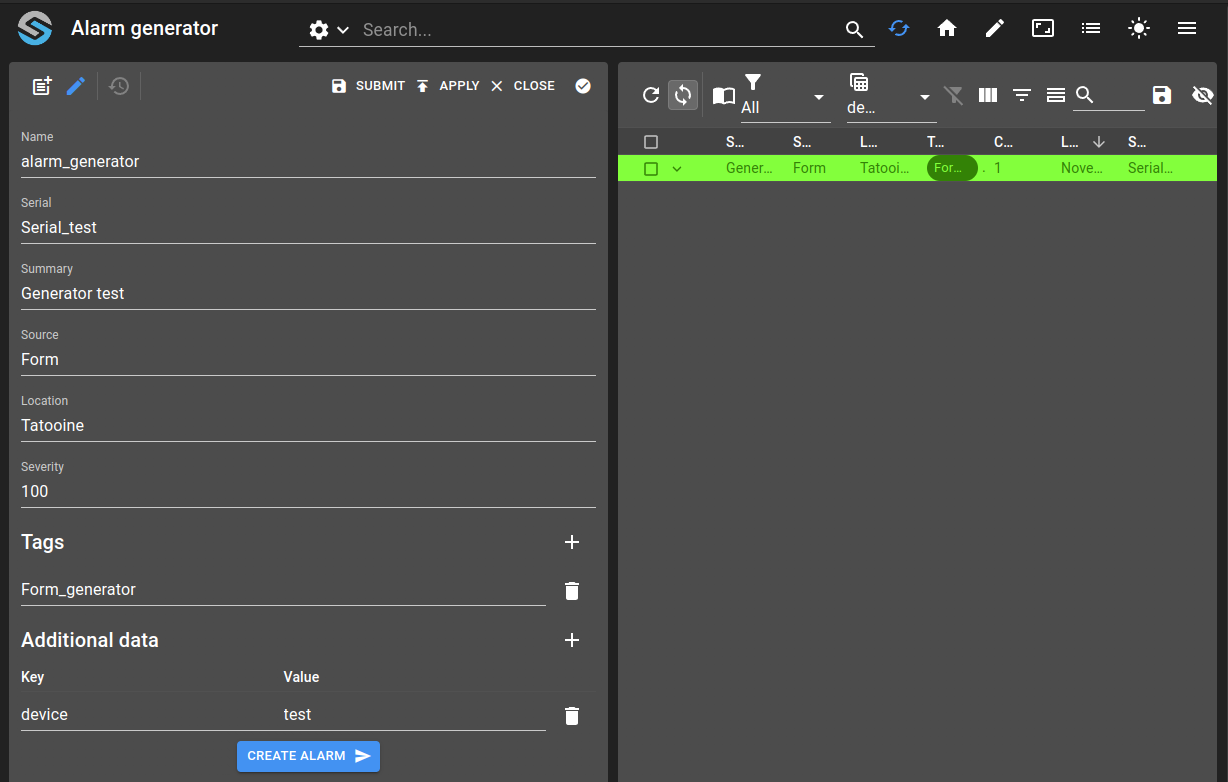
In this tutorial, we will create a collection with a form that will allow us to create an alarm from this form using an action form component.
Define a collection schema with the alarm properties (serial, summary, source, severity, location, tags, additionalData).
Build a form referencing the collection with one field per property and an Action component to trigger alarm creation.
Use
form.<field>expressions inside the action inputs to pass form values to the alarm.Add a dashboard combining the collection table and an alarm table to verify that created alarms appear.
git checkout origin/osp-alarms-configuration .
git checkout origin/osp-web-configuration .
git checkout origin/osp-collections-configuration .
git checkout origin/example-alarms-created-from-form-actions .
Add this example in your configuration
You can directly use the following command to add this example into your configuration:
Steps
1. Define the collection
We start by defining a collection with the following alarm properties:
serial: stringsummary: stringsource: stringseverity: numberlocation: stringtags: list of stringsadditionalData: list of objects
root/__features/form-actions/collections/schema.ospp
{
    "schema": {
        "type": "object",
        "properties": {
            "name": {
                "type": "string"
            },
            "serial": {
                "type": "string"
            },
            "summary": {
                "type": "string"
            },
            "source": {
                "type": "string"
            },
            "location": {
                "type": "string"
            },
            "tags": {
                "type": "array",
                "items": {
                    "type": "string"
                }
            },
            "additionalData": {
                "type": "array",
                "items": {
                    "type": "object",
                    "properties": {
                        "key": {
                            "type": "string"
                        },
                        "value": {
                            "type": "string"
                        }
                    }
                }
            },
            "severity": {
                "type": "number"
            }
        }
    },
    "filters": [
        {
            "id": "all",
            "name": "All"
        }
    ]
}
You can define the rest of the collection as you wish, there isn’t any specific to do with the rest of the collection configuration.
root/__features/form-actions/collections/schema.collections
{
    "moduleId": "modules.collections.collections-1",
    "collectionName": "alarms_generator",
    "indexes": [],
    "filters": [
        {
            "id": "all",
            "query" : {}
        }
    ]
}
root/__features/form-actions/collections/schema.web
{
    "moduleId": "modules.web.web-1",
    "name": "Alarm generator",
    "views": [
        {
            "id": "0",
            "name": "Default",
            "columns": [
                {
                    "name": "Name",
                    "field": "name",
                    "position": 0,
                    "render": "STRING"
                }
            ]
        }
    ]
}
2. Define the collection form
With this collection, we need to define a form that will reference it. In this form, we will add one field for every property described before and another component to run the create action. This component is called Action and needs to know which action to call and the list of inputs the action needs. To get the values from the form, you can use the form object (i.e. form.severity to get the value of the severity field).
root/__features/form-actions/collections/form.web
{
    "moduleId": [
        "modules.web.web-1"
    ],
    "name": "Alarm generator",
    "description": "",
    "bindings": {},
    "schema": "root.__features.form-actions.collections",
    "ui": {
        "type": "VerticalLayout",
        "elements": [
            {
                "type":"Control",
                "label": "Name",
                "scope":"#/properties/name"
            },
            {
                "type":"Control",
                "label": "Serial",
                "scope":"#/properties/serial"
            },
            {
                "type":"Control",
                "label": "Summary",
                "scope":"#/properties/summary"
            },
            {
                "type":"Control",
                "label": "Source",
                "scope":"#/properties/source"
            },
            {
                "type":"Control",
                "label": "Location",
                "scope":"#/properties/location"
            },
            {
                "type":"Control",
                "label": "Severity",
                "scope":"#/properties/severity"
            },
            {
                "type":"Control",
                "label": "Tags",
                "scope":"#/properties/tags"
            },
            {
                "type":"Control",
                "label": "Additional data",
                "scope":"#/properties/additionalData"
            },
            {
                "type": "Action",
                "label": "Create alarm",
                "options": {
                    "icon": "send",
                    "action": "root.__features.form-actions.alarms.actions.create",
                    "input": {
                        "severity": {
                            "extract": "form.severity",
                            "expression": "Number.parseInt(${extraction})"
                        },
                        "summary": {
                            "extract": "form.summary",
                            "as": "string"
                        },
                        "location": {
                            "extract": "form.location",
                            "as": "string"
                        },
                        "source": {
                            "extract": "form.source",
                            "as": "string"
                        },
                        "serial": {
                            "extract": "form.serial",
                            "as": "string"
                        },
                        "forceHide": {
                            "expression": "false"
                        },
                        "tags": {
                            "extract": "form.tags[*]"
                        },
                        "additionalData": {
                            "extract": "form.additionalData[*]",
                            "expression": "${extraction}.reduce((accumulator, currentObject) => { return { ...accumulator, [currentObject?.key]:currentObject?.value }; }, {});"
                        }
                    }
                }
            }
        ]
    },
    "initialValue": {
        "summary": "Generator",
        "location": "Corminboeuf",
        "severity": 100,
        "tags" : ["test"]
    },
    "submit": {
        "destination": "Request",
        "type": "Deferred"
    }
}
3. Add a dashboard
Lastly, we will add a dashboard with a collection table and an alarm table in order to test our form and see if the alarms are generated correctly.
root/__features/form-actions/dashboard/dashboard.view
{
    "configuration": [
      {
        "type": "CollectionTable",
        "id": "XYtU1h5j",
        "title": "Alarms generator",
        "menuReferences": [],
        "collectionTableWidgetSettings": {
          "defaultSchemas": [
            "root.__features.form-actions.collections"
          ],
          "defaultView": "0",
          "defaultFilter": "all",
          "includeSchemas": [
            "root.__features.form-actions.collections"
          ],
          "includeFilters": [
            "all"
          ],
          "multiple": false,
          "disableUrlHistory": true,
          "rowDetailHeight": 250,
          "disableDisplayTypes": ["table"],
          "defaultDisplayType": "form",
          "disableFormPicker": false,
          "disableFormCreate": false,
          "disableFormEdit": false,
          "disableFormHistory": false,
          "pageSize": 50,
          "pageSizes": [
            50,
            100,
            200
          ],
          "resizeMode": "widget",
          "disableToolbarTableRefresh": false,
          "disableSchemaUpdate": false,
          "disableViewUpdate": false,
          "disableFilterUpdate": true,
          "disableToolbar": false,
          "disableToolbarMenu": false,
          "disableSidePanel": false,
          "disableToolbarExport": true,
          "disableToolbarColumnShowHide": true,
          "disableToolbarFilterShowHide": false,
          "disableToolbarSummaryShowHide": true,
          "disableToolbarSearch": false,
          "disableToolbarColumnChooser": false,
          "disableToolbarClearFilter": true
        }
      },
      {
        "alarmWidgetSettings": {
            "defaultFilter": "root.__features.form-actions.alarms.filters",
            "defaultView": "root.__features.form-actions.alarms.views"
        },
        "id": "l3iV4pV4",
        "type": "AlarmTable",
        "title": ""
      }
    ],
    "layout": {
      "lg": [
        {
          "w": 6,
          "h": 6,
          "x": 0,
          "y": 0,
          "i": "XYtU1h5j"
        },
        {
          "w": 6,
          "h": 6,
          "x": 6,
          "y": 0,
          "i": "l3iV4pV4"
        }
      ]
    },
    "breakpoints": {
      "lg": 1200,
      "md": 996,
      "sm": 768,
      "xs": 480,
      "xxs": 0
    },
    "cols": {
      "lg": 12,
      "md": 10,
      "sm": 6,
      "xs": 4,
      "xxs": 2
    },
    "rowHeight": 150
  }
4. Create an alarm using the form
You can now connect to OnSphere and access the dashboard we created. Here, you can fill the form with the alarm info and use the action button to create the alarm. The alarm should appear on the alarm table.