Simple template variable usage
In this tutorial, the usage of template variables is described. The focus is done to understand the prevalence of usage and all the types of variables available.
Define a value that references a template via
templateIdand overrides variables locally.Create a first-level template with its own
templateVariables.Chain a second-level template to provide variables to the root value.
Understand precedence rules: locally defined variables take priority over those inherited from templates.
git checkout origin/osp-web-configuration .
git checkout origin/osp-variables-configuration .
git checkout origin/example-inheritance-template-value-with-variables .
Steps
1. Create a waveform value constant
root/template/final/owner.waveforms
{
    "moduleId": "modules.waveforms.waveforms-1",
    "waveformConfigurationEntity" : {
        "value": 10,
        "type": "CONSTANT"
    },
    "samplePeriod": {
        "unit": "DAYS",
        "value": 1
    }
}
root/template/final/value.ospp
{
    "name" : "Final value",
    "description": "${description} - ${from-template-of-template}",
    "type": "INTEGER",
    "inputType": "INTEGER",
    "preTransform": "${pre-transform-var}",
    "templateId": "root.template",
    "templateVariables" : {
        "description" : "Description variable",
        "pre-transform-var" : {
            "transform": "add(asInteger(value),1)"
        }
    }
}
The pre-transform value comes from the value.ospp file (to show the same file templateVariable definition).
The description uses two variables ${description} which is defined inside the same file
The from-template-of-template variable which is undefined (will be done in next step)
A reference is done to root.template via the
templateIdkey
2. Create a first level of template
root/template/template/value.ospp.template
{
    "templateId" : "root.template-of-template",
    "templateVariables" : {
        "from-template-of-template": "This description is overriden"
    }
}
This value describes a variable which is not used (description), because the variable is defined in the
root.final/value.osppA sub-template is defined by the
templateVariableskey
3. Create a second level of template
root/template/from-template-of-template/value.ospp.template
{
    "templateVariables" : {
        "description": "from-template of template value"
    }
}
This file declares the variable
from-template-of-template. Used by theroot.final/value.ospp
4. Add dashboard to visualize the result
This files are used to visualize the example
{
    "configuration": [
      {
        "type": "ValueSubscription",
        "id": "xMkAMwzR",
        "title": "",
        "valueSubscriptions": {
          "values": [
            {
              "id": "root.final",
              "right": "READ_WRITE"
            }
          ]
        }
      }
    ],
    "layout": {
      "lg": [
        {
          "w": 12,
          "h": 5,
          "x": 0,
          "y": 0,
          "i": "xMkAMwzR"
        }
      ]
    },
    "breakpoints": {
      "lg": 1200,
      "md": 996,
      "sm": 768,
      "xs": 480,
      "xxs": 0
    },
    "cols": {
      "lg": 12,
      "md": 10,
      "sm": 6,
      "xs": 4,
      "xxs": 2
    },
    "rowHeight": 150
  }
{
    "moduleId": "modules.web.web-1",
    "title": "Home",
    "description": "OnSphere home",
    "tags": []
}
5. Check result
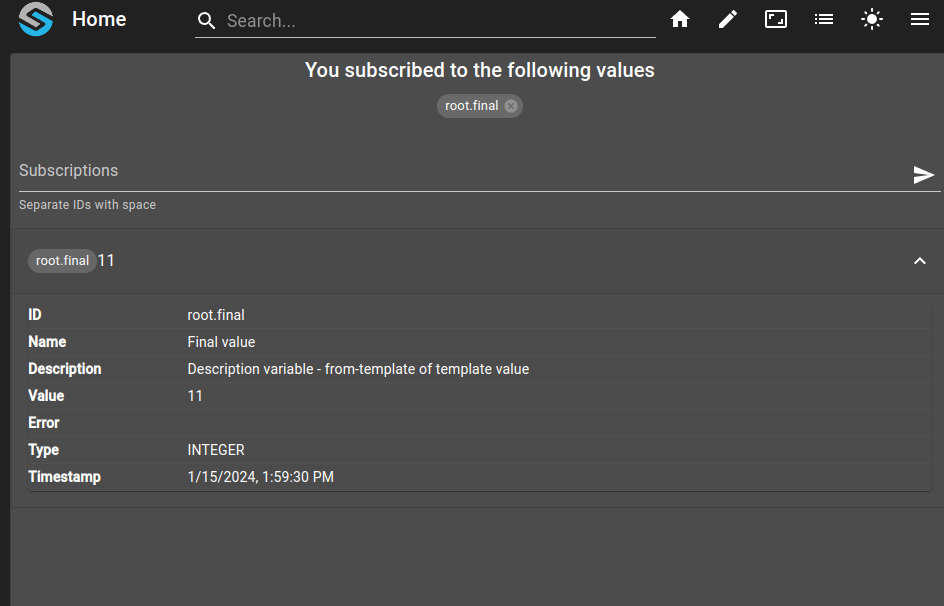
See the result on the dashboard (hostname:5000), log with default user (user) and password (onsphere)
This schema shows from where each value comes from and the rules.
In red, we have a value declared inside a template, but override locally
In green, we have the value who override the red value
In purple, we have a variable declared in template of template
In Orange, we have a node insertion (locally defined)
![@startuml
skinparam backgroundColor transparent
[*] --> v
state "root.final/value.ospp" as v :\
{ \n\
"name" : "Final value",\n\
"description": <color:green>"${description}</color> - <color:purple>${from-template-of-template}</color>",\n\
"type": "INTEGER",\n\
<color:orange>"preTransform": "${pre-transform-var}"</color>,\n\
"templateId": "root.template",\n\
"templateVariables" : {\n\
<color:green>"description" : "Description variable"</color>,\n\
<color:orange>"pre-transform-var" : {</color>\n\
<color:orange>"transform": "add(value,1)"</color>\n\
<color:orange>}</color>\n\
}\n\
}
v -> t : First level of template
state "root.template/value.ospp.template" as t : \
{ \n\
"templateId" : "root.template-of-template",\n\
"templateVariables" : {\n\
<color:red>"description": "This description is overridden"</color>\n\
}\n\
}
t -> t2 : Second level of template
state "root.template-of-template/value.ospp.template" as t2 : \
{ \n\
"templateVariables" : {\n\
<color:purple>"from-template-of-template": "from-template of template value"</color>\n\
}\n\
}
v --> result : Result
result : { \
"name" : "Final value",\n\
"description": "<color:green>"Description variable"</color> - <color:purple>from-template of template value</color>",\n\
"type": "INTEGER",\n\
<color:orange>"preTransform": {</color>\n\
<color:orange> "transform": "add(value,1)"</color>\n\
<color:orange>}</color>\n\
}
@enduml](../_images/plantuml-6d1a8c5c8059ca16a18996fe8f934c09cfa8025a.png)