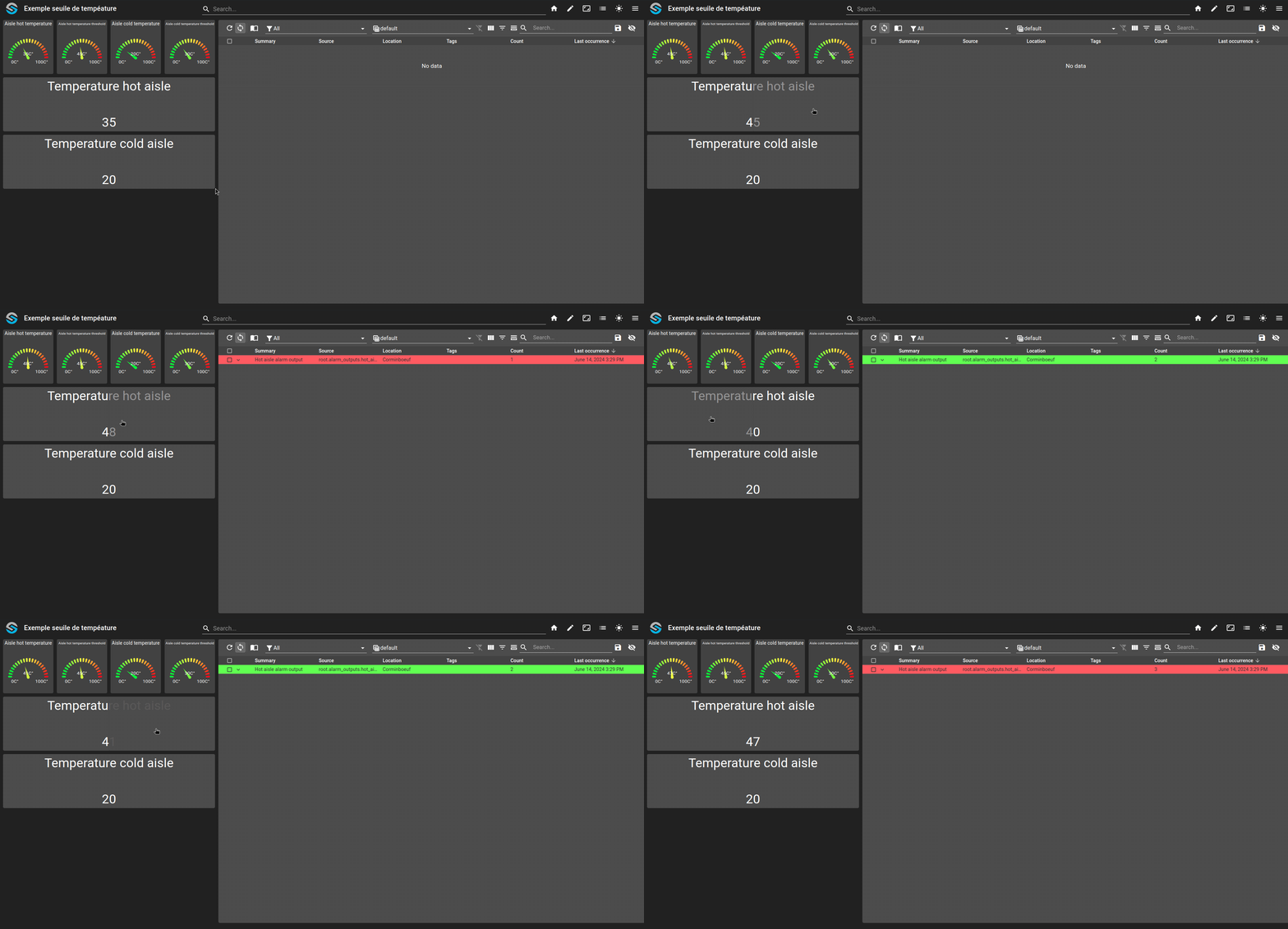
Usage of a template to create an hysteresis
This example tackles the problem of creating a hysteresis using OnSphere to prevent alarm flooding when a value oscillates around a trigger threshold.
Define the hysteresis logic in a reusable
callback.ospp.templatewith configurable threshold and delta variables.Declare per-aisle temperature thresholds using
owner.variablesfiles.Set a shared delta value that controls the hysteresis band for all aisles.
Instantiate the template for each aisle (hot/cold) by binding the required variables in the
callback.ospp.
git checkout origin/osp-alarms-configuration .
git checkout origin/osp-web-configuration .
git checkout origin/osp-variables-configuration .
git checkout origin/example-inheritance-template-hysteresis .
Learning goals
Create an hysteresis to prevent flooding alarms when a value oscillate around the trigger point.
Configuration structure
This example tackle the problem of creating an hysteresis using OnSphere. Due to some design choices it is not trivial to histories the content of values.
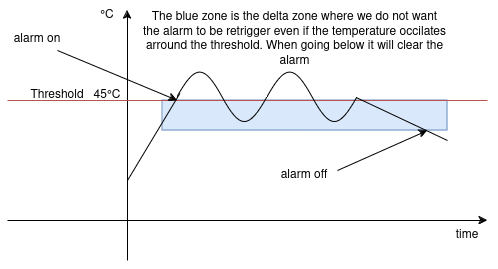
Two server aisle will be simulated, one hot and one cold. Both of the aisle will have an hysteresis applied on them to generate an alarm when too hot. The hysteresis will be based on a threshold defined by a user for the maximum temperature and the delta at which the alarm should be canceled. For example, one can choose that the maximum temperature for the hot aisle is 45°C, this means that if the actual temperature goes above that threshold it will trigger an alarm. Now if the temperature ranges between 44.5°C and 45°C, it would be bothersome to have it trigger an alarm every time it reaches 45°C and the other way clear the alarm when going below 45°C.
A countermeasure to this problem is to use an hysteresis with a delta of 2°C. This will allow the temperature to ranges between 43°C and 45°C without retriggering the alarm every time.
Note that in this structure there is also a cold part that is not described in the schematic below but has the same logic has the hot part.
![@startuml
skinparam backgroundColor transparent
package "root" as root {
package "hysteresis_example_template" as template {
[callback.ospp.template] as callback
}
package "aisle_configuration" as configuration {
package "aisle_alarm_status" as aisleAlarmStatus{
package "hot" as hotStatus{
[output.variables] as output1
[owner.variables] as o1
[value.ospp] as v1
}
}
package "aisle_temperature" as aisleTemp{
package "hot" as hotTemp{
[callback.ospp] as callback1
[owner.variables] as o2
[value.ospp] as v2
}
}
package "aisle_trigger_delta" as aisleTriggerDelta{
[owner.variables] as o3
[value.ospp] as v3
}
package "temperature_threshold" as aisleThreshold{
package "hot" as hotTresh{
[owner.variables] as o4
[value.ospp] as v4
}
}
package "alarm_outputs" as outputs {
package "hot_aisle_alarm_output" as hotAlarm{
[output.alarms] as o5
}
}
}
callback1 -> o5 : Triggers
callback1 -> output1 : Triggers
callback1 -u-> callback : Implements
@enduml](../_images/plantuml-e6162907c8e244213d1952afc5f77f919acd0c6a.png)
Steps
1. Create the hysteresis logic using the templates
root/hysteresis_example_template/callback.ospp.template
{
    "linkedOutputs": [
        {
            "outputId": "${alarm_output_id}",
            "accessedValues": [
                "${threshold_temperature}",
                "${delta_temperature}",
                "${alarm_status}"
            ],
            "condition": "or(and(gte(value, ${threshold_temperature}), not(${alarm_status})), and(lt(value, sub(${threshold_temperature}, ${delta_temperature})), ${alarm_status}))",
            "transform": "cond(gte(value, ${threshold_temperature}), true, not(lt(value, sub(${threshold_temperature}, ${delta_temperature}))))",
            "transformType": "BOOLEAN"
        },
        {
            "outputId": "${alarm_status}",
            "accessedValues": [
                "${threshold_temperature}",
                "${delta_temperature}",
                "${alarm_status}"
            ],
            "transform": "cond(gte(value, ${threshold_temperature}), true, cond(lt(value, sub(${threshold_temperature}, ${delta_temperature})), false, ${alarm_status}))",
            "transformType": "BOOLEAN"
        }
    ]
}
In this file the condition and transformation are the most important part. To create those conditions we need some variables :
Variable name |
Description |
|---|---|
|
The current temperature |
|
The threshold temperature that triggers the alarm |
|
The delta value for hysteresis |
|
The current status of the alarm (true if the alarm is on, false if it’s off). It is also the id of the output to change the state of the alarm status |
|
The alarm output that will generate the alarm |
Now let’s go through the condition and the transform :
The condition to trigger the alarm output or not :
or(
  and(gte(value, ${threshold_temperature}), not(${alarm_status})),
  and(lt(value, sub(${threshold_temperature}, ${delta_temperature})), ${alarm_status})
)
gte(value, ${threshold_temperature}): Checks if the current temperature is greater than or equal to the threshold temperature.not(${alarm_status}): Checks if the alarm is currently off.and(gte(value, ${threshold_temperature}), not(${alarm_status})): Combines the above two conditions to check if the temperature is above the threshold and the alarm is off.lt(value, sub(${threshold_temperature}, ${delta_temperature})): Checks if the current temperature is less than the threshold minus the delta (hysteresis).${alarm_status}: Checks if the alarm is currently on.and(lt(value, sub(${threshold_temperature}, ${delta_temperature})), ${alarm_status}): Combines the above two conditions to check if the temperature is below the threshold minus the delta and the alarm is on.or(...): The outer or combines both conditions to check if either the alarm should be turned on or off based on the temperature.
The transform of the alarm status and the alarm output :
cond(
  gte(value, ${threshold_temperature}),
  true,
  and(
      not(lt(value, sub(${threshold_temperature}, ${delta_temperature}))),
      not(${alarm_status})
  )
)
gte(value, ${threshold_temperature}): Checks if the current temperature is greater than or equal to the threshold temperature.true: If the above condition is true, the transform result is true (alarm on).lt(value, sub(${threshold_temperature}, ${delta_temperature})): Checks if the current temperature is less than the threshold minus the delta.not(...): Negates the result of the above condition.not(${alarm_status}): Checks if the alarm is currently off. This part is only present in the condition of the alarm status. The alarm output does it in its condition.and(not(lt(value, sub(${threshold_temperature}, ${delta_temperature}))), not(${alarm_status})): Combines the negated hysteresis check with the negated alarm status.cond(...): The cond function returns true if the temperature is above the threshold, otherwise it returns the combined result of the negated hysteresis check and the negated alarm status.
8. Declare the wanted thresholds
root/aisle_configuration/temperature_threshold/cold/owner.variables
{
    "default": 30.0,
    "moduleId": "modules.variables.variables-1"
}
root/aisle_configuration/temperature_threshold/hot/owner.variables
{
    "default": 45.0,
    "moduleId": "modules.variables.variables-1"
}
3. Declare the delta
root/aisle_configuration/aisle_trigger_delta/owner.variables
{
    "moduleId": "modules.variables.variables-1",
    "default": 2.0
}
4. Declare the callbacks for both of the temperature with the corresponding variables
root/aisle_configuration/aisle_temperature/cold/callback.ospp
{
    "templateId": "root.hysteresis_example_template",
    "templateVariables": {
        "threshold_temperature": "root.aisle_configuration.temperature_threshold.cold",
        "delta_temperature": "root.aisle_configuration.aisle_trigger_delta",
        "alarm_output_id": "root.alarm_outputs.cold_aisle_alarm_output",
        "alarm_status": "root.aisle_configuration.aisle_alarm_status.cold"
    }
}
root/aisle_configuration/aisle_temperature/hot/callback.ospp
{
    "templateId": "root.hysteresis_example_template",
    "templateVariables": {
        "threshold_temperature": "root.aisle_configuration.temperature_threshold.hot",
        "delta_temperature": "root.aisle_configuration.aisle_trigger_delta",
        "alarm_output_id": "root.alarm_outputs.hot_aisle_alarm_output",
        "alarm_status": "root.aisle_configuration.aisle_alarm_status.hot"
    }
}
Result