Create menu for an Alarm History Table sub-table
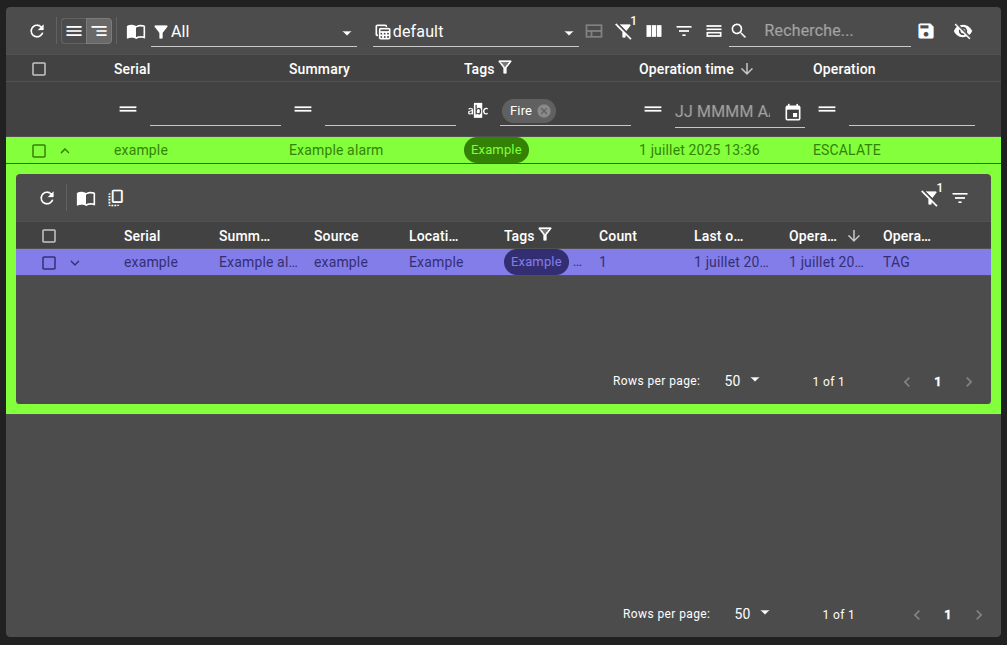
In this example, we will see how to define menus used only by a Alarm History Table widget sub-table, and how to define interactions between the main and the sub table.
Configure the alarm history table with
defaultHierarchyset togroupedandshareFiltersBetweenTablesdisabled.Use a menu condition that checks for
groupAlarmIdto restrict it to the sub-table context only.Use an
evaluateoperation in the menu to copy filters from the main table to the sub-table.
git checkout origin/osp-alarms-configuration .
git checkout origin/osp-web-configuration .
git checkout origin/example-dashboard-alarm-history-table-menus .
Steps
1. Create a dashboard with an alarm history table
For the sake of this example, we will define the defaultHierarchy to grouped and disable the shareFiltersBetweenTables setting, since we want our menu to do that job.
Your dashboard should look like:
root/dashboards/alarm/dashboard.view
{
    "configuration": [
        {
            "type": "AlarmHistoryTable",
            "id": "amq94Tog",
            "title": "",
            "menuReferences" : ["root.alarms.menus.history"],
            "alarmHistoryWidgetSettings": {
                "defaultFilter": "root.alarms.filters.all",
                "defaultView": "root.alarms.views.default",
                "defaultHierarchy": "grouped",
                "disabledHierarchies": [],
                "filtersAppliedToTheFullHistory": true,
                "shareFiltersBetweenTables": false
            }
        }
    ],
    "layout": {
        "lg": [
            {
                "w": 12,
                "h": 4,
                "x": 0,
                "y": 0,
                "i": "amq94Tog"
            }
        ]
    },
    "breakpoints": {
        "lg": 1200,
        "md": 996,
        "sm": 768,
        "xs": 480,
        "xxs": 0
    },
    "cols": {
        "lg": 12,
        "md": 10,
        "sm": 6,
        "xs": 4,
        "xxs": 2
    }
}
3. Visualize the table
Load the dashboard, verify you are in a grouped hierarchy, expand a row and you should see the menu on the toolbar of the sub-table.