Version 2.1.X - Fluffy Squirrel
Version 2.1.5
Release date : November 2026
Improvements
#2188: A SEVERITY column holding a severity object shows the field named by
options.formatinstead ofname, in the cell, the row details and the Excel export. The cell still showsnamewhen that field is empty.#2207: A widget color that follows a value accepts a value holding a
darkandlightpair, as an object or as JSON text, and shows the entry of the current theme. See Dynamic colors.#2214: Every patch run by a version patch of the Composer can now also be applied alone with Apply patch to configuration, and the
OSP Composeroutput names each patch as it runs.
Bug fix
#1770: The modbus module could send a read request longer than the
registerMaxSizeof the slave.A request took every value starting within
registerMaxSizeregisters of its first address. A value of several registers at the end of that range, such as aFLOATor anINT64, made the request longer than the limit. Above 125 registers, the Modbus limit, the request was refused before being sent withtoo many data; below it, a slave whose limit isregisterMaxSizecould refuse it. The values of the block were then read again one by one at every read period. A request now only takes the values that end within the limit, the next ones go to the following request.A
TEXTtoo long for one Modbus request was also accepted, and could never be read or written. Anowner.modbusof more than 250 characters needs more than the 125 registers a read request can hold, and anoutput.modbusof more than 244 characters more than the 123 registers of a write request, counting its final empty register. Both are now refused when the configuration is pushed.Warning
A configuration already deployed with such a
TEXTis refused at its next push and must be corrected.A value longer than the
registerMaxSizeof its slave, for example aDOUBLE(4 registers) on a slave limited to 2, is read alone in one request longer than that limit, which the slave can refuse. The push now reports it with a warning.#2081: A task stopped during a configuration change could keep running and use partly updated data. It now waits for the update to finish, then stops.
#2116: The modbus module now handles a
FLOATorDOUBLEregister holding NaN or infinity, which many devices return for a measurement that is not available (see Non-finite values):DECIMALvalue: now published once, without content and without error, for as long as the register holds NaN. Before, it was published again at every read.INTEGERorBOOLEANvalue: now published in error, for exampleNon-finite value [nan] cannot be published as INTEGER. Before, it was published as-9223372036854775808(INTEGER) ortrue(BOOLEAN).Value with a
deltain its owner.modbus: a NaN read at module start no longer blocks all later reads until the module restarts. A change from a number to NaN is now published.
#2117:
alarms.edit()is correctly removing field from the additionalData if the field is set to null.#2143: When a module stopped, the messages waiting to be sent to RabbitMQ could be saved on disk by two threads at the same time.
The saved file could be corrupted, and the waiting messages were then lost at the next start of the module. The messages are now saved by one thread at a time.
#2144: A change of the collections rights made while the collections module was starting was ignored until the next change.
After a MongoDB failure, a user could also keep incomplete rights, or the module stopped following the changes until restarted. A failed computation now keeps the previous rights and is retried every 5 seconds.
#2149: The modbus module published the
Uninitialized valueof a value of typeDECIMALorTEXTwith the typeBOOLEAN. This message is published when the slave has not answered withinstartupErrorTimeout, and is answered to a republish request until the first successful read: until then, a widget, a script or an expression that relies on the type saw a boolean. It now carries the type of the value,DECIMALorTEXT.#2150: Discovery has now a configurable timeout on the widget settings.
#2176: After a module downtime, callbacks with a
CHANGEcondition were not always triggered.Since #2000 (introduced in 2.1.2), value changes published by other modules are kept in the queue until the module restarts. On restart, the module started consuming these pending changes before its setup was complete, so some of them were not handled correctly and the associated callbacks were not executed. The module now subscribes to the value queue only once its setup is complete.
#2196: Journals in the same widget, such as two journals of a form, shared their column widths. Resizing a column in one journal changed the others, and a journal with different columns failed to display with "The columnWidths property of the TableColumnResizing plugin is given an invalid value". Each journal now keeps its own column layout.
#2197: A few slow scripts could stop every other script of the scripts module.
The module could wait for the end of only about as many triggered scripts at once as the server has processor cores. When that many scripts were still running, for example waiting on a request without answer, the scripts triggered by the other values only ran again once one of the slow scripts ended. A slow script now only delays the values that trigger it.
#2198: Web was restarted due to the order of the upload.ospp, even though no changes were present.
#2202: The generated
*.d.tswere not handling comment properly which lead to invalid content.#2203: A BACnet device whose object list was too large to be sent in a single answer, aborted with
buffer-overfloworsegmentation-not-supported, could not be opened in the Discovery, andosp-bacnetcould fail to read its objects when configuring the device. The object list is now read entry by entry when the device refuses to send it at once. When the object list of a device can't be read, the Discovery now shows the error on the device itself, instead of a child entry that failed withMalformed BACnet object identifierwhen opened.#2204:
rtspPullTransportType: "TCP"in theapplicationSettingsof antmedia-server.media made Ant Media pull the RTSP streams over UDP only, and"UDP"over TCP. A camera reached only over TCP (VPN, firewall, NAT) never showed a picture. Each value now selects its own transport.Warning
Apply the
2.1.5patch of the Composer: it swaps"TCP"and"UDP"so that each application keeps its transport, see RTSP transport.#2209: Every Chart widget showed the widget error card instead of the plot, and never sent its query. Charts display again.
Writing a negative value or zero to a
FLOATorDOUBLEoutput.modbus was refused as out of range, without any error shown. It is now written.
Security fix
#2183: By default, osp-front-end forwarded everything under
/osp/media/to the Ant Media server, including its REST API, to anyone who reaches OnSphere. It now forwards only the HLS files played by the video widget, unlessALLOW_ANTMEDIA_ACCESSistrue. See the upgrade guide.Update Apache CXF to 4.2.4 and Neethi to 3.2.4
Update Bouncy Castle to 1.86
Update Docker compose to 5.7.1
Update Grafana image renderer to 5.12.10
Update Grafana to 13.3.1
Update Guava to 33.8.0
Update Keycloak to 26.8.2
Update MySQL to 8.4.13
Update Netty to 4.2.20.Final
Update Openresty to 1.31.1.1-6
New features
Row buttons in tables
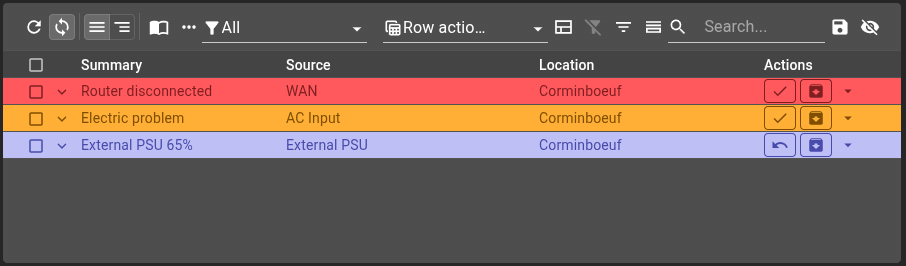
#2165: A table column with the new ACTIONS render shows the entries of the menus listed in options.menuReferences as buttons on every row of alarm tables, alarm history tables, collection tables and journal tables. options.buttonContent sets whether a button shows the icon, the label, or both. Buttons receive the same context as the right-click menu, so an entry can use the row of the button in clicked and the ticked rows in selected, as in a Merge into action. A button click doesn't change the selection. Buttons take the text color of the row, severity colors included. Buttons that don't fit in the column go behind a trailing arrow. See row buttons and the row actions example.
Severity keywords
#2165: A SEVERITY column accepts the keywords notice, success, warning and error, colored from the theme of the dashboard: notice is blue, success green, warning orange and error red. In the tableView of a journal, the SEVERITY column colors the rows, alarm severities included, and the ACKNOWLEDGEMENT column switches them to the acknowledged colors. A journal tableView with two SEVERITY or two ACKNOWLEDGEMENT columns is now refused, as in the other table views. Without a SEVERITY column, the journal status colors the rows. Journal entries accept the new status notice, colored in the table and in the timeline. The status column no longer shows a status for an entry with the status info or without status, such as the ones scripts and actions add by default. The journal table also applies the sortable setting and the options of its columns.
Warning
A configuration already deployed with two SEVERITY or two ACKNOWLEDGEMENT columns in the tableView of a journal, or with a journalSettingsOverride of the wrong type in a form, is refused at its next push and must be corrected.
Version 2.1.4
Release date : October 2026
Bug fix
#2118: A Text widget or a Markdown widget with a background color showed its text at the largest size instead of fitting it, for example in the narrow north pane of a BorderLayout, where only slivers of the text were visible.
Since #2045, the widget fitted its text on the element it first rendered. A widget with a background color replaces that element once its color is known, and the size was then measured on an element no longer on the page. The text is now fitted on the element that is displayed.
A persisted variable could publish its default value after a restart of the osp-variables module instead of its stored content, and the stored content was then overwritten by the default. A persisted variable without default could publish nothing at all.
The store is now fully loaded before the variables are published. The same fix applies to the values persisted by the IP-RCT module.
Security fix
Update ca-certificates to 20260816 linked to CVE-2026-91403
Update Docker compose to 5.6.0
Update Grafana image renderer to 5.12.7
Update Grafana to 13.2.4
Update Jline to 4.3.1
Update Jsoup to 1.23.2
Update Keycloak to 26.7.5
Update MongoDB to 8.0.34
Version 2.1.3
Release date : October 2026
Improvements
#2036: The BACnet module reports a new
bacnet_discovery_deadline_exceeded_totalmetric counting the discovery requests abandoned because the device did not answer in time.The module also logs a warning at startup when
networkTimeoutmultiplied bynetworkTransmissionRetrieslets a single confirmed request outlast that deadline, since such a configuration makes every slow discovery end on the deadline rather than on the device's own answer.#2053: The arrow keys of the dashboard search start from the dashboard you are on, or from the first dashboard found once a search is typed, and the results follow the selection.
Opening the results with an empty search selects the current dashboard and scrolls to it. The selection used to start from wherever it was left the last time, often out of view, so pressing an arrow key seemed to do nothing. The results now scroll to keep the selected dashboard visible. If the current dashboard is not in the results, for example inside a closed folder, nothing is selected and the down arrow starts from the first result.
Typing a search selects the first dashboard found, so
Enteropens it right away. The selection used to stay on the same row while the results changed under it, andEntercould open a dashboard the user had not picked. Emptying the search, or clicking its clear button, selects the current dashboard again.#2053: The results of the dashboard search are easier to read.
Each result shows its title first, with its description on one line under it, and every result has the same height. The tags and the id of the dashboards are hidden by default. The new
Displaysection of the search settings shows them, and the browser remembers the choice. The words of the search text are highlighted in the title, the description, the tags and the id.The dashboard you are on is marked with a
Currentlabel and a light background, and the number of dashboards in a folder is shown on the right of the folder instead of over its icon. The results now stand out from the widgets behind them.#2060: A new expression
isNullis added to the Expression language.It allows to check if a variable (
varor literal variable) is null. This is useful when dealing with potentiallyUninitializedvalues.Note
Currently, a null variable is automatically converted to the wanted type with the following content:
boolean:
falseinteger:
0decimal:
0.0text:
""
Warning
This behavior can lead to unexpected condition or transformation result and it will be changed is a future release.
The future change will break some condition and transformation as the automatic conversion will be removed and trigger an error instead.
We strongly recommend to check each condition and transform to ensure that the behavior is correct.
#2076: A dotted key such as
"alarm.location"now builds the nested object at any level of theinputof a menu or an output, and in thedataof aFORMuser prompt. Before, it only worked for the keys directly underinput. When"alarm"and"alarm.location"both set the location,"alarm.location"wins whatever their order, and a deeper key wins over a shallower one.#2077: The checkboxes of a task list in a Markdown widget can now be ticked.
- [ ]starts unticked and- [x]ticked. Ticks aren't saved, and a reload brings back the state written in the markdown. A bulleted task list no longer shows a bullet next to each checkbox, and checkboxes follow the text size.The new
fontSizesetting keeps a fixed base size, such as"14px", instead of resizing the text to fill the widget. Headings and other text are sized relative to it, the spacing is tightened, and the widget scrolls when the content is taller. Without it, or with"auto", the widget resizes its text as before.
Bug fix
#1986: The
updateWithCustomFilterandupdateManymethods of the collection script controller also updated deleted entries.After an entry was deleted and a new one created with the same values,
updateWithCustomFiltermatched both and failed, since its filter must match a single entry. When only the deleted entry matched, it updated that one.updateManychanged deleted entries along with the active ones. An update on a deleted entry also overwrote the date its TTL relies on, so the entry was never removed. Both methods now only update active entries. A deleted entry must be brought back withrestorebefore it can be updated.#2024: The sub-tables of the alarm table and alarm history table didn't follow the main table.
Without
shareFiltersBetweenTables, a sub-table kept the columns it had when it was opened, and could show a different view than the main table. It now shows the view of the main table and follows its column order and widths. Its own toolbar has a search box and a column chooser, and both only affect the sub-tables.With
shareFiltersBetweenTables, the sub-tables of the alarm history table ignored the sort and search of the main table, and the sub-tables of the alarm table ignored its search. Both are now applied.#2035: Change the type of
alarms.ScriptAlarm.additionalData()andalarms.ScriptHistoryAlarm.additionalData()to allow access field with.<fieldName>.#2036: A single failed request put an equipment of the discovery widget in error and emptied its watch list.
A watched object is polled every few seconds, and a poll can fail on a transient condition: a BACnet read that outlives the browser timeout because a datagram was dropped, or a module restart. The widget still reports the failure, but it no longer discards the properties nor the watched properties of the equipment, so the watch survives the incident and resumes on its own at the next successful poll. A path whose previous poll has not answered yet is skipped instead of piling up requests on the equipment. The tooltip of the error chip shows the message returned by the server rather than a generic one.
Reloading an equipment, either from the error chip or from the refresh icon, also used to drop its watched properties, so the very gesture meant to recover from the error completed the loss. A reload now keeps them, and the watch list keeps showing the last known values until the new ones arrive.
#2036: In the discovery widget, watching a property could apply to another equipment and make sub-equipments disappear from the tree.
The position of the equipment was resolved in the displayed tree, which is filtered by the search field and sorted by name, then applied to the underlying tree, where that same position designates another equipment. The position is now resolved in the tree being modified.
#2036: Reading the properties of an object through the discovery widget could outlast the browser timeout, so a perfectly good answer was discarded as a failure.
Each read used to request the whole object list of the device first, only to locate an object the caller had already named: two confirmed BACnet requests per read instead of one, and twice the exposure to a lost datagram. The object identifier is now parsed directly, so a read is a single
ReadPropertyMultiple. The handling of a discovery request is also bounded: a device that stays silent produces an explicit error instead of a request nobody is waiting for any more, and the expiration given to the BACnet module now sits below the browser timeout so that the server always answers first.#2040: When retrieving a 200MB configuration, the module could fail to load it, returning an error indicating a corrupted tar file.
A race condition enabled the module to fetch the configuration a second time, breaking the previously downloaded version.
#2045: A widget that fits its text to its size could show "This widget could not be displayed" after a dashboard was resized.
Text, markdown, basic I/O, navigation and alarm severity widgets looked for the right font size again at every step of the grid's resize animation. With enough of them on a dashboard, typically in edit mode after resizing the browser window, the page stopped with a "maximum update depth exceeded" error and one of the widgets showed its error panel. The text is now fitted once the widget has stopped changing size.
#2046: A dashboard with a map widget kept re-rendering while nobody used it.
Once the map had loaded, the widget unsubscribed from and subscribed to its values again after every render, and each round re-rendered the whole dashboard, several hundred times per second. The browser stayed busy and the dashboard got slower, and together with #2045 some widgets could fail with "This widget could not be displayed". The subscriptions are now kept as they are between renders.
#2047: A map widget with dynamic icons redrew its icons every time the widget rendered, even when no value had changed.
Each render copied the data of every icon layer, handed it back to the map, which repainted, and registered the value listener again. A dashboard that re-rendered often, for example while resizing widgets in edit mode, kept the map busy. The icons are now updated when a value changes, when the map's content or icon priority changes, or when the map is recreated.
#2048: Tables rebuilt all their cells every time they rendered, even when no row had changed.
This affected alarm tables, alarm history tables, collection tables and journals. On every render, each cell was thrown away and created again with its icons and tooltips, which made the table slow to redraw on a busy dashboard and reset any state a cell held, such as an open tooltip. Cells are now only rebuilt when a column's render type changes.
#2050: Every widget of a dashboard re-rendered each time the dashboard or one of its widgets rendered, even when nothing had changed for it.
The settings shared with the widgets were recreated on every render, and so were the settings each widget passes on to its own parts. In edit mode, each move, resize or breakpoint change went through every widget again. On a dashboard with 4 widgets, entering edit mode and going from the large to the extra small breakpoint used to hand the widgets new settings 213 times, and now 33 times.
#2053: In the dashboard search, pressing the down arrow when a search had no results stopped the arrow keys from selecting anything.
Once the search found results again, the down arrow still selected nothing until the up arrow had been pressed once. The down arrow now does nothing while there are no results.
#2053: The dashboard search did not show its results when clicking the search bar while it already had focus.
Some clicks elsewhere on the page, such as on a journal entry or on the edge of a table side panel, closed the results but left the cursor in the search bar. Clicking the search bar again showed nothing until it lost focus or something was typed. A click on the search bar now always shows the results.
#2054: The form of the collection table showed nothing for a deleted entry.
With a filter whose scope includes deleted entries, the table listed them but the form stayed empty when one was opened. The form now shows a deleted entry as read-only, with a "Deleted" chip in its toolbar that tells who deleted it and when. A link to a deleted entry opens it as well, even when the entry is not on the current page.
An entry deleted while open in a form is now locked as soon as the deletion happens, where the form used to stay editable until a save failed. If the form was in edition, it goes back to view and a message tells who deleted the entry, and whether unsaved changes were lost. A restored entry becomes editable again.
The history of an entry marks its deletions and restorations. A
FORMuser prompt opened on a deleted entry shows the same chip, and is read-only when its submit updates the entry.#2062: The value subscription widget showed an empty content when a value held a boolean.
The details of the value showed nothing for
trueorfalse, and a value holding an object made the widget show "This widget could not be displayed". The content now shows as text whatever its type, withtrueorfalsefor booleans and JSON for objects and arrays.#2063: The modbus configuration accepted addresses outside the Modbus address space.
An
owner.modbusoroutput.modbuswith an address below 0 or above 65535 was accepted by the push, then stopped the module at startup. A value whose registers went beyond address 65535, such as aFLOATat 65535, was accepted too and published in error by the module. Both are now refused when the configuration is pushed.Warning
A configuration already deployed with such an address is refused at its next push and must be corrected.
#2066: The alarm table and alarm history table sent the same query several times.
On load, an alarm history table sent its query once without the sort of its view, then again with it. A sub-table of a table without
shareFiltersBetweenTablessent its query twice when a row was expanded. A table now sends only the last of the queries it makes in a row.#2068: On a dashboard with several alarm history tables, only one of them received its data.
When two tables, or a table and an expanded history row, sent their requests within half a second of each other, the server only kept the last one. The others got no answer and their tables stayed empty. Each table now has its own delay, so a table only replaces its own pending request, for example while the user types in its search box.
#2074: On OpenShift, the custom logo and favicon were replaced by the default ones.
OpenShift runs the web module with a user that could not write to the folder where it publishes the theme files, so the front-end received the default logo and favicon. The folder is now writable by that user, the same way as the rest of the module files.
#2075: The task scheduler can lead to some memory leaks.
#2076: A
FORMuser prompt returned an empty result when saved without changes.The prompt only kept the data the user had edited. When nothing was changed, the initial data from
data, from a collection entry or from bound values was missing from the result. The result now always holds what the form shows.A number or boolean in
datastopped the menu with an error, and a string was read as a path in the context. A value that came out as0,falseor an empty string was replaced by an empty list. Plain values indataare now used as they are. Only an object withextractorexpressionis evaluated, and itsasstill converts the result. A path written as a plain string, such as"rows.clicked.name", must now be written{"extract": "rows.clicked.name"}.In the
inputof an output, a list was sent as an object with"0","1"keys, andnullstopped the menu with an error. A list now keeps its shape, and anextractorexpressioninside it is evaluated.#2079: The BACnet module had several problems when its configuration was reloaded or a device connection changed.
Values sharing a read strategy with an acquisition rule were never polled, and polls added while a device was connected kept running after it disconnected or was removed. After a reconnection, the same points were polled twice.
A device removed from the configuration kept being supervised and could restart its polling.
Reloading the notification configuration ignored every static notification listed after an unchanged one: new ones were not created and removed ones kept triggering their linked action. A modified static notification triggered its linked action twice.
A change of the notification subscription method was ignored until the module restarted.
The notification watchdog queried the recipient list of devices that were not connected yet, which sent Who-Is requests and logged errors for offline devices.
After a first FDT registration failure, a later loss of the registration was no longer detected and the FDT state stayed true. Two registration retries could also run at the same time.
#2099: A table cell with the TIMESTAMP render showed 01.01.1970 when the record had no value. It is now empty, in the table, in the copied row details and in the Excel export. An empty OPERATIONS cell no longer shows its untranslated key.
The BACnet module never retried to configure a device when reading its object list failed at connection, for example after a lost segment.
The supervision kept reporting the device as reachable, but its connection value stayed false, its values were no longer acquired and its alarm notifications were refused until the device disconnected or the module restarted. The configuration is now retried, first after the supervision
delayBetweenRetriesMs, then with a delay that doubles at each failure up to the supervisionmonitoringFrequency.
Security fix
Update Jackson to 2.21.7
New features
Write several Modbus coils in a single request - #2072
An output.modbus on a COIL can now set several consecutive coils at once. Give the number of coils in length (up to 63): the integer is written bit by bit, starting at address, with Modbus function 15. All the coils change in the same request, where two separate outputs used to send two requests one after the other. See multiple coils.
Cluster map icons
ICON layers can now be clustered like the STANDARD and SEVERITY point layers, by setting clusteringType in their layer configuration. A cluster of icons is drawn with the icon of one of its items and a badge with the number of items. clusteringType defaults to NONE for ICON layers, so existing layers are not clustered.
Spread stacked map icons on hover
The spreadOnHover option of a layerOptions entry of the maps widget spreads the icons of an ICON layer that sit at the same position. When the pointer is over them, they are drawn on a ring around that position in place of the stack, so each one can be clicked or opened with a right-click menu. A dot marks the real position and a line links each icon to it. Icons that only overlap without being at the same position are not spread. It defaults to true. The configuration patch sets it to false on the ICON layers of the existing maps widgets, so they keep their stacked icons (see Version 2.1.3). On every ICON layer, whether it spreads or not, a badge on stacked icons shows how many there are. The badgeColor and badgeTextColor settings of the maps widget set the colors of these badges and of the icon cluster badges, which default to the theme colors.
Switch sub-table filter sharing from the toolbar - #2067
The toolbar of the alarm table and alarm history table has a button next to the hierarchy buttons. It switches between sub-tables that share the filters of the main table and sub-tables with their own filters. The button only shows with the grouped hierarchy. Expanded rows stay open when switching.
shareFiltersBetweenTables sets the initial state, and the choice of the user is kept when userPreference is set to LOCAL_STORAGE. The new disableToolbarShareFiltersBetweenTables setting hides the button.
When the sub-tables have their own filters, a reset button in their toolbar brings their hidden columns, sort, column filters, search and filter back to those of the main table. It is enabled once the user changes one of them, and the new disableToolbarResetSubTable setting hides it.
Pick several severities - #2056
The severity picker of the form widget has a multiple option. With it, the user can pick several severities, and the property holds an array of severity numbers.
Filters on a severity field have two more operations, "Is one of" and "Is none of", which take several severities. The severity filter of alarm tables has them too.
The SEVERITY user prompt has a multiple option too. The prompt then returns an array, with the selector applied to each picked severity.
The severity picker now shows a picked severity as a chip in its color, and the list shows each color as a stripe beside its name. With several severities, each picked chip has a button to remove it.
Configuration changes
#2076: The
inputof a menu context now accepts objects and lists, at any level, withextractandexpressionevaluated inside them.nullis still refused.The outputs of a menu context are now validated when the configuration is pushed. An output has either an
actionor anoperation, never both, and an optionalcondition. Any other key, an operation that doesn't exist, and a prompt ornullin itsinputare refused. They used to be accepted, then ignored or failing in the front-end.
Version 2.1.2
Release date : September 2026
Improvements
#2041: A menu or toolbar item without an
iconnow shows abug_reporticon. It used to be invisible in toolbars and in theMenuActionwidget, where only its tooltip gave it away.#2041: The list of a toolbar that has more items than it can display, and the sub-menus of a menu or toolbar, now look like the menu opened by a click.
Their labels were centered and started at different positions depending on their length and on their icon, and the list had no border to set it apart from the widget behind it. Labels are now aligned after the icon, items without an icon line up with the others, and the list is drawn on a raised panel. The gap between the icon and the label of every menu is also smaller.
#2043: Editing a dashboard no longer adds an
xxsentry to its layout.The first change made in edit mode used to save an
xxslayout that nobody had edited, copied from the nearest larger size and squeezed into 2 columns. The layout now only holds the sizes the dashboard was displayed or edited at. Dashboards that already have such anxxsentry keep it until someone edits or removes it.A Map now requests a little more than the area it displays, and only asks again once the viewport leaves what was already loaded.
Bug fix
#1957: Creating an entry from a Collection Table form left the form on the first entry of the table instead of the one just created.
Which entry was shown depended on the sort and the filters in use, so the user could end up viewing, and then editing, an unrelated entry. The new entry is now always displayed once saved, for forms configured in both
ImmediateandDeferredsubmit mode. When the sort places it outside the page currently loaded, it is fetched on its own so it can still be displayed.#1979: The osp-communications, osp-media, osp-mqtt, osp-scripts and osp-variables modules were not reporting errors correctly to the callback processing logic.
This caused the retry logic added in version 2.1.0 to break.
#2000: To avoid messages loss, the management of the RabbitMq queue was updated.
These changes ensure that messages will be received even when a module is offline it will eventually receive the value published.
The name of the queues are changed to avoid creating new one when a module restart.
The following parameters were changed on all queues:
The time-to-live was increased from 10 minutes to 7 days.
The maximum messages present on the queue was reduce from unlimited to 100000. If the limit is reach the oldest message will be dropped.
The time-to-live of the messages was increased from 10 minutes to 7 days.
All queues are now durable (persistent across RabbitMq restart).
See the upgrade guide for information about the requiered actions.
#2005: A RabbitMq long shutdown will not trigger a restart loop of all module.
#2009: The generated Compose file was validated when the configuration contained no local module (
module.service).This triggered a validation error
services must be a mappingduring aggregation, particularly with regard to the Validation docker.Note
This bug was introduced in the version 2.1.0-beta.1.
You can avoid it by creating the file
.onsphere/repository.confwith the content{ "validation": {"orchestratorMode": "UNMANAGED"} }
#2011: The clustered points of a Map could regroup on their own — a cluster moving sideways, a point appearing then disappearing — most visibly when one of their values changed.
#2011: The layers of a Map could briefly disappear and come back while panning or zooming the map.
Note
This bug was introduced in the version 2.1.0.
#2012: A collection input list could offer entries that no longer matched the collection.
The list was filled from a streaming request whose results drifted from the stored entries, and it now reads a snapshot instead.
A column filter rendered as
COLLECTIONalso takes a search option, documented with the other column options and in view.web. It mirrors what the form component already offered through searchMethod and searchTerms:localfilters the entries already received,remotesends the term to the collections module and matches it against the listed fields. A query returns at most 1000 entries, soremoteis the only way to reach them all in a larger collection.#2012: A journal placed in a form refused to open when its journalSettingsOverride described the table to display.
The description had to repeat every setting of a saved view, including the ones a journal has no use for, and an incomplete one was rejected with a validation error in place of the journal. Listing the columns is enough now, and the settings left out take the values the journal was using anyway. A column that formats its content, such as a date column, also keeps that formatting instead of falling back to the raw value.
#2012: Editing a form opened in a modal could lose what had just been typed.
The prompt fed the form its own data back on every change, which re-rendered the component and could restore the previous value of the field being edited. Fields declaring dependsOn are now also cleared when one of their dependencies changes, which until now only happened for forms displayed directly in a widget.
#2012: The input row of a journal placed in a form grew a scrollbar and clipped its content.
The row was held to the height of the Add button beside it, so a validation message appearing under a field was cut off instead of opening the row. The row now takes the height it needs and the entry list gives back the space.
#2020: The history queries were slowing down depending on the total number of entries.
The impact is particularly important if MongoDB cannot cache the collection History alarm view into the ram.
#2037: Searching in a journal opened in a form filtered the table behind it and wrote the search term in the url.
A journal displayed in a form, in a side panel or in the detail of a row has no address of its own, so it wrote its search term and its page number under the name of the widget hosting it. The collection table or alarm table behind it then read them back as its own, and the browser kept every journal search in its history. A journal opened while the table was already filtered started on that same term. These journals no longer write anything in the url.
#2037: The
disableUrlHistorysetting of a Map had no effect.The widget kept writing its state in the url whatever the setting said, and it was the only widget offering the setting without honouring it. Turning it on now stops every parameter the map carries, its position and, where the map offers a floor picker, the selected floor. See the url parameters.
#2038: The Trigger
triggerTypeavailable on the scripts was not converted properly into a string.This was causing the check
trigger.triggerType === "PARAMETERS_SCRIPT"ortrigger.triggerType === "VALUE_SCRIPT"to always fail.#2039: A failed output of a fire-and-forget value was not retried when the value was triggered again before the retry.
A new trigger cancelled the pending retries of the previous one, whatever the retention of the value. Only steady values still cancel them: for a fire-and-forget value, the output now completes its retries before processing the next trigger. Each output still processes its triggers one after the other, independently of the other outputs of the same value.
#2039: Regression script concurrent execution is not working as expected
The priority queue was not handled correctly, preventing scripts with the same priority from being executed concurrently.
#2041: Some queries sent by the front-end did not match what the back-end expected, so parts of them were ignored or rejected.
The
sortsof the collection form components, such as the Collection: Combo box and the Collection: Checkbox group, were ignored and the documents came back in their default order.Collection form components ignored their
filtersin a form opened from a menu prompt or used as a journal custom input form. They listed every document of the collection and could not display their current value. In a journal custom input form, thefilterIdand the remote search were ignored as well.A filter without an operation, for example set by a script calling
appendFilterorapplyFilterwithout theoperationargument, made the Alarm Table, the Alarm History Table and the Collection Table fail to load. The filter now falls back tocontainsas documented.An action of type
REMOVE_STREAM_FROM_SELECTOR_MEDIArun from the front-end always failed and the stream stayed in its selector. See Control stream from action.
Security fix
Update Antmedia to 3.1.0
Update Docker compose to 5.5.1
Update Grafana image renderer to 5.12.3
Update Grafana to 13.1.6
Update Httpclient client to 5.6.4
Update MongoDB to 8.0.32
Update RabbitMq client to 5.36.0
New features
Maps floors URL
The floor selected in a Map is now carried in the url, so a link can open a dashboard directly on a given floor.
Documentation
#2041: The payload of a
GENERATE_REPORTaction documentedtemplateIdwhere the server readstemplate, so a report generated by following the documentation had no template. The optionallocaleis now documented as well. See Generating report.The
disableUrlHistorysetting is now documented, with the url parameters and on each widget offering it: the Alarm Table, the Alarm History Table, the Collection Table, the Discovery and the Schematic. Turning it on stops the widget reading the parameters as well as writing them, so a link carrying them no longer opens the widget on that state. The Map is covered as well.
Version 2.1.1
Release date : September 2026
Improvements
#1941: Improved Basic I/O widget context by adding the following modifiers.
updateLabel: change the label displayed by the widget
updateIcon: change the icon displayed by the widget, whichever icon the value state would select
updateLayout: change the parts displayed by the widget and the order they are displayed in
updateLayoutDirection: change the direction the parts are displayed in, stacked from top to bottom (
column) or side by side from left to right (row)updateValueId: change the value displayed by the widget
A modifier applied this way lives as long as the widget is displayed.
The value type of a value reached through updateValueId is read from the value itself, while its access rights remain the ones the widget declares. A value that cannot be updated stays read-only whichever rights the widget declares.
Added the Lay out and drive a basic I/O widget example, showing how the parts of a Basic Input Output Value are laid out and how its context changes them while the widget is displayed.
#1965: An error is now displayed where it happens instead of replacing everything around it. A form element, a dialog, the form of a collection table, a widget and the page itself each report on their own, so the rest of the interface stays usable.
Each of them names what failed and offers to display it again. The technical detail sits behind an Error details toggle with a copy button, ready to attach to a support request. The new error display page describes what each scope replaces and how to display it again.
#1983: Several parts of the front-end stayed in english whatever the language selected in stack.cfg.
Various language spelling corrections and improvements as well as overall widget translations.
A dashboard URL can carry
?kioskto open the dashboard with the toolbar hidden, without configuring anything on the browser or on the user of the screen.?kiosk=falsedisplays the toolbar instead, which gives a maintenance link for a screen already left in kiosk mode.The parameter applies to the load it is given on and is not kept, so following a kiosk link once does not leave a browser in kiosk mode afterwards.
Escstill leaves kiosk mode as before.See kiosk mode for more information.
Improved on Value Subscription context to support subscribing and unsubscribing to values with:
subscribeTo(value: string | string[]): subscribe to one or more values.
unsubscribeTo(value: string | string[]): unsubscribe to one or more values.
Bug fix
#1877: In the Discovery, a device could stay marked Loading after its answer had come back, and that answer was applied to another device of the device list. Same for a device that could not be reached, whose Error chip was shown on the wrong device. Happened once a root device was taken out of the selection while another one was still loaded.
#1946: Storage was not allowing to set the encoding when injecting text data.
The methods
storage.getTextData()andstorage.createTextFile()have a new parametercharset.#1950: Form collections component with dependsOn would not work on form displayed on modal, as the field with dependencies would never become available.
#1951: Form attachments component would not allow to upload more files with the button when one and only one element was present. The button would automatically open the preview modal for the file instead of showing the list and the add button if only one element was present.
#1952: BACnet hot-reload was not accepting the old notification class, even after the device had been deleted. This has now been fixed.
#1965: An AlarmsFilterBuilder configured with a
viewthat is not a usable alarm view crashed the widget hosting the form. The view is now validated and the error reported on the element itself.#1966: The build of the initial History alarm view was leading to
OutOfMemoryerror after a migration from 1.4.x.#1967: The
accessedValuesin the cache on Callback were not supporting a concurrent update for the value that triggered the callback. This caused an incoherent state with the condition and transformation.For example, the value
root.triggerwith the following callback could have return the previous state of the value during the transformation or condition.{ "linkedOutputs": [ { "outputId": "root.output", "condition": "asBoolean(root.trigger)", "transform": "asInteger(root.trigger)", "accessedValues": [ "root.trigger" ] } ] }
#1968: Fix an issue where a Value Subscription would allow to update a subscribed value configured as only READ.
#1977: The summary row of the tables was displaying the aggregate of a boolean column as a checkmark or a cross instead of a number, because the aggregate went through the formatter of the column.
sumandavgare now displayed as numbers,minandmaxkeep the display of the column.#1978: A
backgroundColorset on the Menu action widget had no effect. The configuration accepted the setting and the widget dropped it.The Refresh, Range and Limit also suffered from the same issue and now apply the color, given as a hex value, as a value reference or as a
dark/lightpair.#1985: The publication of the module state was possibly failing due to a race condition.
#1988: Collection was not publishing some change properly which lead to out of date data present on the table.
Note
A reload of the table solve the problem for the version before this fix.
#1990: Improve the exception handling during a topology recovery to avoid useless restart of the module.
#1993: Collection changes on form were not properly shown. This happened when multiple updates occurred on the same document at short intervals.
#2002: The value scripts (owner.scripts) were not limited properly to only one concurrent execution.
The resulting value was the outcome of the final script that finished when the execution time was not fixed (for example, an HTTP request).
#2004: The cache used for the accessedValues was not immutable during the execution of a script.
This was causing the values accessed by the script to be updated during the script execution, instead of keeping the state they had when the script was scheduled. This regression was introduced in version 2.1.0.
A recipient declared by network address in a controller
Recipient_Listcrashed the notification watchdog, silently preventing OnSphere from registering itself for events.A
BACnetRecipientdesignates either a device identifier or a network address, and both forms are valid. OnSphere assumed the device form, so a single address form entry raised an error that aborted the whole recipient list synchronization before it could be written. The failure was silent in its effect: OnSphere never appeared in theRecipient_Listof the device, no event notification was ever received from it, and the error repeated for every notification class at each watchdog cycle. See NotificationTo.Address form entries are now left untouched, since they can never designate OnSphere, and the skipped entry is logged at debug level to allow the offending recipient to be identified. The same guard was applied when OnSphere removes itself from a recipient list, where the error was not even logged.
BACnet
object-identifierproperties reported an object type of12for every object, whatever its real type.The type was taken from the ASN.1 application tag of the
BACnetObjectIdentifierprimitive, which is the constant12, instead of from the object type itself. Ananalog-valuewas therefore announced as type12(loop), exactly like anotification-class. The consequence went beyond the display: because the write direction reads that field as a real object type, reading such a value and writing it back turned any object into aloop. Every format embedding an object identifier was affected, including ObjectIdentifierAdapterFormat, RecipientAdapterFormat, ObjectPropertyReferenceAdapterFormat, DeviceObjectReferenceAdapterFormat and AddressBindingAdapterFormat.A configuration written by copying an object type displayed by OnSphere was therefore targeting a
loopon the network. Such a configuration is not broken by this fix, since the write direction is unchanged, but it is now revealed as incorrect and must be corrected.
Security fix
Update Keycloak to 26.7.3
Configuration changes
#1941: The Basic Input Output Value parameters
showLabel,showIconandshowValueare replaced by layout, which also decides the order of the parts, and bylayoutDirection, which stacks them from top to bottom (column) or side by side from left to right (row).Apply the composer patch
2.1.1to migrate existing dashboards.
Documentation
The Schematic widget page has been reviewed against what the widget actually offers.
osp.user, holding the profile of the current user, and its${osp.user}value reference form are now documented.The
osp-font-colorbinding, theosp-text-varandosp-fill-color-varaliases, and theosp.navigateToandosp.alarmBySeverityaliases are now documented.The context available to a binding, which is not the one of an interaction, and the two behaviours specific to
osp-textare now described.The operations the schematic exposes to the rest of the dashboard through
osp.widgets(id)are now described.The
stylesheetsetting, thedark/lightform ofschemaandstylesheet, and the widget levelvariablessetting are now mentioned.The menu examples were naming a non existing
osp-menuproperty. They now nameosp-input-onclick-menuandosp-input-onrightclick-menu, which hold the array of menu items.
Version 2.1.0
Release date : August 2026
Improvements
#1762: Alarm history rebuild is now using the previously built state History alarm view to avoid useless work.
This significantly reduce the load on MongoDB.
#1882: Improved Collection table widget context by adding the following modifiers.
updateFilter: change the current selected filter of the table
updateView: change the current selected view of the table
updateSchema: change the current selected schemas of the table.
#1922: An expression that cannot be parsed during dynamic evaluation is now retried as a parenthesized expression instead of resolving to
undefined.This mainly concerns an interpolated object placed at the very beginning of an expression, such as
${itemId}.state === ${otherItemId}.LOCKED. Once interpolated, the leading object was read as a code block rather than as an object literal, which made the whole evaluation fail. Such an expression now evaluates as expected.Only expressions that do not parse are retried, and an expression failing both attempts still resolves to
undefined.RabbitMq metrics are enabled by default and available on port 9100. See the RabbitMq documentation for more information how to use them.
Removing an alarm which don't exist on live, will not fail the operation anymore. Only a message
Serial didn't existwill be returned.The Basic Input Output Value and Alarm Severity contexts now expose
osp.updateValueto write a value, accepting eitherosp.updateValue(id, content)orosp.updateValue({id, content}).In addition, the Basic Input Output Value
onClickoperation is now evaluated through the standard dynamic evaluation pipeline, giving it the same context as the other operations of the widget, plusvalueholding the current widget value.
Bug fix
#1702: Media widget resize correctly the video to the available size.
#1773: Media streams were not synchronized properly with the Antmedia server.
#1845: Adding a throttle and a distinct to a Collections list request to avoid unnecessary messages and refresh to the front-end Collection Table widget.
#1863: RELATIVE_TIME table render no longer use timestamp 0 with empty value. It would show time since epoch rather than no value.
#1873: The order in which operations were carried out within a batch was not guaranteed by the Standard insertion.
The fallback behavior of retrying the operations in the batch one at a time in the event of an error was not functioning correctly.
#1875: Alarms module was not able to execute operations correctly when the history entry corresponding to the alarm is exceeding 16MB in size.
#1878: The modules were processing the request one at the time.
This can lead to unacknowledge message on Rabbit with message
Acknowledgement from module to Rabbit..and timeout when waiting for response by other module with messageObserver invalidated because no response is received for request.#1879: The Basic Input Output Value was not repainting when its value or the active theme changed, leaving stale content and colors on screen.
#1879: The
showColumn,showFilterandshowSummarysettings of the Alarm Table, Alarm History Table and Collection Table widgets were not carried into the resolved view, and the summary was hidden before the columns were known.#1880: The script was not correctly subscribing to all callbacks if an output was targeted by multiple callbacks.
Note
This bug was introduced in version 2.1.0-beta.1.
#1881: Modbus was not handling value message for other module properly.
This was introduced by
#1700.#1883: authorization.keycloak was not loading the accessed values properly.
#1887: Enforce uniqueness of apiKey for users.keycloak.
Using a non-unique API key can cause problems when applying permissions to a request.
#1888: Modbus was not subscribing correctly to accessed values declared in callback.ospp.
This was causing incorrect evaluation of the condition and transformation.
#1896: During a topology recovery of the rabbit state initiated by a module, some errors were not handled properly which cause an excess use of channels.
#1924: The internal data of the Form was not properly cleaned, the initial values of the form being re-applied on top of every change.
A property emptied by the user, by a script or by a menu was silently restored to its initial value, and data could be shared between two successive instances of the same form. The initial values are now applied once, when the form data is created or when a document is loaded, and the form is fully recreated whenever its definition changes.
#1926: Storage and Alarms manipulation controllers were not wrapped correctly into the
executionResult.The following methods are impacted:
Security fix
Update Docker compose to 5.4.0
Update Grafana image renderer to 5.12.0
Update Grafana to 13.1.3
Update Jackson to 2.21.5
Update Jetty to 12.1.10
Update Keycloak client to 26.0.12
Update MongoDB driver to 5.10.0
Update MongoDB to 8.0.28
Update netty to 4.2.17
Update the front-end dependencies, most notably replacing the deprecated
i18next-xhr-backendwithi18next-http-backend.
New features
Update a collection record with a custom filter - #1734
The Collections script API now features a updateWithCustomFilter method. It updates the single record matching a custom MongoDB filter by applying a list of field-level updates.
Unlike updateMany, the filter must match exactly one record: the request fails when no record matches and fails as well when several records match. Only active records readable by the caller are considered.
Startup, Liveness and Readiness probes are now configurable - #1805
The helm chart allow to configure of the Startup, Liveness and Readiness probes for each modules.
Note
osp-mongo and osp-configuration-dispatcher have some probes already configured.
Schematic full cell state from a single value
The Schematic osp-state binding now drives the whole state of a cell from a single value. See State binding.
The binding accepts either a JSON string or an object, whose keys are applied to the cell:
visible: shows or hides the cell.text: replaces the cell label.x,y,width,height: moves and resizes the cell.image: replaces the cell image, includingdata:URIs.any other key is applied as an mxGraph style (
fillColor,strokeColor,opacity, ...).
Each key accepts either a literal value or a conversion object mapping a content to one of several possible values.
All keys are applied in a single graph update, so a state change repaints the cell once. A value that is neither an object nor parsable JSON is ignored instead of interrupting the rendering.
Storage upload prompt improvements - #1868
The upload prompt used to upload osp-storage related files got two improvements:
Two new settings for upload.ospp were added to improve the control over file uploads timeouts.
timeoutMs: Allow to define a timeout in milliseconds for each individual file upload. Previously, files uploaded from the front-end add a fix timeout of 10 seconds. Ten seconds is now the default value but can be changed with this setting.
batchSize: Previously, when uploading a large number of files, every upload was done at the same time. However, web browsers usually put a limit on the number of simultaneous requests to a single domain, meaning that the other requests were queued until a connection opens. While the request was queued, the timeout was still running, which led to timeout errors because the requests were queued for too long. To prevent this, files are now uploaded as chunks of size defined by this setting (default is 1) and chunks are handled sequentially. This allows uploading multiple files without having issues related to timeout because of time waiting in a queue. batchSize should not be too high because otherwise we fallback to the same issue. Web browsers usually limit requests around 6 max requests so we recommend you not to exceed this value.
A new setting showPreview for Upload files prompts was added. This setting allows to load or not a preview of the successfully uploaded files. Previously, this was always true even though only files likes images, videos and PDFs actually have a working preview currently. Every other type of file just displays a generic info box containing the file name. Disabling the preview when you expect files that are not compatible reduces the number of queries done because for the preview a request needs to be done to retrieve the file content.
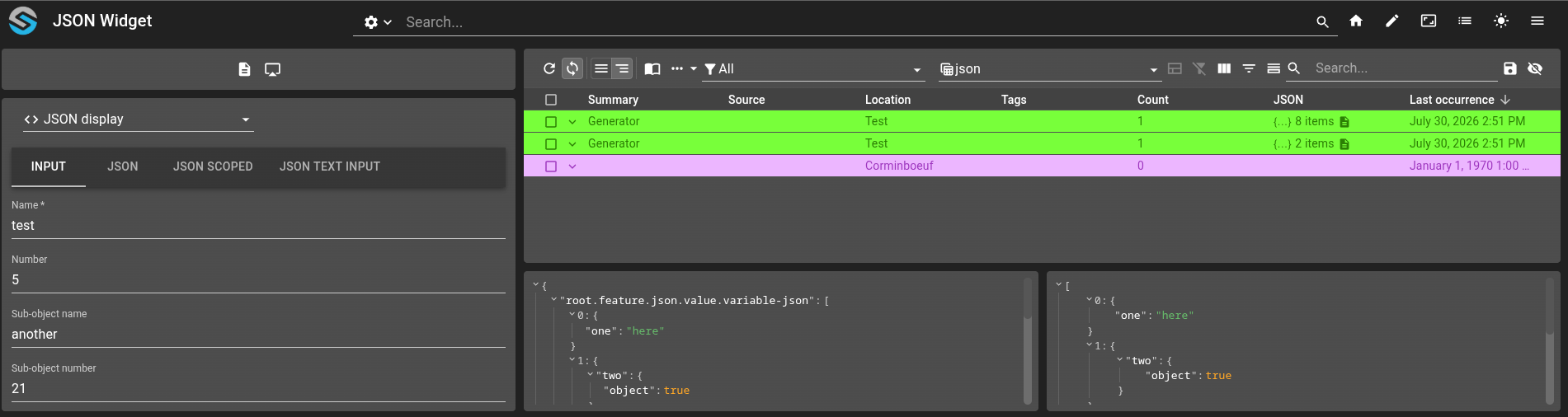
Render JSON in the front-end — widget, table cell, form component and menu output - #1782
Raw JSON values can now be rendered anywhere in the front-end through a shared, theme-aware JSON viewer (collapsible tree, syntax highlighting and optional clipboard copy). The same viewer is exposed in four places:
JSON widget : the new Json widget displays a JSON value on a dashboard. Its content can be provided statically in the configuration or set at runtime from a menu, a script or another widget through the setJson widget-context action.
JSON table render : a column can now use the
JSONrender. Objects and arrays are shown as a compact summary in the cell and expanded in a modal when clicked.JSON form component : the new Json form component displays a read-only JSON view of a bound property inside a form.
JSON menu output : the new
jsonoutput operation opens a modal displaying a JSON payload produced during menu evaluation.
The viewer display options (collapsed, displayDataTypes, objectSortKeys, ...) and its appearance (style CSS variables, with optional light / dark overrides) are shared across the four surfaces.
Toolbar links - #1717
Toolbar dashboard results are now links with href to properly support tab opening.
In addition, search bar result display preferences are stored locally for users.
Helm changes
#1893: The users initialization was not waiting for the replicaset to be ready.
#1894: Certificate generation was not failing properly when the secret name was too long.
The generation was successful but the pods were not able to start.
#1917: Add public rights certificate only on module that need it.
Other changes
#1818:
tsconfig.jsonis now importing the default configuration of the types fromtsconfig.onsphere.jsoninstead of defining it.This allow the integrator to override them easily by editing
tsconfig.json.#1885: Added the environment variable
ALLOW_VERSION_MISMATCHto all module.This allows you to disable the verification of the version by the module introduced by Module check configuration version during update - #1802.
Prevent authentication filter from printing logs and exceptions upon webhook access with an invalid JWT token.
Version 2.1.0-beta.2
Release date : July 2026
Improvements
#1866: Collection: Combo box supports case-sensitive and case-insensitive element filtering.
Bug fix
#1786:
BoxLayoutwidget sizing now relies on CSSflex-basisinstead of a size measured in JavaScript, fixing inconsistent sizing of its children.#1820: The alarm and collection tables could crash while rendering the detail panel or certain cell types when the underlying data was missing or malformed; rendering is now guarded against these cases.
#1820: Relative time displays (such as the alarm table
RELATIVE_TIMEcolumn) now refresh immediately when their value changes instead of waiting up to five seconds for the next tick.#1820: Copying a non-text value (such as an object or a number) now works as expected; objects are serialized to JSON and numbers are converted to text before being placed on the clipboard.
#1733: Properly handle specific entry ID fetching for Collection Table should the document not be present in current table.
#1859: Issues with how message from WebSocket were handled was preventing actions to receive the result of their request. Therefore, no actions output were triggered correctly.
#1858: Front-end was not cleaning request properly on form.
#1864: Alarm archive manager was not ignoring collection generated during the migration process.
#1865: Local storage on Collection Table was not keeping user modification on table columns.
#1867: Tables SEVERITY render support ItemId reference.
#1872: After navigation, the Map widget, might crashes with the following error:
Cannot read property of undefined (reading 'style').#1700: Values retransmissions are now separated by module to prevent unexpected output and script execution.
The callbacks (for a script only if the
triggerModescontainsRETRANSMISSION) were re-triggered when a dashboard or module was loaded if the value was needed by it.#1873: The order in which operations were carried out within a batch was not guaranteed by the Standard insertion.
This can lead to inverted creation when the same serial is present multiple times on the same batch. For example, the alarm at 10:40:00 will be inserted after the one at 10:40:02.
#1874: menu.web was not validated correctly. Some reference inside the inputs/outputs were not checked during the aggregation.
#1762: Alarm history rebuild was too slow. A pre computed History alarm view was created to have a more reactive history display.
The history view is updated at an interval of 2 seconds by default. This interval can be configured on module.alarms with the field
historyReconstructionInterval.#1871: Fixed menu.web items using
blockFrontInteractionWhileExecutingwhen the operation failed, the backdrop never disappeared, requiring a browser refresh to clear it.#1869: Properly clean Alarm Table and Alarm History Table selection when elements exits sub-group.
Security fix
Update Grafana image renderer to 5.9.1
Update MongoDB to 8.0.26
Update Mysql to 8.4.10
Update Keycloak to 26.6.4
Helm changes
The
customAnnotationsintroduce by helm observability was rename topodAnnotations.
Version 2.1.0-beta.1
Release date : July 2026
Upgrading warnings
Warning
Since version 2.0.0, the upgrade guide is available in a dedicated chapter. See upgrade guide.
Bug fix
#1696: Value with pre-transform/post-transform now need the setting of the inputType. See Transformation
#1719: The maximum length of an ItemId is now strictly limited to 255 characters. This avoids messages that cannot be sent on RabbitMQ.
#1729: Regression the certificates where not loaded from cacerts as expected for API service.
#1729: Add preemptive authentication for user/password for api-service.ospp.
#1735: Container shutdown was slow due to improper messaging termination.
#1735: Resolved a minor memory leak.
#1745: Config controller return
config.Dashboard()andconfig.Severity()object usable in JS.#1814: The configuration dispatcher could start very slowly on large repositories when a version upgrade is performed, this is fixed now.
Composer is now backward-compatible with templates generated by the previous version (prior to 2.0); the cleanup process, which previously did not work, has been fixed.
Composer could previously fail to clean certain directories due to race conditions when removing all templates; this issue has been resolved. Avoiding a re-run of cleanup task.
Alarms pre-insertion rules where not cloning alarms properly which lead to change propagation between operations.
Alarms create archive indexes in the background.
#1746: Fixed multiple issues related to WebSocket usage with RabbitMQ stream requests. In certain edge cases—particularly when switching rapidly between two dashboards using the same collection, no data was sent to the frontend until a timeout occurred.
#1395: The preview template was not working as expected with variables file inclusion.
Fixed a caching issue in VSCode where Nunjucks file inclusions were not refreshed; the cache is now properly reloaded.
#1752: Standardize JSON formatting in the composer to ensure consistent file structure.
#1775: Composer settings file association are stable.
#1775: Composer exports integrator settings if defined in
settings.json.#1742: The navigation widget was not working when configured on a user’s main dashboard (home page).
#1740: Prevent the license pop-up from appearing too frequently (once every 4 hours)
#1747: WebSocket now uses a binary format by default instead of a text format, providing a slight performance improvement.
Text messages can be re-enabled either by setting
osp.config.enable.websocket.text-messagetotruein the browser’s local storage, or by forcing text mode in the module.web using thewebsocketForceTextMessageoption.#1712: Fixed an issue where the Execution script controller raised catchable JavaScript exceptions.
The execution termination mechanism has been updated to ensure scripts are halted immediately without allowing the guest language to intercept the interruption via
try-catchblocks.#1783: Files in .onsphere directory are now detected when VSCode is launched.
#1769: The field
iterateOnis now able to use data from the CSV.#1730: The
passwordfield in the OSP Toolbox is now calledEncryption key.#1329: When a patch is applied with composer on a configuration with templates, a warning is now displayed.
#1792: The template cleaner now properly clean empty directories.
#1795: .nunjucks extension is now associated with the file without the .nunjucks extension.
#1793: Alarms ignore collection was not cleanup automatically.
A ignore collection configuration was added to module.alarms to set the time to live of the collection. The default value is 60 days.
#1791: API service skip the response filtering and validation step when a non 2XX http code is reported.
This allow the user to see the real error in case the format doesn’t match the provided schema.
#1797: Create a new history entry if it doesn’t exist during the migration.
This avoid error like
Serial was not found on historyafter the migration.#1813 : Fixed multiples spurious warnings emitted at the starting of multiples modules
#1822 : Fixed an issue where hot-reload (experimental) was evicting cache entries upon reload. Values relying solely on a default value would never pick up their updated value; other values would only be refreshed on the next change.
#1837: The dispatcher did not publish the updated configuration to all modules over RabbitMQ after a configuration change, as expected. This caused a delay before the heartbeat detected the outdated configuration, and the new configuration was sent even when the dispatcher was about to restart, leading to a longer downtime than expected.
#1838: The dispatcher did not allow enough time to update the RabbitMQ users when it was updated itself, leading to edge cases where authentication failed for some modules. The system recovered automatically on the dispatcher’s next start, but unusual logs and behavior could occur in the meantime.
#1841: The ValueScript type for
myselfis now supported in script-writing types, enabling autocompletion.#1821: Fixed an issue where
docker-validation(run from Composer) attempted to validate osp.vault even though the required secrets are not available locally. The validation now uses placeholder plaintext values, allowing the validation step to complete successfully.
Security fix
Update Ubuntu image to 24.04
Update openssl
Update snmp-pp
Update Keycloak to 26.6.3
Warning
A manual migration step is required. See Keycloak update for more informations.
Tighten valid redirect URLs for the Keycloak client
Redirection to
https://<hostname>:<port>/*as defined in stack.cfg is now only allowed for the Dashboard and Grafana client.PKCE challenge is enforced for the Dashboard client.
Disable
direct access grantfor Dashboard and Grafana client.Harden script execution context and option for module.scripts and module.keycloak. The options
allowNativeAccessallowHostClassLoadingandallowInnerContextOptionsinexecutionConfigurationare deleted.Update Antmedia to 3.0.3
Update RabbitMQ to 4.3.1
Update MongoDB to 8.0.23
New features
Webhook return code, script response and HTTP methods - #1823
A Webhook endpoint now offers more control over the request handling:
Execute a script linked to the endpoint.
Return a value from the endpoint.
Declare the HTTP verbs the endpoint answers (
GET,POST,PUT,DELETE).Extract a field from a JSON or XML body into a value.
See webhooks for details.
Alarms value ON_ALARM split created and modified - #1631
The alarms value ON_ALARM now split created and modified alarms.
The content of the ON_ALARM value is the following (as a string):
{
  "created": [
    {
      "serial": "serial-created",
      "severity": 200
    }
  ],
  "modified": [
    {
      "serial": "serial-modified",
      "severity": 300
    }
  ],
  "removed": [
    {
      "serial": "serial-removed"
    }
  ]
}
Warning
To simplify the migration, the script using this can merge the two array to keep the same logic.
const triggerContent = JSON.parse(trigger.content);

const modified = [...(triggerContent.created), ...(triggerContent.modified)];
const removed = triggerContent.removed;
Script execution scheduling - #1734
The osp-scripts module now uses a priority-based scheduling system, giving fine-grained control over how scripts are queued and executed concurrently. New configuration parameters are available in owner.scripts and detached.scripts:
priority: Execution priority of the script. Lower values run first. Scripts sharing the same priority are dispatched in strict arrival order (FIFO).
maxConcurrentExecutions: Maximum number of executions running simultaneously for this script.
maxInFlightExecutions: Maximum number of executions kept in memory (queued and running combined). When this limit is reached, the backpressure strategy is applied.
backpressureStrategy: Defines how executions are dropped whenmaxInFlightExecutionsis exceeded.
validity: Execution time-to-live. If an execution has not started within the configured duration, it is silently discarded.
In addition, detached scripts now support:
useTriggerAsId: When enabled, each distinct trigger value is treated as an independent execution stream, with its own queue, concurrency limit, and priority slot within the shared pipeline.
Module check configuration version during update - #1802
The module validate that the configuration version match its version before updating.
This avoids any unwanted downtime during an OnSphere update.
Note
If a module is restarted by the orchestrator, it might not be able to load the configuration until the update is done.
The helm chart allow to set a different version for the dispatcher to allow an update with less downtime by mimicking the behavior of the swarm update for the Upgrading unmanaged configuration. See Global Configuration.
Validation of Expression Language - #1718
Expressions defined in value.ospp, within both preTransform and postTransform, are now validated during the aggregation phase.
This validation covers:
Syntax correctness of the expression
Return type compliance
Consistency of referenced variable names within the expression
Refer to Transformation for details on transformation behavior
Map points coming directly from alarms and collections - #1707
The maps module can now stream GeoJSON features directly from collection documents and live alarms. The Map widget renders those collection-backed and alarm-backed layers alongside existing static geo.maps layers.
Supported source types:
COLLECTIONS streams live documents from the collections module and reads the GeoJSON object from the configured
geometryfield path.ALARMS streams live alarms directly from osp-alarms and reads the GeoJSON object from the configured alarm field path.
Those dynamic sources can be exposed through the same map widget request flow as static layers.
Those dynamic sources can also be set to use alongside a floor setting Display floor-filtered mixed map sources.
See Geographical aggregation, Display collection-backed layers on map, and Display offline live alarm layers on map.
Controller autocompletion in scripts
Scripts now feature autocompletion for API Script
Highlights:
Autocompletion suggests controller methods directly in scripts
Function parameters are type-checked visually, incorrect types are underlined in red with an explanation
Inline documentation appears alongside function suggestions, helping prevent common mistakes
Note
Java-to-JavaScript type mapping is in best effort mode, this feature only affects editor display and does not enforce validation on dispatcher push.
Alarms manipulation in scripts can retrieve existing alarms
Alarms manipulation provide new methods to access existing alarms.
alarms.exists(): Check if an alarm exists.
alarms.getLive(): Return a list of live alarms.
alarms.getHistory(): Return a iterator of history alarms.
CSV Controller - CSV to JSON parsing
A new CSV allows parsing CSV content into JSON in scripts.
Supports:
Full parsing (
parse), iteration (parseIterator), and batch streaming (parseStream)Configurable format (
delimiter,quotes,escape,line_terminator,comments)Header management
Line filtering and trimming
Storage Controller - Read and write file from osp-storage
A new Storage controller allows to access the document stored inside osp-storage.
Supports:
List content with
storage.listContent().Get metadata for a document with
storage.getMetadata()Read content as binary with
storage.getBinaryData()or text withstorage.getTextData().Write content as binary with
storage.createBinaryFile()or text withstorage.createTextFile().Remove content with
storage.remove().
Collection Controller - New method are added
The Collections controller has new method to improve its capability.
collections.deleteWithCustomFilter()allows to delete document matching a custom filter.collections.insertMany()allows to create multiple document at once.collections.updateMany()allows to update multiple document at once.
InfluxDB Tasks - Flux-based task management
The analytics module now supports managing InfluxDB tasks using the task.analytics configuration file.
Tasks are defined using Flux scripts and executed directly by InfluxDB.
All tasks created by OnSphere are automatically prefixed with osp- in InfluxDB. By default, the analytics module option disableOspOrphanTasks is enabled. Any task prefixed with osp- that is not declared in the configuration will be automatically disabled.
Restarting or reloading a module will not publish error immediately - #1676
Previously, when a module restart, the value uninitialized was published immediately. This cause unwanted trigger of callback and script.
Similarly, when a error is publish during the start of the module, it was sent immediately.
The new behavior hold both value for at most the timeout configured on the module or by value. The default timeout is one minute.
Note
When a value without an error is publish, the timeout is stopped and from this moment on, the next error will be published immediately.
Callback retry - #1675
The callback.ospp allow to retry the output when a failure is detected. See Callback for more information.
Script Encoder - Direct UTF-8 String Conversion
The script encoder previously supported multi-base encoding/decoding using byte array inputs and outputs. It now also supports direct conversion between UTF-8 strings and base-encoded strings.
Supported bases: base16, base32, and base64.
Script Http client support NTLM
The HTTP requests allow to set credentials for NTLM used for microsoft suite.
Script controllers made available in keycloak scripts engine
BACnet whole module refactoring
The BACnet module has been fully refactored to support hot-reload and to handle a wider range of hardware types, with certain limitations.
Hot-reload : BACnet now supports hot-reload for all external parameters (modifying the local-device will trigger a module restart).
Supervision : The supervision of devices now supports multiple methods. See documentation.
Write : The module can now write to most BACnet properties and object types, instead of being limited to presentValue.
Read : The module can now read a broader range of data types and return results in JSON format, enabling improved control and easier parsing within scripts.
Auto-subscribe to NotificationClass : An option is now available to automatically subscribe to all NotificationClass objects based on configuration rules, allowing the device to be used as a trusted source.
Auto-subscribe to Properties : An option is now available to automatically subscribe to all properties based on configuration rules, allowing the device to be used as a trusted source.
Allowing a lot of new configuration parameters for devices : The configuration of modules and devices has been enhanced to provide greater control over methods, timeouts, and device support, enabling improved customization.
Change of the subscribe to NotificationClass : Before this release, osp-bacnet would always register itself as a destination in the NotificationClass. This behavior can now be disabled, as some devices only support static registration.
Discovery
BACnet discovery has received several improvements :
More readable property values
Addition of integer representations of properties
Addition of value types
See Discovery for details.
Documentation The documentation is totally rewritten.
Accepting null state for values #1696
Values can now have a null state, indicating that the value is “unset” on the device. Note that this state is supported by only a few protocols, such as BACnet. It is recommended to avoid using null values unless necessary, as they are invalid in most commands. For example, writing a null value in Modbus is meaningless and will result in an error. See Value concept for more info.
Hide pagination component for alarms and collections table - #1749
You can now disable the pagination component on the bottom of a table. You can do it by either using the setting disablePagination or by limiting the number of pageSizes to one.
This is only applied to Collection Table and Alarm History Table. The Alarm Table table, which represent the live current alarms never displays any pagination component.
Support system CA by default - #1722
Previously, the following modules did not use the CA certificates provided by the Docker image by default. This required manually importing all external certificates, resulting in complex certificate management or setting an option.
The system CA is now loaded automatically by default. As a consequence, several configuration options that enabled or disabled this behavior have been removed.
Modules impacted:
osp-scripts (HTTP scripts controller)
VScode composer - usage of diagnostic
Validation errors are now reported as diagnostic entries in VSCode. This feature is still partially implemented and currently highlights only the first line of the affected file. If initial testing is successful, the system will be extended to support and display more accurate errors.
API service support custom header authentication - #1784
A custom auth header can be injected into the request.
Beta features
Warning
 This feature is currently in beta. It may change in a future version without prior notice. See the Beta Features page for the full list of beta features and their planned release. If you’re using this feature, we encourage you to share your feedback to help with the evaluation process.
Helm allow to define annotations to scrap metrics and logs - #1819
The helm Modules Configuration (modulesConfiguration) allow to set annotations to automatically scrap logs and metrics.
observability.metrics.enabled: Set the annotationsobservability.onsphere.ch/metrics-enabledandobservability.onsphere.ch/metrics-portwhen enabled. The port 9100 is also opened on the pod.observability.logs.enabled: Set the annotationsobservability.onsphere.ch/logs-enabledwhen enabled.customAnnotations: Inject custom annotations.
Note
For non conventional requirement, the metrics flag can be set to false and the customAnnotations and ports of type LOCAL can be used.
Warning
The metrics flag was previously creating a service to expose the port 9100 of the pod. This is now removed.
Map widget controls - #1674
It is now possible to add a menu in the map and interact with for multiple use cases (for example adding an alarm at a given location or interacting with the map context).
Repository and Validation Configuration Enhancements
It is now possible to define and pre-configure environments and validation settings for repositories.
Environment can be automatically selected when executing playbooks or presented as a pre-selected element for manual choice
Validation settings allow specifying log levels and orchestrator modes
Composer template - execution rule
Playbook Environment Execution (all)
QuickPick now shows all available environments for playbooks with multiple environments.
Playbooks execute for all environments whose name matches the user selection.
Ensures only valid environments are executed and all options are visible to the user.
Composer template - improvement
Description fields are now supported in most parts of templating. These fields are for documentation purposes only and have no functional effect.
Performance improvement: CSV files are now loaded line by line during processing, reducing RAM usage. This does not apply to variables, as Nunjucks requires all variables to be available for processing.
The CSV parsing have a lots of news options :
Support for sourceEncoding
Support for comment
Support for hardcoded headers columns
Add method for converting to camelCase, snakeCase,pascalCase, kebabCase and onlyAlphaAndNumberDash see documentation
Adding a new variable named templateEnvironment to represent the currently running environment.
Variables can now be conditionally included.
Adding a function to convert from itemId to relative path
Adding a function to convert from relativePath to ItemId
Module restart handling
This change ensures that the Kubernetes or OpenShift cluster does not trigger the crashLoopTimeout when multiple configuration updates are applied.
This also allows modules to restart more quickly when their configuration changes.
Note
This is not the experimental hot-reload. We just avoid recreating the container. The application restart completely.
The environment variable USE_LEGACY_RESTART can be set to fallback the previous restart behavior.
VSCode Composer - Template Security
The composer now allows configuring an environment safeguard to prevent pushing a template built for one environment (e.g. TEST) to another (e.g. PROD).
See doc for more details.
Attachments on alarms and collections with new module osp-storage - #1649
Attachments are files of any type that can be uploaded and attached to either an alarm or a collection entry. They can then be visualize and retrieved from any front-end widget that can display alarms/collections.
These attachments are uploaded and downloaded through the osp-storage module.
Currently, storage attachments can be uploaded / retrieved with the following:
Front-end: front-end widgets that displays alarms or collections and menus as well are able to both upload and download files. For alarms, attachments manipulation is done through menus and journal entries. Collections on the other hand allow more interactions with the use of forms and new ui components.
Reports: PDF reports can contain images that are retrieved from osp-storage. Only PDF reports are currently able to display them. Other reports type like a plain HTML report won’t allow to retrieve and interpret anything.
For a more detail explanation of this new feature, take a look at Attachment documentation.
If you want to use attachments on front-end, take an additional look at the following links:
If you want to use attachments within reports, take an additional look at the report documentation.
Collection table - List of user currently subscribed to a collection entry - #1649
The Collection Table now offers a way to know the users that are currently viewing/editing an entry of the table. This information is only visible if you are viewing/editing the same entry as well.
On the right-side of the toolbar, a new component gives you the list of users with their usernames and the last time they updated this entry.
This gives you an insight on who is currently subscribed to the same entry as you are, which can be helpful for when you may have conflicts with your changes after someone else also edited this entry.
Features graduated from beta
The following features were previously listed as beta and are now considered stable as of this release. They are no longer subject to breaking changes without prior notice.
Audit Logs — Dedicated logs tracking user interactions, stored in a specific MongoDB collection. Available since 1.4.0.
Grafana — Embed and interact with Grafana dashboards directly from OnSphere. Available since 2.0.0.
Object Browser — Navigate through the OnSphere configuration and display all defined values with live value updates. Available since 1.1.0.
PDF Viewer — Open in another window — Ability to detach the PDF Viewer widget content into a separate browser window. Available since 1.2.0.
PTZ Controller — Widget to control Pan-Tilt-Zoom cameras directly from an OnSphere dashboard. Available since 1.2.0.
Theme Overriding — Override the OnSphere theme using Material UI customization parameters defined in
stack.cfg. Available since 1.4.0.Vault — Central storage for passwords and secrets that can be retrieved in scripts. Available since 2.0.0.
API service — Usage of external API (REST). Available since 1.4.0.
Configuration changes
osp-mysql memory footprint reduced — new
OSP_MYSQL_*tuning variablesThe MySQL container now generates a tuning file at startup from a set of
OSP_MYSQL_*environment variables. The default values are sized for the small Keycloak database that OnSphere hosts internally, and cut idle RAM usage significantly compared to the MySQL stock defaults (from ~450MB to 150MB).All variables are listed and described in the osp-mysql documentation and are pre-populated in the default
module.service, making them easy to override per deployment.Add a new environment variable
CUSTOM_JVM_OPTIONSto set JVM options.Note
In a containerized environment with RAM limits enable, the default JVM configuration will only use 25% of the RAM limit as the maximum heap space. Using this option to set
-XX:MaxRAMPercentage=75.0will increase the maximum heap size to 75% of the limit.Warning
This should not be set if there is no limit enabled.
#1714: Json configuration file now support C/C++/Java comment style.
{
  // TODO: rewrite the description
  "description": "",
  "name": "My value",
  "type": "BOOLEAN"
}
#1652: The output format of configuration validation (git push and validator) was changed to improve its readability.
The following example show the new format.
{
  "ERROR" : [
    "error",
    {
      "message" : {
        "description" : "A required file is missing",
        "fileOnError" : "/tmp/test/root/value.ospp",
        "missingFile" : "/tmp/test/root/dashboard.view",
        "type" : "MISSING_FILE"
      }
    }
  ],
  "WARNING" : [
    "warn"
  ],
  "INFO" : [
    "info"
  ]
}
#1394: Update enable event type to generate value from Keycloak event.
On realm.keycloak, the new value of
realm.enabledEventTypesis[ "AUTHREQID_TO_TOKEN_ERROR", "AUTHREQID_TO_TOKEN", "CLIENT_DELETE_ERROR", "CLIENT_DELETE", "CLIENT_INFO_ERROR", "CLIENT_INFO", "CLIENT_INITIATED_ACCOUNT_LINKING_ERROR", "CLIENT_INITIATED_ACCOUNT_LINKING", "CLIENT_LOGIN_ERROR", "CLIENT_LOGIN", "CLIENT_REGISTER_ERROR", "CLIENT_REGISTER", "CLIENT_UPDATE_ERROR", "CLIENT_UPDATE", "CODE_TO_TOKEN_ERROR", "CODE_TO_TOKEN", "CUSTOM_REQUIRED_ACTION_ERROR", "CUSTOM_REQUIRED_ACTION", "DELETE_ACCOUNT_ERROR", "DELETE_ACCOUNT", "EXECUTE_ACTION_TOKEN_ERROR", "EXECUTE_ACTION_TOKEN", "EXECUTE_ACTIONS_ERROR", "EXECUTE_ACTIONS", "FEDERATED_IDENTITY_LINK_ERROR", "FEDERATED_IDENTITY_LINK", "FEDERATED_IDENTITY_OVERRIDE_LINK_ERROR", "FEDERATED_IDENTITY_OVERRIDE_LINK", "GRANT_CONSENT_ERROR", "GRANT_CONSENT", "IDENTITY_PROVIDER_FIRST_LOGIN_ERROR", "IDENTITY_PROVIDER_FIRST_LOGIN", "IDENTITY_PROVIDER_LINK_ACCOUNT_ERROR", "IDENTITY_PROVIDER_LINK_ACCOUNT", "IDENTITY_PROVIDER_LOGIN_ERROR", "IDENTITY_PROVIDER_LOGIN", "IDENTITY_PROVIDER_POST_LOGIN_ERROR", "IDENTITY_PROVIDER_POST_LOGIN", "IDENTITY_PROVIDER_RESPONSE_ERROR", "IDENTITY_PROVIDER_RESPONSE", "IDENTITY_PROVIDER_RETRIEVE_TOKEN_ERROR", "IDENTITY_PROVIDER_RETRIEVE_TOKEN", "IMPERSONATE_ERROR", "IMPERSONATE", "INTROSPECT_TOKEN_ERROR", "INTROSPECT_TOKEN", "INVALID_SIGNATURE_ERROR", "INVALID_SIGNATURE", "INVITE_ORG_ERROR", "INVITE_ORG", "LOGIN_ERROR", "LOGIN", "LOGOUT_ERROR", "LOGOUT", "OAUTH2_DEVICE_AUTH_ERROR", "OAUTH2_DEVICE_AUTH", "OAUTH2_DEVICE_CODE_TO_TOKEN_ERROR", "OAUTH2_DEVICE_CODE_TO_TOKEN", "OAUTH2_DEVICE_VERIFY_USER_CODE_ERROR", "OAUTH2_DEVICE_VERIFY_USER_CODE", "OAUTH2_EXTENSION_GRANT_ERROR", "OAUTH2_EXTENSION_GRANT", "PERMISSION_TOKEN_ERROR", "PERMISSION_TOKEN", "PUSHED_AUTHORIZATION_REQUEST_ERROR", "PUSHED_AUTHORIZATION_REQUEST", "REFRESH_TOKEN_ERROR", "REFRESH_TOKEN", "REGISTER_ERROR", "REGISTER_NODE_ERROR", "REGISTER_NODE", "REGISTER", "REMOVE_CREDENTIAL_ERROR", "REMOVE_CREDENTIAL", "REMOVE_FEDERATED_IDENTITY_ERROR", "REMOVE_FEDERATED_IDENTITY", "REMOVE_TOTP_ERROR", "REMOVE_TOTP", "RESET_PASSWORD_ERROR", "RESET_PASSWORD", "RESTART_AUTHENTICATION_ERROR", "RESTART_AUTHENTICATION", "REVOKE_GRANT_ERROR", "REVOKE_GRANT", "SEND_IDENTITY_PROVIDER_LINK_ERROR", "SEND_IDENTITY_PROVIDER_LINK", "SEND_RESET_PASSWORD_ERROR", "SEND_RESET_PASSWORD", "SEND_VERIFY_EMAIL_ERROR", "SEND_VERIFY_EMAIL", "TOKEN_EXCHANGE_ERROR", "TOKEN_EXCHANGE", "UNREGISTER_NODE_ERROR", "UNREGISTER_NODE", "UPDATE_CONSENT_ERROR", "UPDATE_CONSENT", "UPDATE_CREDENTIAL_ERROR", "UPDATE_CREDENTIAL", "UPDATE_EMAIL_ERROR", "UPDATE_EMAIL", "UPDATE_PASSWORD_ERROR", "UPDATE_PASSWORD", "UPDATE_PROFILE_ERROR", "UPDATE_PROFILE", "UPDATE_TOTP_ERROR", "UPDATE_TOTP", "USER_DISABLED_BY_PERMANENT_LOCKOUT_ERROR", "USER_DISABLED_BY_PERMANENT_LOCKOUT", "USER_DISABLED_BY_TEMPORARY_LOCKOUT_ERROR", "USER_DISABLED_BY_TEMPORARY_LOCKOUT", "USER_INFO_REQUEST_ERROR", "USER_INFO_REQUEST", "VALIDATE_ACCESS_TOKEN_ERROR", "VALIDATE_ACCESS_TOKEN", "VERIFY_EMAIL_ERROR", "VERIFY_EMAIL", "VERIFY_PROFILE_ERROR", "VERIFY_PROFILE" ]
#1394: Remove default
offline_accessfor account. This avoid generating long live token for all user.If realm.keycloak is define on the configuration, you can add:
On
realm.roles.realm:{ "name": "default-roles-onsphere", "description": "${role_default-roles}", "composite": true, "composites": { "realm": [ "uma_authorization" ], "client": { "account": [ "view-profile", "manage-account" ] } }, "clientRole": false, "attributes": {} }
On realm.defaultRole:
{
  "name": "default-roles-onsphere",
  "description": "${role_default-roles}",
  "composite": true,
  "clientRole": false
}
#1722: Options allowing the selection of whether system CAs were included have been removed due to automatic load of system CA:
includeSystemCain module.keycloakuseJVMTrustStorein module.comsuseJVMTrustStorein module.smtpuseJVMTrustStorein module.ip-rct
Hot-reload support - #1279
Some modules now support the experimental hot-reload feature, which avoids restarting a module when its configuration changes.
Add getters for AlarmBuilder - #1768
It is now possible to retrieve the values of the fields set in the AlarmBuilder from the Alarms Controller.
Documentation
The Auto-boxing behavior is now documented with greater clarity.
The scripts controller documentation has been fully reworked.
Error handling is now documented for users.keycloak, groups.keycloak, federations.keycloak, realm.keycloak, and identityProviders.keycloak.
The pricing page has been removed.
A dedicated section listing beta and deprecated features has been added.
The search engine has been replaced with Pagefind, enabling full-phrase and multi-token search across the documentation.
Examples are now categorized by section and fully indexed, making them easier to discover through search.