Reports List
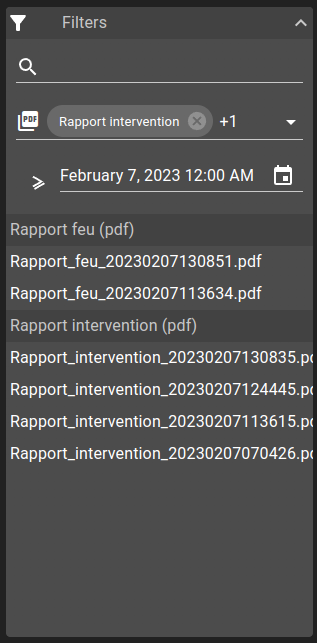
The ReportsList widget allows visualizing reports list available inside your database. This list can be shortened by using available filters :
search: Search based on report name
template: Selector to filter templates used for the report generation
date: Filter by date with multiple operation (equal, less, lessOrEqual, greaterThan, greaterThanOrEqual, between)
List of configuration files
Filename |
Short description |
Format |
Link to documentation |
|---|---|---|---|
dashboard.view#ReportsListWidget |
Defines the ReportsListWidget widget global settings |
json |
List of examples
Short description |
Link to documentation |
|---|---|
Visualize generated reports in a dashboard |
Widget context
The widget context can be accessed from menus in order to fetch these different values from the alarm table. Alarms objects are dependant on the view used.
reportsclicked: report clicked on the listdocumentId: Id of the database entrytemplateId: ItemId of the templatetemplateName: Name of the templatedata: Data used to generate the reportparsed: Result of the templatepdfContent: PDF content if template has PDF formatreportName: Name of generated reporttemplateFormat: Format of the reporttimestamp: Timestamp of generation