Alarm Severity
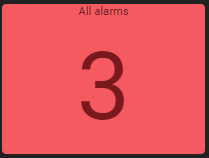
Example of an Alarm Severity box in OnSphere
The Alarm Severity widget allows displaying an alarm count and severity summary associated with an alarm filter.
It consists of two elements:
Count: The number of alarms matching the filter (with the foreground and background color matching highest severity)
Label: A label describing the alarm severity (optional)
List of configuration files
File |
Type |
Short description |
Format |
|---|---|---|---|
Defines the Alarm Severity widget global settings |
json |
List of examples
Short description |
Link to documentation |
|---|---|
Alarm severity widget onClick |
onClick operation
The onClick operation of this widget can make use of dynamic evaluation.
In this operation, you have access to:
osp.widgets(id): to access any widget available in current dashboard using widgetid. This will allow access to widget exposed features.osp.navigate(path)to navigate to any dashboard see Navigation from widget contextosp.evaluate(code): to allow menucodeinteraction evaluation (see dynamic evaluation)osp.updateValue(id, content)to update a value with itscontent. The object formosp.updateValue({id, content})is also accepted.
You can read the Alarm table filter update with alarm severity widget example to get a better view of the possibilities available with this operation.