Logo
OnSphere v: latest
Versions
Links
Documentation Home

General documentation

  • Introduction
  • Licensing System
  • Beta and deprecated Features
  • Changelog
  • Upgrade guide

Getting started

  • Getting started
  • Examples

Composer

  • Composer
  • Validation docker

Exploitation

  • Upgrading guidelines
  • Audit
  • Network and availability
  • Storage and persistence
  • Security
  • Swarm administration
  • Helm Chart Values Reference

Features

  • Authentication & Authorization
  • API Script
  • Configuration
  • Data-processing
  • Industrial protocols
  • External API
  • Front-end
    • Configuration
    • Theming
    • Dashboard
    • Widgets features
    • Widgets list
      • Tables
      • Alarm Severity
      • Analytics Aggregate
      • Basic Input Output Value
      • Chart
      • Discovery
      • Form
      • Gauge
      • Icon
      • Journal
      • JSON
      • Limit
      • Map
      • Markdown
      • Media widget
      • Navigation
        • List of configuration files
      • Object browser
      • PDF Viewer
      • Ptz Controller
      • Range
      • Refresh
      • Reports List
      • Reports Viewer
      • Schematic
      • Select
      • Submit
      • Text
      • Toolbar
      • Value
      • Value Subscription
      • Video Player
      • Web View
  • Misc
  • Third party

Modules

  • Modules capabilities
  • Core modules
  • Integration
  • Plugin modules
  • Schemas
  • Module update

Misc

  • FAQ
  • Glossary
  • Known bug
  • Troubleshooting
SDN OnSphere Documentation
  • Docs »
  • Front-end »
  • Navigation

Navigation

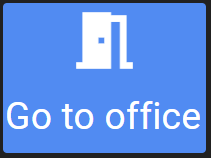
../../../_images/navigation-example.png
The Navigation widget allows to:
  • create internal links between dashboards

  • create external links to other online resources

  • create a custom logout button

  • create a custom refresh button

Visually, it consists of two parts (both optional):
  • Icon: An icon that best represents the navigation button

  • Label: A label to describe the navigation button

Behind the scenes, you need to specify the type of link with the target attribute:
  • target: describes the type of link that will be generated

    • ROUTER: used for internal link, must be a relative path, such as an OnSphere path. (e.g. root.dashboard.my_awesome_dashboard)

    • EXTERNAL: opens an external link in the current tab.

    • EXTERNAL_NEW: opens an external link in a new tab or window

    • REFRESH: refreshes the current page

    • LOGOUT: logs out the user

List of configuration files

Filename

Short description

Format

Link to documentation

dashboard.view#NavigationWidget

Defines the NavigationWidget widget global settings

json

Link


© Copyright 2026, SDN Ltd - OnSphere version 2.1.2. Last updated on 28 Sep 2026.