Web View
Capabilities
Capability |
Support |
Comment |
|---|---|---|
Embedded content through an iframe |
|
Renders an external URL (source) within an iframe. See this section Embedded content through an iframe |
Filter the redirection of the iframe |
|
Provide an array of regex patterns to block specific URL patterns within the iframe. If a match is detected, the iframe automatically reloads the initial source or the source passed to the web view via an action or a script. See this section Filter the redirection of the iframe |
Display the content in fullscreen |
|
Provides a button to toggle the iframe into the browser’s fullscreen mode. |

Concept
WebView is a web widget that embeds external websites, dashboards, or other resources in an iframe. It can be used to display dynamic content such as Grafana dashboards or custom applications directly within OnSphere dashboards.
Examples
Embedded content through an iframe
Concept
When added to a dashboard, WebView loads the specified source URL in an iframe. This source can be further configured by adding a dark or light parameter which will allow a different source loading depending on the dashboard theme.
Usage
{
    {
      "type": "WebView",
      "id": "id",
      "title": "",
      "debug": false,
      "webViewWidgetSettings": {
        "source": "http://stack-1.onsphere.local:8086",
        "title": "InfluxDB"
      }
    }
}
{
    {
      "type": "WebView",
      "id": "id",
      "title": "",
      "debug": false,
      "webViewWidgetSettings": {
        "source": {
          "dark": "http://stack-1.onsphere.local:8086?theme=dark",
          "light": "http://stack-1.onsphere.local:8086?theme=light"
        },
        "title": "InfluxDB"
      }
    }
}
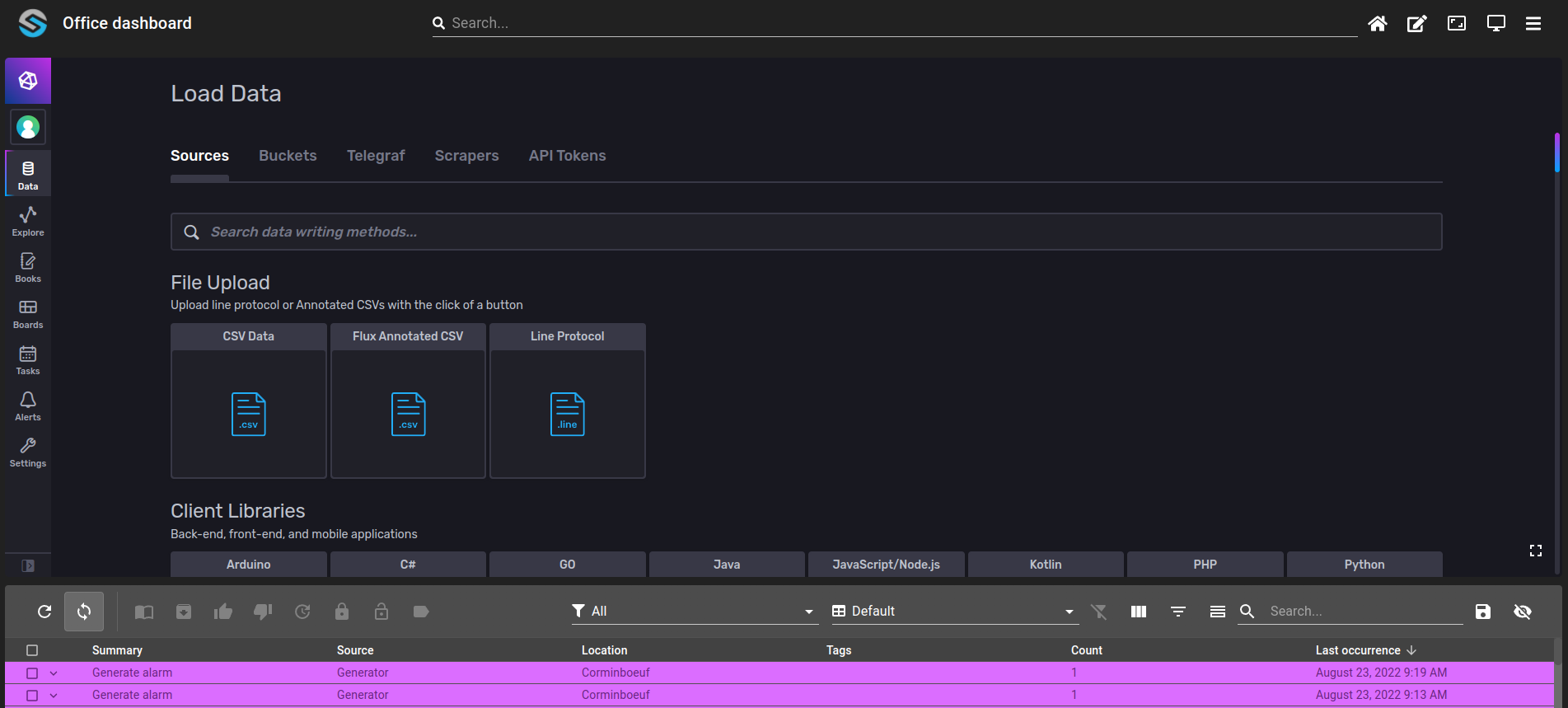
Example of a WebView containing the InfluxDB UI inside the dashboard:
Warning
Modern browsers usually block content mixing (HTTPS and HTTP). Mixing secure (HTTPS) and insecure (HTTP) content can be a security risk. As OnSphere is loading using HTTPS, adding an iframe coming from an HTTP source is blocked. You can allow mixed content in your browser settings for testing, but in production it is insecure.

Filter the redirection of the iframe
Concept
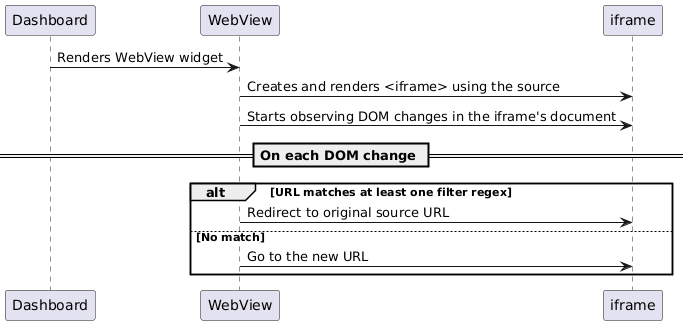
The iframe’s DOM changes are monitored. If the user or scripts within the iframe attempt to navigate to a URL matching one of the patterns in filterUrlRegexRules, the iframe immediately redirects back to the original source. This mechanism helps lock the iframe to a trusted domain or subset of URLs and prevents unwanted navigation. A typical use case is embedding a dashboard (e.g., Grafana) while disallowing navigation to certain URLs.
Usage
{
  "type": "WebView",
  "id": "id",
  "title": "Test",
  "webViewWidgetSettings": {
    "source": "https://test-blacklist/osp/grafana/iframedummy",
    "filterUrlRegexRules": [
      "^.*\/osp\/grafana\/\?.*"
    ],
    "title": "Grafana iframe"
  }
}
When rendered, the widget:
Loads source (depending on the theme (dark or light)) into an iframe.
Displays a fullscreen icon in the top-right toolbar.
Uses filterUrlRegexRules to detect and block unwanted URL navigation.
Warning
As the source of an iframe can change it’s redirection will also change if a filter regex is triggered.
Widget context
The widget context gives access to these operations :
loadUrl: loads the given url