Version 1.3.X - Curious Penguin
Warning
MongoDB has been upgraded from 5.0 to 6.0 with 1.3.0 release.
The current MongoDB features version is 4.4 for OnSphere prior to 1.3.0.
Before upgrading to 1.3.0, the features version must be set to 5.0. This can be done by running the following command inside the MongoDB container:
$ mongosh --eval "db.adminCommand({getParameter:1,featureCompatibilityVersion:1})"
{ featureCompatibilityVersion: { version: '4.4' }, ok: 1 }
$ mongosh --eval "db.adminCommand({setFeatureCompatibilityVersion:'5.0'})"
After the update, when OnSphere is stable, the features version can be updated to the current version:
$ mongosh --eval "db.adminCommand({setFeatureCompatibilityVersion:'6.0'})"
Version 1.3.9
Release date : May 2025
Bug fix
#1487: iOS touch and hold interactions was not working for
Tablesas well asSchematic.#1487: Reactivate, on mobile, side panel close button.
Version 1.3.8
Release date : April 2025
Bug fix
#1471: Journal input
Messagewas creating journal entries without a valid date for collections only. Now, date of the inserted entry will be the current date when inserting.
Security fix
Update docker-compose to 2.35.0.
Update mysql to 8.0.42.
Update Http client to 5.4.4.
Version 1.3.7
Release date : March 2025
Bug fix
#1452: A regression was introduced in 1.3.6, the values with a template were not aggregated correctly, leading to errors similar to :
{
  "type": "VALIDATION",
  "description": "A configuration file is not valid",
  "fileOnError": "root/path/to/value.ospp",
  "field": "$.name: is missing but it is required",
  "message": "name"
}
Version 1.3.6
Release date : March 2025
Features enhancing
#1439: Front-end automatically clears local storage upon version update to avoid configuration mismatches.
Bug fix
#1442: Data validation using the filters LUA lib or JS lib on sub-objects fields (like
field.subfield) was always returning false.#1439: Table (
AlarmTable,AlarmHistoryTableandCollectionTable), following #1416, no longer respected user custom column width. It now shows an icon when the user sets a specific column width to clear user settings. It also allow to keep column sizes with local storage active. FlagsdisableUserUpdatedColumnsMemoizationanddisableToolbarClearUserUpdatedColumnsallows control of this behavior.#1439: No longer show filter or view for
AlarmTableandAlarmHistoryTablewhen only one element is available.#1446: Chart widget background color was not changing correctly when switching from light to dark theme and otherwise.
#1441: Using filters lib in any Lua script method with an alarm (i.e. filters.match(alarm, filter)) was not converting correctly the Lua representation of the alarm into a Java object, resulting in an incomplete Java representation of the alarm, mainly missing the tags.
Warning
Lua representation of an alarm tags is now indexed by an integer value instead of the string value of the tag. Before, the tags were converted as {tag-1: "tag-1", tag-2: "tag-2"} and now uses integer indexes instead as {1: "tag-1", 2: "tag-2"}.
This change was done to insure the order of the tags remains the same from the stored alarm in the database. With the previous representation of tags, the order could not be guarantee.
#1437: Dispatcher was not handling the change of a wildcard properly which can lead to unexpected
MISSING_FILEerror during a push or value not accessed by a script on runtime.#1443: Dispatcher was sometimes hanging during the aggregation. The last log displayed was
Collecting information about all changed files.#1444: The dispatcher would sometimes fail to aggregate the configuration with an error like
Wrong type - working on [simple type, class <class>] - got [simple type, class <class>]where the two classes were the same.#1449: Value linked to a layer.ospp were not aggregated properly.
#1450: Adding a new value to the configuration was not triggering the update of the map and web properly.
Security fix
CVE-2025-24928, CVE-2024-56171, CVE-2024-12797 and CVE-2025-26519 on osp-proxy.
Documentation
Fix Modules capabilities persistent storage
Version 1.3.5
Release date : February 2025
Bug fix
#1422: Dispatcher did not reject a configuration if a folder name contained a dot
..
Security fix
Update openresty to 1.27.1.1-1
Update openjdk to 21.0.6
Update netty to 4.1.118
Update json-smart to 2.5.2
Documentation
Read and update Values now has a description of the result of
blindUpdateandupdate.Scheduled executions describe more detail about the expected usage of the cron expression.
Version 1.3.4
Release date : February 2025
Bug fix
#1416: Table (
AlarmTableandCollectionTable) width computation take into accountminWidth,maxWidthandautowidth used.#1415: Auto-increment fields on collection are now correctly readonly fields. Updates on auto-increment fields are ignored.
#1413: Enforce journal IDs uniqueness to prevent duplicated entries for
Journalwidget.#1419: On some rare case, the alarms change were not propagated properly after a restart of MongoDB.
Security fix
Update docker-compose to 2.31.0.
Update influxDB to 2.7.11.
Update envoy to 1.32.3.
Update logback to 1.5.13.
Version 1.3.3
Release date : November 2024
Documentation
Describe how to use the full path of the group instead of the name to avoid conflict on module.rights. See the mapper on Create an user and setup is access rights or the group configuration entity on module.rights.
Bug fix
Warning
Autogenerated timestamp fields in collections (__modified_at/__created_at) were stored in a IsoDate format, which could lead to some weird or bugged behavior. Changes were made to store them directly as a nanosecond timestamp (long).
We strongly encourage you to update to a version that uses date as nanoseconds and to update your collections data to transform those dates into long timestamp. We provided two script you can use on your mongo database to update automatically these fields. Check the migration guide here to migrate your database.
Security fix
Update internal keycloak dependencies to 26.0.6.
Version 1.3.2
Release date : November 2024
Upgrading warnings
Warning
In script API, collections controller do not allow anymore any username specification in functions collections.insert(), collections.update(), and collections.delete(). The username is now automatically determined by whom is the source of the script execution.
Specifying username manually has been definitely removed and some script may not work anymore. You may be safe to simply delete username from method call.
Features enhancing
Front - Improve value subscription and object browser error/warning reporting, and features - #1382
Both widgets now indicate error and warning with icon and colors to signify the value status.
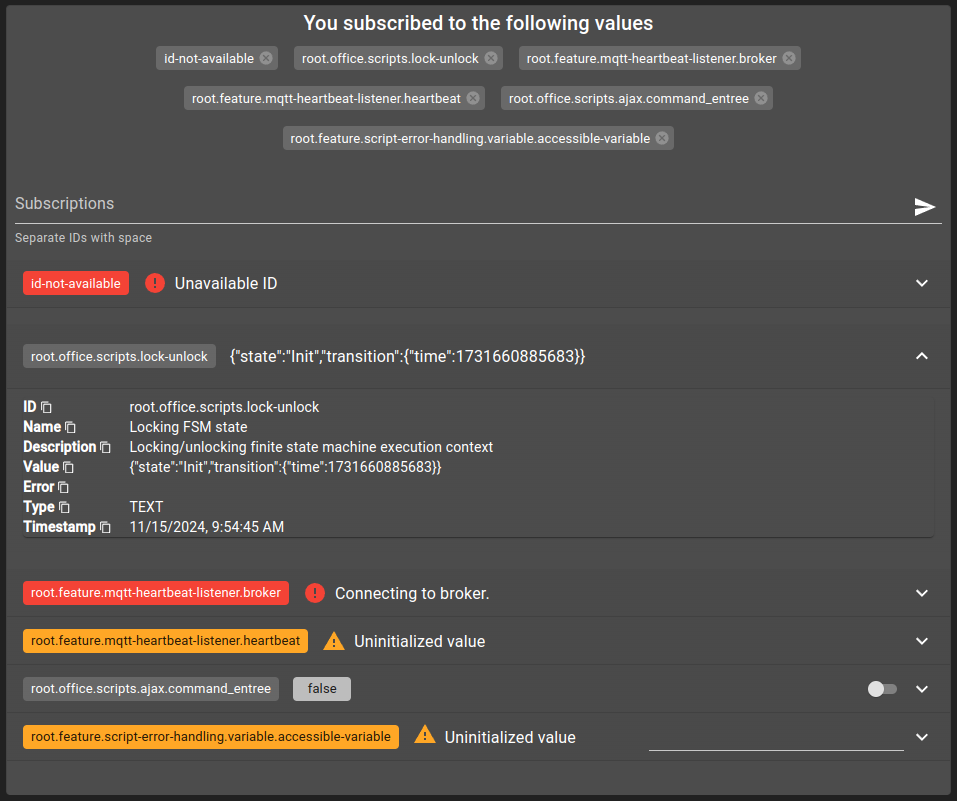
Clicking on OnSphere path (i.e. root.feature.mqtt-heartbeat-listener.broker) will copy the path. When expanded, it is possible to copy each part of the value.
Documentation
#1112: Script Controllers API documentation is fully redesigned with auto-generated based directly on codebase. All script controller documentation are now automatically generated, significantly reducing the potential for manual errors and speeding up future improvements.
Security fix
Update Openjdk to 21.0.5.
Update Mysql to 8.0.40.
Update MongoDb to 6.0.18.
Update Envoy to 1.32.1.
Update Openresty to 1.27.1.1.
Update Netty to 4.1.115.
Bug fix
#1386: The exit process may fail in specific cases, resulting in an inability to restart certain modules from the dispatcher. This issue is not handled correctly.
#1382: Fixed local storage content validation. Front-end local storage might not be able to correctly save/load data since 1.3
#1385: If the connection to RabbitMq was unstable, a value could be published multiple times when reconnecting. The frontend was not able to display the value when this happened.
Version 1.3.1
Release date : November 2024
Features enhancing
#1359: The OPC UA modules now accept
nsunotation. You can declare anodeIdofowner.opc-uaoroutput.opc-uaas follow (raw string or json object)“nodeId”: “nsu=http://microsoft.com/Opc/OpcPlc/;s=AlternatingBoolean”
“nodeId”: “ns=3;s=AlternatingBoolean”
“nodeId”:
{ "ns"=3, "s"="AlternatingBoolean" }“nodeId”:
{ "nsu"="http://microsoft.com/Opc/OpcPlc/", "s"="AlternatingBoolean" }
Bug fix
#1377: Alarm/Collection table settings (filters and views) were not reset to default value correctly when using along side url history parameters.
#1361: Keycloak group aggregator was not handling properly the
attributesandsubGroups.#1364: Collection table create operation not working properly when using url history on the table.
#1365: Script were not executed properly if a
RegExpwas used. The error wasNo language for id regex found. Supported languages are: [js].#1367: The validation of override menu file was invalid with IO error
.. `Cannot construct instance of `ch.swissdotnet.osp.runner.configuration.ConfigurationFile` ...
#1370: SNMP Get of the same OID on multiple values was not possible for one target. One of the value was staying
Uninitialized.#1372: Avoid creating multiple value websocket by front-end.
#1369: Some issues could occur when attempting to pull an object from an array within a collection.
Issues were linked to the declared order of the fields not matching between the element stored in the database and the object used for the pull update request. Changes were made to assure that upon inserting or updating a collection, data is ordered to guarantee that the order is always the same.
Additionally, we recommended you to add an unique id to each object, allowing to pull the content only based on this unique id and not the full object. Please check Updates for more detail about this.
#1368: Retrieve user
AlarmTableandAlarmHistoryTablelast filter and view whenuserPreferenceis set toLOCAL_STORAGE.#1368: Toolbar for
CollectionTablewhen in form view might disappear.#1368: Avoid
CollectionTablenot responding when clearing schema, filter or view.#1368: Properly store user preferences for tables (
AlarmTable,AlarmHistoryTable,CollectionTable). For each schema and view, whenuserPreferenceis set toLOCAL_STORAGE, the system uses stored preferences.#1368: Align journal side panel text on the left rather than centered.
#1368: Use Swiss French and German locales by default for date formatting.
Language was not set properly on Firefox which prevent the loading of the front-end.
Security fix
Update Graalvm to 23.0.1.
Update docker-compose to 2.29.7.
Update msal4j to 1.17.2.
Update jetty to 11.0.24.
Version 1.3.0
Release date : October 2024
Note
Operating systems and container engines dependencies have been updated. See System for more information.
New OS supported: Ubuntu 24.04 Noble
New Docker engine supported: 26.0.1 or 27.0.3
Ubuntu 20.04 Focal not supported anymore.
Docker engine 20.10, 23.0 not supported anymore.
Upgrading warnings
Warning
The fact that we are now checking the types of values upon creation may cause errors in existing configurations.
Why was it working before? It was because some value types were previously ignored and automatically converted to the correct type.
With the new change, you will need to reconfigure some value.ospp with the correct type.
To find the values that have a problem you can either:
Load an ObjectBrowser with all your values and check the error message
Type of the value and the content are not compatible..Check the module logs containing the module error message
The value [itemId] was created with an incompatible content [content] and type [type].
Performance update
Version 1.3.0 marks a significant milestone in automated performance analytics, setting the stage for automatic monitoring and analysis of performances in future releases. This new development tool introduces several performance updates that are available immediately. However, it’s important to note that performance monitoring is yet fully automated within the Software Development Life Cycle (SDLC).
New update method for module
Significant reduction in downtime when the integrator pushes a new configuration. The module lifecycle has been modified to allow a module to be started with a new configuration before the oldest one is stopped. This significantly reduces downtime and jitter for each new version of the configuration. The integrator can now configure the module update process.
List of supported modules availables in modules capabilities.
Enforcing starting order of modules
Since Docker Swarm doesn’t accommodate depends_on tags, OnSphere now incorporates the wait-for-it script for all modules. This adjustment is aimed at enhancing the startup sequence, optimizing CPU usage and times, particularly during full stack restarts or initial deployment phases.
See startup order for details.
Multi-threading of configuration dispatcher parsing
Previously the osp-configuration-dispatcher was mono-threading for the first validation step, this is not the case anymore.
See dispatcher-threads-file-hierarchy for configuration.
Avoiding costly GIT commands
When a new configuration is pushed, an automatic merge process, involving many Git commands, used to be triggered. These commands can be slow on large repositories. The new version skips these commands if no local changes are detected.
Minor changes
Use optimized flags for keycloak see official documentation for details
#1358: Script logs whenever a backpressure occurs for further analysis.
Improving the docker image size
Major reduction of
osp-keycloaksize by removing not used lib (freeipa-client) (-280mo)Major reduction of
osp-configuration-dispatchersize by improving external library usage (-330mo)Major reduction of
osp-scriptssize (-200 mo)
New features
New form component filter builder - #1332
Two new form components were added allowing building a filter for either alarm or collection values.
More information on the form components documentation.
New dashboard search settings and dashboard folders - #1314
Dashboard can now be part of one or more folders. Folders are simply represented by their path and allow grouping dashboard together. With folders, new settings were added to the dashboard search bar.
You can now choose to display the results of the search with either:
Show dashboards grouped by folders, allowing navigating into a folder
Show dashboards grouped by tags, allowing navigating into a tag
Show dashboards on their own (previous behavior), with no grouping at all
Look for more information regarding dashboard search settings in the dashboard documentation page.
New collection owners parameters to control return content - #1336
New parameters for collection owners add new functionalities:
watchList: Define a list of properties to watch when a change occurs. Only if at least one of the updated fields matches an element of this list, update the value. If the list is empty, the value will always be updated.scope: Define the scope of the result content. Either return the full entry of the collection, only the changes or both at the same time.targetProperty: Define a specific path using JsonPath to retrieve only a portion of the element.
More information on the collection features documentation.
Reports request collections data with historic - #1307
New report template method allows retrieving collection entries with their full historic added to them.
More information on the reports collections methods documentation.
Collection table with multiple collection sources - #1271
By default, a collection table displays the content of only one collection, but now you can change this behavior. Using the multiple setting, the table will allow you to select more than one collection and merged their content together.
When so, you will be able to edit as well any element of the table, with a form that is chosen based on the collection the element is from. Creating a new element will also let you choose the form you want, allowing you to choose in which collection the new element is inserted.
When more than one collection is selected, the only available views and filters are limited to the ones that share an id in common.
Look at collection table for further details on how do set the table settings.
Table Collection column filters can depend on other column filter values - #1274
Table columns using render type COLLECTION now have an option dependsOn which allow filtering the result of the query with another column filter value. This new option is meant to be used with the schemaId option that allows making a query to a collection in order to populate the filter options with the query result.
Dependencies are represented by two properties:
column: name of the other column from which we take the filter value.field: name of the field of the collection we query (collection specified with theschemaIdoption)
Once a dependency declared, a match operation is added to the collection query as such: filter values where field == column.filter. As an example, with two collections location and subLocation and two columns with queries on each of these collections, adding dependence to location for the subLocation column in order to have the filter options for the subLocation column being filtered by the value of the location column filter.
Browser history can track some widgets changes - #1217
Some changes on a few front-end widgets will now push a new entry into the browser historic. This was added to improve the navigation of the front-end. As an example, you can now select a filter form an alarm table, change it and go back with the browser to retrieve the previous filter automatically.
This behavior is available for :
AlarmTable: filter, view and search
AlarmHistoryTable: filter, view and search
CollectionTable: schema, filter, view, search, display type and current selected entry id
Schematic: page
This is enabled by default on any widget of one of these types but can be disabled if necessary in the widget settings.
This work in tandem with the next described feature.
Set widgets state by passing parameters in the url - #1217
You can a widget state by passing parameters in the url. The matching widget will use these parameters to set his state. These url parameters must be formatted like <widgetId>.<property>=<value>. Be careful with the names of your widgets and the values as it could break the overall url. Symbols like ?, #, &, = or . among others must be avoided in order to guarantee this functionality correct behavior.
As an example, the url https://<onsphere-host>/home/root#D2H2STZ3.filter=root.alarms.filters.all will set the current filter of the widget D2H2STZ3 with the filter Id root.alarms.filters.all.
This behavior is available for :
AlarmTable: filters, views and search
AlarmHistoryTable: filters, views and search
CollectionTable: schema, filters, views, search, display type and current selected entry id
Schematic: page
This work in tandem with the previous described feature.
Collection table expand row shows detailed view - #1100
You can now define the row detail view component in a schema view, allowing to have an expanded row with more information about the expanded entry.
You can set tableRowDetail to either display:
detail: shows every property and their values.journal: shows the journal entries if present in the schema and view
This property can also be set for alarm views, letting you display the alarm journal in the expanded row of an alarm. For it to work for either alarms or collections, you need a column with the render type JOURNAL in the view.
Get started with this feature by following this example.
Beta features
Warning
 This feature is currently in beta. It may change in a future version without prior notice. See the Beta Features page for the full list of beta features and their planned release. If you’re using this feature, we encourage you to share your feedback to help with the evaluation process.
Configuration Validation
The osp-configuration-validation tool is a new integration designed to enable users to validate their configurations without applying them. This functionality ensures that configurations are thoroughly verified prior to deployment, reducing potential errors during implementation.
Full Configuration Validation: The tool runs a comprehensive validation aggregation process, checking the integrity and correctness of the configuration without requiring it to be applied.
Seamless Integration: The validation tool is fully integrated into the Composer, allowing users to execute validation directly within their existing workflow.
Bug fix
#1282: The values are now type checked before being created.
Warning
The fact that we are now checking the types of values upon creation may cause errors in existing configurations.
Why was it working before? It was because some value types were previously ignored and automatically converted to the correct type.
With the new change, you will need to reconfigure some
value.osppwith the correct type.To find the values that have a problem you can either:
Load an ObjectBrowser with all your values and check the error message
Type of the value and the content are not compatible..Check the module logs containing the module error message
The value [itemId] was created with an incompatible content [content] and type [type].
#1330: Alarms were not deleted properly under rare conditions.
#1356: BACNet was not supporting Multi State Input and Output properly.
Security fix
Update commons-io to 2.17.0 to fix GHSA-78wr-2p64-hpwj.
Configuration changes
#1310: Output now requires an output.onvif file. Doors and cameras can’t be directly configured from a callback to respect basics Onsphere concepts.
External modules update
MongoDb was upgraded to the version 6.
Keycloak was upgraded to 25.0.6