Searching dashboard
When using web interface, you can access dashboards available depending on your access rights. They are accessible in the search bar at the top of the interface.
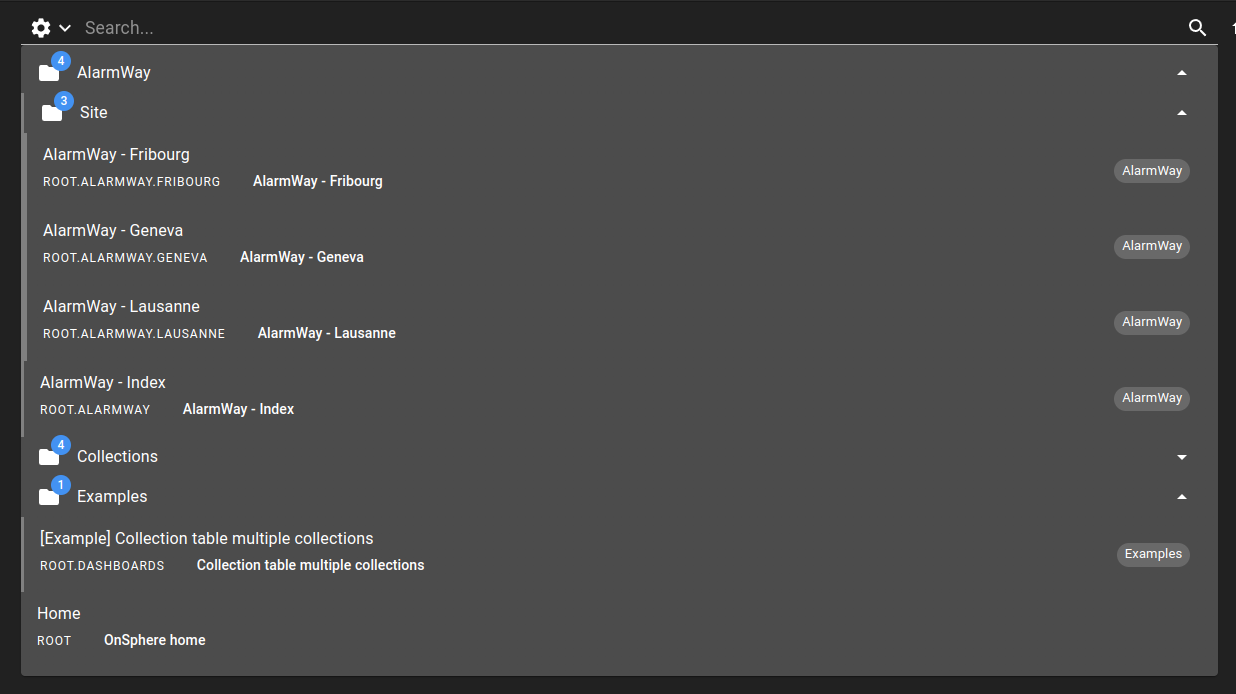
You can customize the search behavior of a dashboard to be shown in dashboard.web file:
EMPTY_SEARCH: (default) the search bar will show the dashboard when no search text is provided or when search content matches its contentSEARCH_REQUIRED: the search bar will only be displayed when there is a matching search textHIDDEN: the dashboard will never be displayed in the search bar area
Search settings
You can customize the search behavior by interacting with the settings panel that you can open with the settings icon on the left of the search bar.
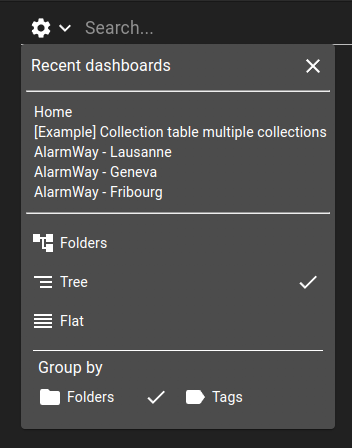
In this panel, you can :
Recent dashboards: show the five last dashboards picked using the search bar. Dashboards that you navigate into from any other way than the search bar will not appear in this list. Pick a dashboard in the list to navigate to it.Display behavior: choose between the available behaviors:Folders: display a list of folders that are configured on each dashboard configuration file and the dashboards that doesn’t belong to any folder. Upon clicking on one of those folders, you move into it, loading the dashboards and sub-folders of this folder.Tree: Display a list of folders, as explained for the previous behavior. Unlike the previous behavior, instead of moving into the folder, the folder content extends in the current view, showing the folder dashboards and sub-folders while keeping the previous results on the same view.Flat: Display every dashboard on the same level, without any folder.
Grouping behavior: choose how to group dashboards. Only useful when the display behavior is eitherFoldersorTree. You can group dashboard either by their folders or their tags, both described in dashboard.web. Note that you can create multiple levels of folder, but only on level with tags.