Basic concepts
Overview
To be OnSphere proficient some concepts must be understood first. OnSphere is organized around what is referred to as the configuration.
Each element of the configuration is represented by a text file allowing you to benefit from Git’s strengths. Used formats are :
yamlfor docker descriptionjsonfor configuration filesdrawiofor dashboard schematics
OnSphere architecture lays on micro-service called modules. Those modules are also configured inside text files located in the root directory of the configuration file-hierarchy.
File hierarchy
The configuration is organized as follow :
Directory path |
Description |
|---|---|
modules |
The modules directory contains the list of |
stack |
Defines the default configuration of the SWARM. See stack directory documentation |
certs |
Contains public keys used to authenticated |
root |
The root directory contains the |
schema |
Contains the up-to-date list of schemas used for validation. See schema directory documentation |
templates |
This folder is used only for playbook templates. See playbook template documentation |
Modules
The modules directory is where modules configuration is stored including:
module.<module-name>(e.g.module.modbus) handles module configuration. It is specific to each module and allows to fine tune module behavior based on requirements.module.servicehandles the container setup for given module. See module.service documentation.module.resourceslists files resources needed by a module
Stack
The stack directory contains configuration files for the stack as a whole.
Certs
The certs directory contains certificates used by modules for internal communication as well as external resources requiring certificates.
Root directory
The root directory is where your OnSphere integration resides. It is the entry point whenever something except module needs addressing.
It can contain:
value point gathered by a protocol
script being run on user interaction
callback to update given value
front-end dashboard definition
Based on your requirements you can organize your folders and files to meet your needs.
For example, let’s say your requirements include multiple sites aggregation of physical probes (temperature, water level and gaz).
If you need to focus on geographical repartition you could use the following hierarchy :
root
   site-1
      temperature
      water-level
      gaz-detection
   site-2
      temperature
      water-level
      gaz-detection
   site-n
      temperature
      water-level
      gaz-detection
But if you rather need to focus on aggregated metrics you could use :
root
   temperature
      site-1
      site-2
      site-n
   water-level
      site-1
      site-2
      site-n
   gaz-detection
      site-1
      site-2
      site-n
Naming convention/limitation
The folders and files must use only a-zA-Z_0-9 characters for naming.
Schema directory
The schema directory contains JSON schema used by both the Configuration dispatcher and the Composer to validate and autocomplete the configuration.
Configuration validation
The configuration is validated by the Composer (VSCode plugin) based on json-schema provided directly in the git repository. Links between files are then validated by the osp-configuration-dispatcher module when the configuration is pushed.
Module configuration
The configuration of modules lays on a SWARM configuration located in the modules directory of the configuration hierarchy. This configuration allows to define which modules are available on the swarm and the number of their instance(s).
A module can be local as part of the SWARM or external to the SWARM. When a module is external to the SWARM it is called a remote connector.
Terminology
The following concepts are basic terminology used through the configuration process. Understanding these concepts will greatly increase deployment speed and configuration comprehension.
In the realm of OnSphere configuration, various distinct components work together to form the complete configuration. This introduction to the different types of elements that make up an OnSphere configuration will help you understand their role and function.
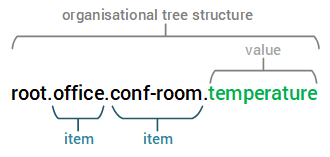
Every file contained within an Item (which is invariably represented as a directory) is interconnected by a common conceptual thread. Consider, for instance, the path root/device/modbus/building/east, where the files root/device/modbus/building/east/value.ospp and root/device/modbus/building/east/owner.modbus are intrinsically linked. These files within the Item share a cohesive purpose or function, contributing to the coherent structure and functionality of the OnSphere framework.
Item
OnSphere object hierarchy is constructed around the concept of Items. These Items serve as fundamental structural elements within the hierarchy, facilitating the organization of the hierarchy into logical segments.
The identification of Items uses a relative dotted representation derived from the file structure hierarchy. In practical terms, an Item located within /tmp/onsphere/root/building.east would be referred to as root.item.
To illustrate, consider the example of root.office.conf-room.temperature. In this case, each of the components, namely root, office, conf-room and temperature are instances of Items.
Note
This usage of dot separated path was made to uniformize ids with RabbitMQ topics, already using this representation.
Each Item is uniquely identified by an ItemId.
An Item is simply a structural component of the hierarchy. They are used to split the hierarchy into logical parts. For example, in root.office.conf-room.temperature, each of the elements root, office, conf-room and temperature are Items.
ItemId
An ItemId is the identifier of an Item.
It is constructed from the file structure hierarchy. For example, the Items inside root/office/conf-room/temperature will have the identifier root.office.conf-room.temperature.
The identifier might use the name of the element followed by Id to refer to the ItemId of an element of a certain type.
For example, the ItemId of a Value will be ValueId, Output will be OutputId and so on for the other configuration elements.
Wildcard
Wildcards are supported for multiple ID reference, but not for individual reference. The only supported char is “*” who can be placed : * “*” : match everything * “root.*” : will match every subpath of root excluded root himself * “root.alarms.*.test” : will match every itemId who is beginning with root.alarms and finishing with .test
For example : * excludeFilters of AlarmsTables use this wildcard * excludeViews of AlarmsTables use this wildcard
- The wildcard “*” can be used to replace any subpath.
“root.alarms.*” will match any direct filter children of “alarms” but excludes “root.alarms” itself.
Value
A Value, as its name implies, signifies a specific data point at a given moment in time. This data point can be acquired through various means, such as reading from an external system (e.g., modbus read from a PLC), generated through a specific function (like a waveform or script evaluation), or simply assigned a value (either set through a script or input from the dashboard).
The Value linked to an Item represents the state or content of that particular Item. For example, consider the temperature Item within the hierarchy root.office.conf-room.temperature. In this context, the temperature Item can be associated with a decimal Value that stores the current room temperature. This association is done by adding a file named value.ospp in the directory corresponding to the Item.
Each Value have some properties defined on value.ospp. The main properties are :
Name
Description
Type:
BOOLEAN: true, false
INTEGER: 64 bits integer, ranging from -2^63 to 2^63 - 1
DECIMAL: 64-bit IEEE 754 floating point
TEXT: minimal length is 0 (empty string), no maximal size (you should be mindful though as the longer it is the more performance issues you might encounter)
Retention:
STEADY (state): The value is cached by the module. When a module is started, it will be able to get the last value.
FIRE_AND_FORGET (event): The value is published only once and when a module starts it will not receive the last state of the value.
Startup error timeout: define the delay during which an value in error will not be published. The default timeout is one minute and can be configured on value.ospp and the module file.
Note
The timeout configuration of the module is overridden by the one on the value.ospp.
Note
When a value without an error is publish, the timeout is stopped and from this moment on, the next error will be published immediately.
On wire message TTL: A value can define the maximum amount of time that a message is allowed to remain in a publication queue (in RabbitMQ) before it is dropped.
This can be used to manage the time interval within which another module must react to a change. For example, information about a door opening may only be relevant for five minutes. Once this time has elapsed, the module should not take any action in response to the change.
To define this TTL use the field
onWireMessageTTLon value.ospp.Note
The default TTL is 7 days.
Warning
All messages have a maximum time to live (TTL) of 7 days.
Warning
Some protocols, such as BACnet, define a null value to indicate that a value is neither set nor used. Although this is an uncommon scenario, it is supported. However, it is recommended to minimize the propagation of null values, as in most other protocols a null value carries no meaning and may cause write errors.
A Value supports the following operations before being published. Operations are applied in the order listed below.
The following diagram show the publication process of a value.
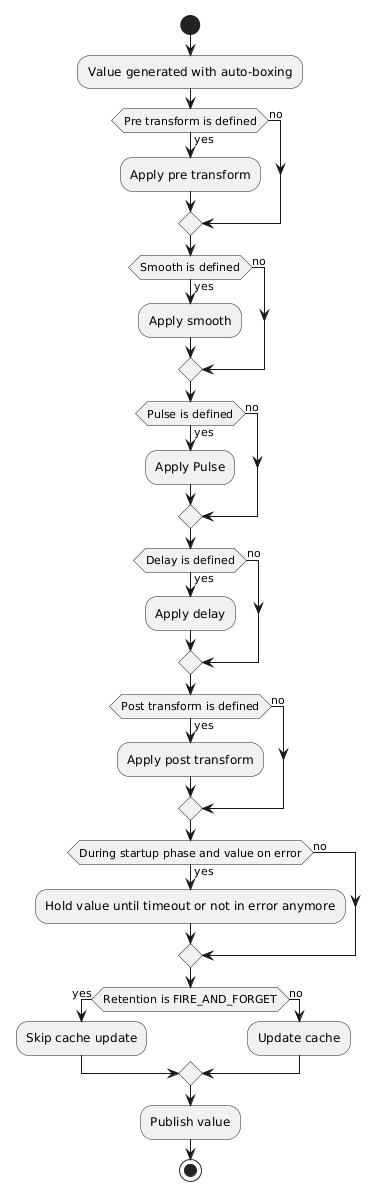
When a module publishes a value, a transmission mode is appended to clarify the value’s state from the module’s point of view. The following modes are used:
CHANGE: The content of the value has changed.RETRANSMISSION: The value is republished without change.INITIALIZATION: The value is created and doesn’t have a content yet. This is a transient state during the startup of the module.
Auto-boxing
When a value is created, it is automatically converted to one of the supported types (TEXT, INTEGER, DECIMAL, BOOLEAN). Most conversions are logical and straightforward, but the following points should be noted:
Conversions between DECIMAL values are not exact, as in any computing system, and may lead to precision errors (≈ 1e-6).
Converting numeric or BOOLEAN values to TEXT is supported and results in their string representation (number or “true”/”false”).
Converting a DECIMAL value to INTEGER truncates the decimal part (no rounding is applied).
Converting a DECIMAL or INTEGER value to BOOLEAN results in true if the value is not equal to 0, otherwise false.
Converting TEXT to BOOLEAN results in true only if the text is exactly equal to “true” (lowercase).
Owner
In the context of OnSphere, an Owner File represents a dedicated configuration that defines the link between the value and the module responsible for it. The Owner File is instrumental in defining roles and responsibilities, ensuring efficient management and control of values within the OnSphere framework. A value can only have one Owner file.
Output
An Output is an Item that defines a reaction on a Value change and is associated to an Item.
When an Output is triggered, it “forwards” the content of the Value that triggered it to whatever is the “destination” of the output (i.e. a modbus register address, a script, an http request, …).
Callback
A Callback is an Item that defines the link between a Value and one or more Outputs.
![@startuml
skinparam backgroundColor transparent
package "root" {
package "A value" {
[callback.ospp] as callback1
[value.ospp] as value1
}
package "A modbus controlled element" {
[output.modbus] as output1
}
package "A bacnet controlled element" {
[output.bacnet] as output2
}
package "An internal state" {
[output.variables] as output3
}
}
callback1 <-[#black]-> value1 : Link together
callback1 --> output1 : Call when value change
callback1 --> output2 : Call when value change
callback1 --> output3 : Call when value change
@enduml](../_images/plantuml-f35eb1bd0a3385745277c9d23615011f1ed0ef63.png)
It is possible to specify a condition for triggering an Output so it is only triggered if the condition is fulfilled. It is also possible to specify a transformation to apply to the Value before it is forwarded to the Output.
If an output fails, the action will be retried based on the retry configuration. By default, there is 3 retries, each separated by 10 seconds.
Retrying a previous value will stop if a new value triggers the callback.
Each linkedOutputs can override the retry configuration defined in callback.ospp.
Conditions and Transformation are expressed using the Expression language. These expressions have access to the variable value, error and mode containing the content, error and mode of the Value bound to the Callback, and they can also access any Values present in the OnSphere configuration hierarchy.
Warning
Transformation are only executed if the corresponding condition is fulfilled (return true).
Note
Values must be declared in accessedValues to be used inside a condition.
Tip
accessedValues field supports wildcard. root.*.test will match for example root.device.1.test, root.server.test.
The wildcard can also be used on root.serial1020*.test to match for example serials.
Callbacks are defined by callback.ospp.
Action
In OnSphere, an Action is an essential component specifying an operation performed by a module. These operations can encompass a wide range of tasks, such as sending a notification email when a specific value undergoes a change. Actions empower modules to perform precise, predefined operations based on the evolving conditions within the system, enhancing automation and control.
Modules
OnSphere’s architecture is organized into distinct modules, each serving a specific role within the system. A module, in essence, is a dedicated docker container designed to perform a particular task. These modules are categorized into two primary groups:
Core modules
These modules are used as the foundation of any OnSphere stack, serving as the essential building blocks that enable the system to function. They provide the fundamental basis for OnSphere’s operation.
Plugin modules
Plugins are valuable additions to OnSphere, enhancing its capabilities by introducing new functionalities. These modules expand OnSphere’s feature set, allowing users to tailor the system to meet specific needs and requirements.
By categorizing modules in this manner, OnSphere creates a modular and extensible framework that can adapt to a wide array of automation challenges, making it a powerful and versatile solution for diverse applications. Additionally some plugin module can perform as external module called Remote connectors.