Remote connectors
OnSphere introduces a notable capability where specific modules can be declared outside the swarm environment. This flexibility opens up the opportunity to collect information from external sources and seamlessly integrate it into OnSphere without the necessity of being within a trusted network. By enabling modules to operate outside the swarm, OnSphere offers a secure yet versatile approach to data acquisition, ensuring that valuable information from diverse, untrusted sources can be efficiently gathered and integrated into the system, bolstering its capabilities and adaptability.
A remote-connector is a module deployed outside of the swarm. It doesn’t benefit from all the free features of swarm like:
Secret sharing
Channel encryption
DNS hostname resolution
High availability
But it can be deployed in any environment with an Internet connection.
Note
Only some module can be used outside of the stack see the Module capabilities for details
Note
It’s recommended to have a DNS hostname for all your swarm node, to keep the high-redundancy system and support a node failure.
See examples
Network
Connectors are establishing communication with the stack. They need connectivity to two kinds of modules, one to get its own configuration and the other to join RabbitMQ.
The following diagram show network flow during initialization sequence:
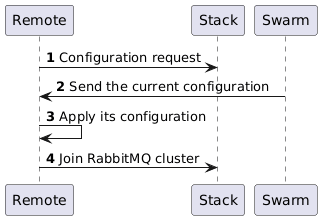
In the previous flow diagram, the Remote is a connector located on any host independently of the other modules. Stack represents the core of OnSphere that is installed inside the main Swarm cluster.
Number |
Destination port |
Description |
|---|---|---|
1 |
10000 (TCP) |
Retrieve the configuration for the remote connector. |
2 |
5671 (TCP) |
Join RabbitMQ cluster to communicate with other modules. This establishes a persistent TCP session to share values and other requests between modules. |
At first, the remote connector establishes communication to fetch its own configuration. Then it configures itself with the new configuration.
Then, the remote connector establishes a session with the RabbitMQ module to share values and requests with other modules.
Authentication and encryption
For the authentication and encryption of the communication, the remote connector requires the following certificates:
ca.crt
remote-connector.crt: It needs to be renamed to module.crt when mounted inside the docker.
remote-connector.key: It needs to be renamed to module.key when mounted inside the docker.
Certificates must be deployed manually on the host of the external connectors and shared with the docker.
Warning
The auto-generated certificates are stored inside the GIT configuration including the key which must be kept private at every cost. It’s done to simplify the deployment of remote connections.
Communication with configuration dispatcher (on port 10000) uses TLS 1.3 and communication with RabbitMQ module uses TLS 1.2.
Connector Installation
Hosts requirement
Connectors are deployed as docker, so you can launch them from any host with a compatible docker version. See the system requirements for the list of supported OS and docker version.
Other OS like Windows and Mac are not officially supported but can probably work as well.
Connector creation
To create a remote connector, create an empty file named module.remote instead of the standard module.service file.
name: A name for the connector
image-name: The name of the remote connector (ex. osp-snmp-trap)
image-tag: The version of the remote connector (ex. )
DISPATCHER_HOST: The address (either IP or hostname) to join your OnSphere Stack
DISPATCHER_PORT: The port available for your OnSphere Stack
host-secret: Where the secrets are stored on your host system
Start the connector as a service
Note
This is the recommended way as with this method the secrets are securely stored.
Warning
The server running a service must be a swarm.
Create the secret for the certificate
$ docker secret create my-stack_ca.crt /path/to/ca.crt
$ docker secret create my-stack_remote-connector.crt /path/to/remote-connector.crt
$ docker secret create my-stack_remote-connector.key /path/to/remote-connector.key
Create the service
$ docker service create --name=[choice-any-name] --env DISPATCHER_HOST="your-dns-name-or-ip" --env DISPATCHER_PORT="10000" --secret source=my-stack_ca.crt,target=ca.crt --secret source=my-stack_remote-connector.crt,target=module.crt --secret source=my-stack_remote-connector.key,target=module.key [image-name]:[tag]
Start the connector as a docker
Create a folder containing the certificate
$ mkdir [host-secret]
$ cp /path/to/ca.crt [host-secret]/ca.crt
$ cp /path/to/remote-connector.crt [host-secret]/module.crt
$ cp /path/to/remote-connector.key [host-secret]/module.key
Launch the container
Normal network
$ docker container run --detach --name=[choice-any-name] --restart=always --env DISPATCHER_HOST="your-dns-name-or-ip" --env DISPATCHER_PORT="10000" -v [host-secret]:/run/secrets [image-name]:[tag]
With host network
$ docker container run --detach --name=[choice-any-name] --network host --restart=always --env DISPATCHER_HOST="your-dns-name-or-ip" --env DISPATCHER_PORT="10000" -v [host-secret]:/run/secrets [image-name]:[tag]