Authorization
Warning
The naming of the internal groups of OnSphere and Keycloak are clashing, be sure to identify which group is related to your section of the documentation.
Capabilities
Capability |
Support |
Comment |
|---|---|---|
Authenticate users |
|
Authentication and authorization (this chapter) are two distinct processes the first identifies who the user is, while the second determines the actions they are permitted to perform. |
Distinguish between rights (write/read) |
|
Permissions are divided into two separate authorizations: |
Define external group without external source of trust |
|
By default some groups are created in keycloak, this list can be extended or modified. See Manage external groups |
Using group of users |
|
OnSphere use only group granularity to manage rights see Manage internal groups |
Using groups of groups |
|
This feature is currently not supported. In case of interest please contact us at info@sdn.ch |
Affect the same user to multiples groups |
|
A user can be a member of any number of external groups see Rights order in case of conflict to understand how the rights are managed. |
Manage access by user |
|
In OnSphere the notion of user is not existing (for access rights), a user must be included in a external group. |
Manage access by groups |
|
Rights must be managed by groups. |
Configure user with configuration push rights |
|
The rights for pushing a configuration are described Pushing a configuration rights |
Create local user (without SSO) |
|
A user can be configured locally see Add local user |
Remove local user |
|
An issue has been filled (#1433), to remove a user it’s mandatory to connect on keycloak afterward removing in |
Inheritances of rights |
|
By default, a ItemId inherits rights from its parent. Refer to rights inheritances rules for more details. This rights can be specialized by overriding for specific items. |
Using rights inside scripts |
|
|
Manage access rights from dashboard (by collection for example) |
|
This is only supported for the access of collection see |
Using an external API to associate users and groups |
|
An external API can be called to enrich the token, this permit to add some rights from an external source like a HTTP rest API. See Incorporating permissions from an external source |
Give access to specific itemId |
|
Each ItemId has two implicit rights (read and write) that allow access to individual items. See Implicit rights access for more details. |



Concept
This chapter only handle the authorization elements after the user authentication for authentication consult the dedicated_chapter
When discussing authorization, two “domains” need to be considered. The first involves assigning a user to one or more internal groups within OnSphere. The second entails mapping external groups to internal groups. The rights inside the OnSphere hierarchy only apply to internal group.
Link between external group to internal groups
A external group is a group defined either on Keycloak or who are provided to keycloak from an external source of trust like LDAP or another similar technology. To be used in OnSphere, the external group must be mapped to an internal group to do so consult Manage internal groups.
Rights
The rights are managed as a tree base on the directory, with the following access level :
READ: Grands permission to visualize the elementWRITE: Grants permission to modify the element
Warning
access.rights is mandatory on the root folder.
Manage external groups
Concept
An external group is a group that can originate from:
Keycloak
An external trusted source, such as LDAP
This external group representation enables centralized access management for OnSphere, allowing a single source of truth to link a user to a group. See Keycloak default configuration for the keycloak configuration.
Use-case
Receive groups and mapping (between group and user) from an external source of trust
Add / remove / update groups on keycloak
Usage
Keycloak local groups
The groups from keycloak are simply declared in the file groups.keycloak
Manage internal groups
Concept
An internal group refers to a group within OnSphere, aimed at defining how the external world—represented by external groups—is mapped to OnSphere. These groups aggregate multiple users to streamline rights management.
In most cases, groups are managed externally in the organization’s global directory, requiring a mapping process to align the external representation with OnSphere’s internal structure. Note that a internal groups can be linked to multiples external groups.
Use-case
Define group of user to simplify rights managements
Map multiples sources of trust to an internal representation
Usage
The external groups are defined there, when declared they can be simply mapped to internal group by declaring the list of external link in the file module.rights.
The mapping must be done in user federation or the identity providers section of keycloak
Add local user
Concept
By default OnSphere declare 3 defaults users, this local user are declared in the users.keycloak file, and can be freely changed. Other user can be declared on the same file.
Use-case
Define user if no external source of trust is available
Define emergency users
Define administrator access
Usage
The user can be added/removed/edited by modify the file users.keycloak, the mapping to the group must then be absolute path.
Force password
The password of a user declared in the users.keycloak file can be reset at each change of configuration (set the initial value to false)
One time password
The password can be temporary and ask the user to change-it at the first login, to do so set the field temporary to true.
Warning
When adding a local user through the users.keycloak configuration, removing it from the configuration does not automatically remove the user from Keycloak. You must manually delete the corresponding user directly from the Keycloak control panel.
Warning
The email must be unique between all user define on users.keycloak and the one define federations.keycloak and identityProviders.keycloak
Rights order in case of conflict
Concept
The image below present how different access configuration can work together
Groups 1, 2 and 3 have access to open dashboard1
Groups 1 and 2 have read access to values in items
Only Group 1 has permission to execute action1
Groups 1 and 3 can view menu1
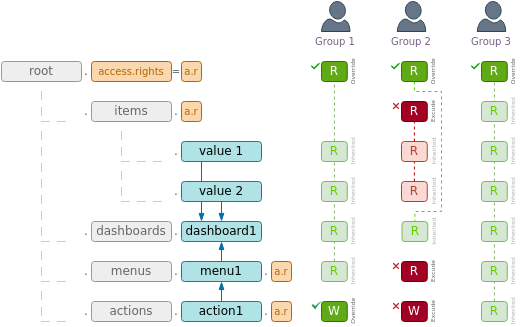
Exclude/include
If a user is both included and excluded in the same file, the exclusion rule takes precedence. Therefore, this is not advisable.
Override and exclude/include
override is exclusive with include and exclude and the configuration is refused
Pushing a configuration rights
To push a configuration the internal group must be mapped to the keycloak realm role Configuration-management. See Default keycloak groups for details. By default this link can be done by affecting
"groups": [
  "/internal/Configuration-management"
],
Define rights
The access.rights file defines the permissions for the current folder and its subfolders. If different permissions need to be applied to a specific folder, the Inheritances rules will be used.
Inheritances rules
The rights are managed as a tree base on the directory. This implies that an element in a sub-directory will inherit the right of its parent.
There are three keywords used to define the rights :
override: Reset the right with the one define here.include: Add a new group from the access level.exclude: Remove a group from the access level.
Examples
Implicit rights access
Each itemId can be authorized by adding a group to the user with the following format :
itemId-read - for read access
itemId-write - for write access
Example :
root.dashboard.alarms-read : give access to the dashboard in read
This allows each user to be assigned to specific groups using this format, granting access to any ItemId without explicitly setting access.rights. A common use case is to enrich the Keycloak token via a script, using a collection defined by the frontend to provide access to item IDs without requiring a new configuration deployment.
Warning
The aggregator does not validate whether the specified access right actually exists.
It only checks if the value ends with -read or -write, ignoring case sensitivity.