AE IP-RCT
Capabilities
Capability |
Support |
Comment |
|---|---|---|
Configuration of the IP-RCT (provisioning) |
|
This feature is currently not supported. In case of interest please contact us at info@sdn.ch |
Connection state monitoring of IP-RCT |
|
|
Connection state monitoring of SPT |
|
Only for supported protocol (DC-09, TS-50136-9). See SPT connection monitoring |
Virtual cluster of IP-RCT |
|
|
Changing administrative state of a SPT |
|
|
Fetching the administrative state of a SPT |
|
This feature is currently not supported. In case of interest please contact us at info@sdn.ch |
Handling alarms |
|
See Handling alarms |
Pre-receive hook for alarms |
|
Execute action before acknowledging the received alarms, this can be done to choose the answer (ACK/NACK). See Pre-receive hook for alarms |
Sending remote order (command) |
|
See Remote orders |


Examples
IP-RCT clustering
Concept
Warning
The following description applies to most of the fire installation compliant with the EN-50136 norm but there are some cases where the installation can be different with this standard configuration.
In many setups, at least two IP-RCT devices work together to handle alarms. While these devices synchronize for history, configuration, and statistics, it’s crucial to note that each alarm needs to be acknowledged by the same device that initially received it. To elaborate, if an alarm is sent to a specific IP-RCT, say, IP-RCT A, OnSphere must be connected to IP-RCT A as the designated alarm receiver. This connection is necessary because the alarm receiver may vary for each IP-RCT, depending on factors such as the location of operators.
To accommodate these scenarios without causing disruptions due to different alarm receivers, OnSphere supports a cluster configuration. This allows OnSphere to treat multiple IP-RCT devices as a unified entity, ensuring smooth handling of alarms without being impacted by variations in alarm receivers.
Use-case
Avoid logic when working with a cluster
Usage
Receiving alarms
Clusters of IP-RCT can be configured so alarms from any path of a cluster will be correctly forwarded to the corresponding values.
Sending order and setting administrative state
Sending SPT states and remote orders on a cluster will try each one until one succeed or all paths have failed.
RCT Connection monitoring
Concept
OnSphere acts as an AE plugin. Connection can be monitored to detect when the system is disconnected.
Use-case
Raise an alarm when the
AEplugin is not working as expected
Usage
The value associated with owner-device.ip-rct reflects the connection status between OnSphere and IP-RCT.
SPT Connection monitoring
Concept
Warning
Monitoring of the SPT can only be done for DC-09 and TS-50136-9 protocols.
There are three different alarms linked to the monitoring of an SPT :
Alarm type |
Description |
Supported types |
|---|---|---|
|
The state of the primary ATP (the primary path is usually an internet physical link) |
|
|
The state of the alternative ATP (the secondary path is usually a GSM link) |
|
|
The global state of the ATS (the ATS is fine if at least one path is connected) |
|
Use-case
Raise alarm when an SPT is not connected and thus cannot send alarms
Check the connectivity of every path (example : stats)
Handling alarms
Concept
Alarms received from IP-RCTs are acknowledged when they can be matched with at least one destination in the hierarchy. If there’s no suitable destination, the alarm remains unhandled. In cases where the alarm is directed to an alarm value with an associated linked action, acknowledgment depends on the successful execution of that linked action. If the linked action fails or exceeds a set expiration time, the alarm is considered unhandled.
Warning
The validity of a criteria’s state depends on both the IP-RCT and the osp-ip-rct module being online during the last occurrence of the alarm. In alarm transmission, the device creating the alarm (typically an IP-SPT) repeats it until an end device acknowledges. If another AE acknowledges the alarm in a multi-AE scenario, OnSphere will not be notified.
By default, the osp-ip-rct module keep track of event ordering when reflecting it to state or value. This behavior can be disabled by setting disableEventOrdering to true on owner-criteria.ip-rct.
Use-case
Mobilize people when an alarm is raised
Usage
When an alarm is generated, a specific field can be made available as a simple value. The value type depends on the accessed field. The configuration is done by the owner-criteria.ip-rct schema definition.
When the CRTIERIA alarm data is used, criteria’s alarm and restore expressions are used to generate the value content. If the alarm matches the criteria’s alarm expression the value content is set to true, and if the alarm matches the criteria’s restore expression the value content is set to false.
See owner-device.ip-rct file for details
Accessible fieldsAdvanced
Warning
Depending on the SPT protocol used for alarm transmission, some fields may not be available (empty).
Alarm data |
Supported types |
|---|---|
CRITERIA |
|
MAINTENANCE |
|
STATE |
|
SPT_NAME |
|
SPT_DESCRIPTION |
|
SPT_CUSTOMER_COMPANY |
|
SPT_CUSTOMER_CONTACT |
|
SPT_CUSTOMER_ADDRESS |
|
SPT_CUSTOMER_PIN |
|
SPT_CUSTOMER_PHONE |
|
SPT_CUSTOMER_EMAIL |
|
BUILDING |
|
LOCATION |
|
ROOM |
|
VERIFICATION |
|
INFO |
|
OCCURRENCE |
|
SITE |
|
LONGITUDE |
|
LATITUDE |
|
ALTITUDE |
|
ACCOUNT |
|
ACCOUNT_INFO |
|
TYPE |
|
TYPE_INFO |
|
ADDRESS |
|
DATE |
|
DATE_INFO |
|
TIME |
|
TIME_INFO |
|
USER |
|
USER_INFO |
|
AREA |
|
AREA_INFO |
|
PERIPHERAL |
|
PERIPHERAL_INFO |
|
AUTOMATED |
|
AUTOMATED_INFO |
|
PHONE |
|
PHONE_INFO |
|
LEVEL |
|
LEVEL_INFO |
|
VALUE |
|
VALUE_INFO |
|
PATH |
|
PATH_INFO |
|
GROUP |
|
GROUP_INFO |
|
SUBSUBSCRIBER_INFO |
|
SUBSUBSCRIBER |
|
Disabled behavior
It is possible to disable parts of IP-RCT behavior. Disabling behavior is done in server.ip-rct file.
Possible behavior to disable are:
Alarm handling with
HANDLE_ALARMbehavior (will also includeACKNOWLEDGE_ALARM). This will stop alarms from propagating to the value, states and linked actions.Alarm acknowledgement with
ACKNOWLEDGE_ALARMbehavior. This will propagate alarm state and linked action but will prevent OnSphere from acknowledging alarms.Remote order being sent with
SEND_REMOTE_ORDERbehavior. This will stop remote orders which might be sent on output.ip-rct to be propagated.SPT administrative state being set with
SET_SPT_STATEbehavior. This will stop administrative state which might be sent on output.ip-rct to be propagated.
Examples
Pre-receive hook for alarms
Concept
A linked action can be set up to react to alarms reception in owner-alarm.ip-rct.
Unlike outputs, only one linked action can be set on an alarm value and it will have to be completely executed before acknowledging received alarm. The alarm will not be acknowledged if the action fails to execute or if it takes longer than the expiration time.
Use-case
ACK alarm when it must be treated on OnSphere.
NACK alarms when it must be treated elsewhere than OnSphere.
Usage
A linked action is simply a reference to an action (action.ospp) and the parameters to pass to the action (parameters and their type depend on the action type). The description of this link is done in the owner-alarm.ip-rct file by using the Value accessor.
Examples
Create one OSP alarms from a DC-09 device Create an alarm from a DC 09 alarm
Change SPT administrative state
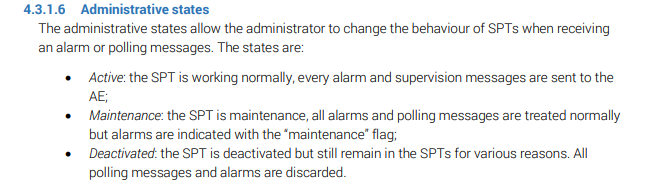
Extract from the IP-RCT manual version 1.2.2 :
Use-case
Disable SPT during a maintenance.
Usage
Changing the administrative state is done using a SET_SPT_STATE action in the output.ip-rct file
Configuration example :
deviceId: string : The id of the targeted device of the set state operation
sptState: string : The state to send to the targeted device (MAINTENANCE, ACTIVATE, DEACTIVATE)
Remote orders
Context
A remote order is a command sent to an external SPT device in an asynchronous way. Most of the time, the command is sent back to a polling from the end device, but this is protocol dependent. Be aware that not all SPT products support this feature so consult the user manual of the end device to ensure compatibilities.
Use-case
Activate actions on remote site * Open a door * Close a door * Start a video stream
Usage
Setting a remote order is done by using the SEND_REMOTE_ORDER action in the output.ip-rct file
Configuration example :
deviceId: string : The id of the targeted device of the remote order
remoteOrder: string : The remote order to send to the targeted device
Remote orders can be sent to a device using callbacks and outputs. The content of the remote order is defined from the triggering value of the callback, and only TEXT values are supported as IP-RCT callbacks trigger. The remote order content is dependent on the protocol used by the SPT