Password configuration and storage
Capabilities
Capability |
Support |
Comment |
|---|---|---|
Store password in plaintext |
|
The most basic method of storing passwords. See Store password in plaintext format. |
Store password in an encrypted way |
|
Use a secret key (stored with osp-configuration-dispatcher) and an external source of storage (like keepass), to store the password in an encrypted way. See Store password in encrypted format. |
Store password in orchestrator docker secret |
|
Use secret provided by the orchestrator SWARM or K8S. See Store password in orchestrator secret. |

Concept
Most connection on devices and external services require a password. The password can be stored in different ways, depending on the security level required and the capabilities of the device or service. This password must be reversible and there-so understandable by the device or service.
Store password in plaintext format
Concept
Warning
In case of GIT compromise, the password will be lost. This is the most basic method of storing passwords. It is not recommended for production use, but it is useful for testing and development purposes.
This is the most basic way of storing passwords, the system is easily readable and understandable. The password is stored in the GIT configuration file.
Usage
Use passwordProvider like this:
{
    "moduleId": "modules.ip-rct.ip-rct-1",
    "hostname": "dc09.gateway.local",
    "port": 8080,
    "username": "ae-osp-user",
    "passwordProvider": {
        "type": "PLAINTEXT",
        "password": "ae-osp-password"
    },
    "aeIdentifier": "ae-osp"
}
Example
Store password in encrypted format
Concept
To prevent password loss in the event of a GIT compromise, the password can be securely stored in an encrypted format. Although saved in the GIT configuration file, the password is encrypted using the following method:
base64(aes256(IV, key, password))
As a result, users must know the encryption key to read or generate the password. This mechanism allows different teams using the same OnSphere instance to have distinct levels of access to the password.
Usage
The key must be stored as a secret in the orchestrator to allow the osp-configuration-dispatcher to decrypt it. The generation of the password can be done with the vscode plugin extension or with the osp-scripts module. The password must be stored in the GIT configuration file.
Encrypted Toolbox Usage
Launch the toolbox using the command Ctrl+Shift+P, then select:
osp: Toolbox
This will open the following panel:
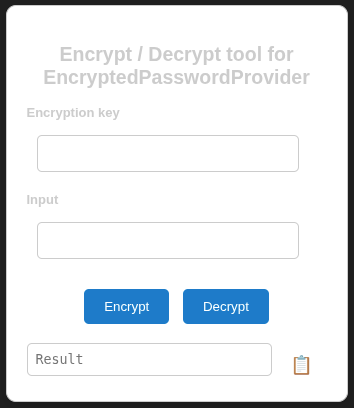
The
Encryption keyfield contains the secret key shared between the user and the orchestrator.The
Inputfield is used to enter the password to encrypt or decrypt.
The Result field displays either the base64-encoded password or the decrypted password, depending on the selected action.
Example
See Connect an OPC UA client to read, write and use methods from a server.
Store password in orchestrator secret
Concept
Orchestrator allow to store secret in a secure way. The password is stored in the orchestrator secret and is not readable by the user.
Hint
The dispatcher must have access to the secret key in order to decrypt the password and accept a configuration that includes password encryption. Therefore the creation of the secret must be done before using this feature.
Usage
The creation of the password can be done in multiples ways, depending on the orchestrator used. This can be done with the GUI of the portainer client, or by command line :
echo "your_secure_password" | base64 | docker secret create key-a -
Then the secret must be shared with the container who is using it, this is done by declaring the secret in the stack.secrets key-a
secrets:
- source: ${{stackid}}_admin-pwd
  target: admin-pwd
- ${{auto-generated-secret-access}}
- source: key-a
  target: key-a
And with the module :
modules_configuration-dispatcher_main:
# The osp_configuration-dispatcher name must not be changed.
  image: ${{image-repository}}osp-configuration-dispatcher${{image-version}}
  networks:
    - "back"
    - "portainer"
  ports:
    - target: 5022
      published: 5022
      protocol: tcp
    - target: 9100
      published: 9102
      protocol: tcp
    - ${{remote-port:"10000:10000/tcp"}}
    - ${{debug-port:5005}}
  volumes:
    - "osp-git:/git:rw"
    - "osp-runtime-configuration:/osp/run/config/:rw"
  configs:
    - source: osp-config-1
      target: /osp/config/portainer.json
  secrets:
    - source: ${{stackid}}_admin-pwd
      target: admin-pwd
    - ${{auto-generated-secret-access}}
    - source: key-a
      target: key-a
  ${{optional-env-section}}:
    - ${{image-repo-env}}
    - ${{image-version-env}}