Version 2.1.X - Fluffy Squirrel
Version 2.1.2
Release date : September 2026
Inter-module communication
The queue snmp-trap-replay-trap-queue might not be updated automatically with the new parameters.
The logs of the module osp-snmp-trap will show an error about creating a queue with different parameters.
To solve this problem, you can remove the queue manually either:
Remove the impacted queue
rabbitmqctl delete_queue snmp-trap-replay-trap-queue
Restart the module if it didn’t recover
Open the RabbitMq ui
https://<stack-host>:<stack-port>/rabbit/
Connect with the stack admin user
Go to the queue and stream tab
Search for the queue
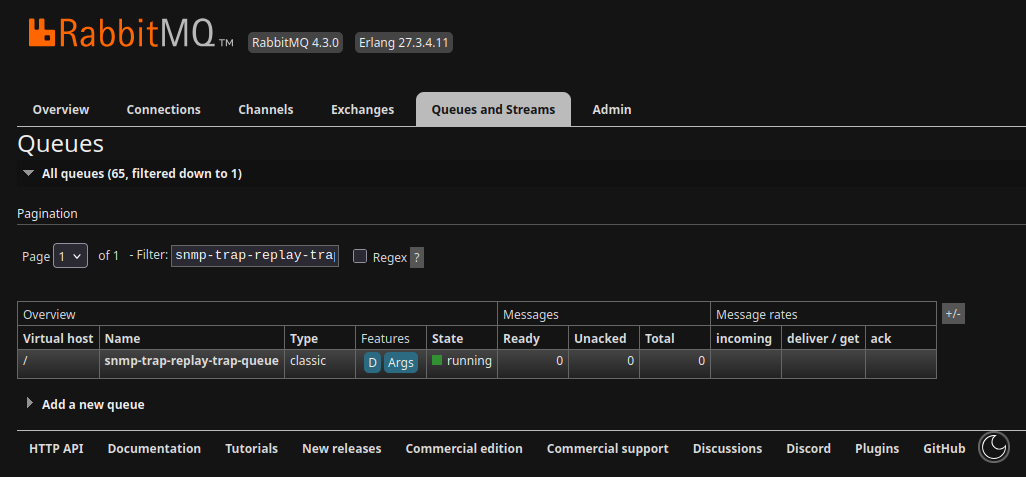
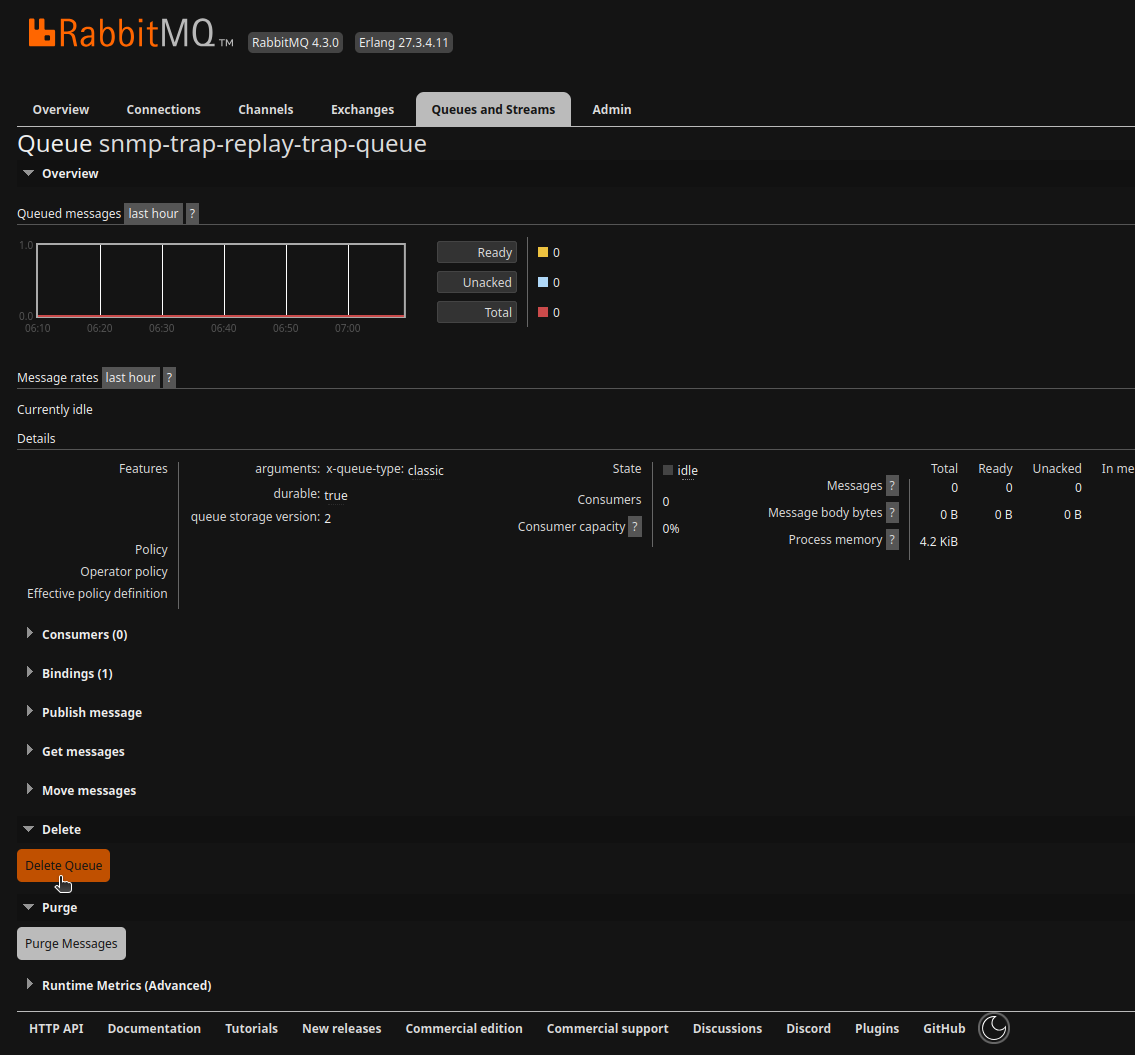
Open it by clicking on it
Remove it
Restart the module if it didn’t recover
Version 2.1.0-beta.1
Release date : July 2026
Keycloak update
The Default Policy and Default Permission need to be removed before the migration from the cli-client.
Connect to the Keycloak web UI.
Navigate to the realm
OnSphere.Navigate to
clientson the left menu.Select
cli-client.Go to the tab
Authorization.Select the sub-tab
PoliciesRemove the
Default Policy.
A warning will appears to confirm the removal of the
Default Permission. Confirm the deletion.
Select the sub-tab
Permissions.Ensure that the
Default Permissionis removed if not remove it.Continue the update as usual.
Open the file realm.keycloak.
Find the client with the
clientIdnamedcli-client.Find the object
authorizationSettings.policiesand set it with an empty array.
{
  "authorizationSettings": {
    "allowRemoteResourceManagement": true,
    "decisionStrategy": "UNANIMOUS",
    "policies": [],
    "policyEnforcementMode": "ENFORCING",
    "resources": [
      {
        "attributes": {},
        "name": "Default Resource",
        "ownerManagedAccess": false,
        "type": "urn:cli-client:resources:default",
        "uris": [
          "/*"
        ]
      }
    ],
    "scopes": []
  }
}
Push the configuration.
Continue the update as usual.
Script execution context hardening
Harden script execution context and option for module.scripts and module.keycloak.
The following fields on the executionConfiguration are removed:
allowNativeAccess: The script will not be allowed to access native interface anymore.
allowHostClassLoading: The scripts will not be able load java classes anymore.
allowInnerContextOptions: The scripts will not be able load new context anymore.
osp-envoy deletion
The osp-envoy module was not used and has been removed.
Composer template - execution rule
Playbook Environment Execution (all)
QuickPick now shows all available environments for playbooks with multiple environments.
Playbooks execute for all environments whose name matches the user selection.
Ensures only valid environments are executed and all options are visible to the user.
The environment names is now an array, there is no automatic migration, as the previous logic can be broken and need some analyze :
Previously each template has only one executed environnement, now all matching name environment are executed.
Previously each template has a pop-up to ask for desired env, now the selection is global
Previously each template is executed without asking if there is a empty name
Composer template - variables as CSV
Standardized CSV column names to use underscores (_) instead of dashes (-). Previously, the same column could appear under two different names, causing inconsistencies when used in Nunjucks templates. Template execution will now fail if a column name mismatch occurs.
Composer breaking template variables names
Since the Composer template is still in beta, we are introducing a breaking change to the variable naming. This update aims to correct poorly chosen names now rather than maintaining them in the long term. As a result, template generation from version 2.0 includes some breaking change.
The osp-playbook.json-schema of this version must be updated in the configuration schema/ path if the version is between 2.0 and 2.1.0.
Hint
With this release, template generation is expected to become increasingly stable, as it is now being successfully adopted and used more extensively internally.
List of breaking change :
CsvAsVariables.pathhas been renamed toCsvAsVariables.relativePathfor consistency.All variables are now defined as objects and include a condition field, allowing a variable to be included or excluded based on a condition. As a result,
VariablesFilesis now a list of objects instead of a string array.The
variable.variablefield has been renamed tovariable.localfor improved clarity and logic.
Pre-transform / post-transform improvement
The Auto-boxing of values is now more strict, and some value pre- or post-transformations may be affected, as auto-boxing is applied earlier in the process. When a pre-transformation or post-transformation is configured, the inputType becomes mandatory. In most cases, the input type is identical to the value type. However, if the valueType is, for example, BOOLEAN, and the pre-transformation performs a check on a textual input, then the inputType must be set to TEXT.
BACNet Module
The BACNet module now performs property access validation for configured objects, in compliance with the MBE-CH BACNet profile. If a property is marked as read-only by the BACNet standard but is configured with write access in the module’s configuration, the configuration will be rejected. This ensures strict adherence to the defined property access rights and prevents misconfiguration.
To continue in the direction of the standard, the objectType, objectIndex and property fields of owner.bacnet and output.bacnet are move into a new field object. objectType and objectIndex are renamed to type and instance respectively.
BACNet module is now capable of handling Proprietary object type / property and Proprietary / vendor property.
The BACnet module updated the connection status of remote devices only if at least one owner or output was linked to it. This was a problem in configurations where we just wanted to track the connection status of the BACnet device.
The BACnet notifications had an issue where in some cases they were removed. They are now watching their status correctly and making sure they are staying the recipient list if still active.
Scripts
The functions reportFailure() and reportResult() were throwing an exception, which was not the intended behavior. From now on, the script will exit immediately as expected. If you were relying on this behavior, please update your code accordingly ((issue #1712)
const main = () => {

    try {
        insertAlarmToReportFailureInAlarmTable(....);
        execution.reportFailure(".... err msg ....");  // Was throwing an exception, but return now.

    } catch(exception) {
        // Not more triggered by execution.reportResult() or execution.reportFailure().
    }
};

main();
Script execution scheduling — maxInFlightExecutions
The parameter maxPendingScriptsNumber has been removed and replaced by maxInFlightExecutions, which counts both pending (queued) and running executions combined.
maxConcurrentExecutions remains unchanged.
The patch automatically migrates existing configurations by setting maxInFlightExecutions to maxConcurrentExecutions + maxPendingScriptsNumber, reproducing the previous behavior.
Hint
The migrated value is a conservative baseline that preserves the old behavior.
The script executor now uses virtual threads, which are lightweight.
If scripts are not CPU-intensive, maxInFlightExecutions can safely be set to a much higher value.
As a rough guideline, a minimal script context (e.g. a console.log) uses approximately 100 KB of RAM.
Use this to estimate the memory impact of a higher limit.
See Priority scheduling for the full description of this parameter.
Version 2.1.1
Basic I/O widget layout
The Basic Input Output Value parameters showLabel, showIcon and showValue have been removed.
The parts to display are now listed by layout, which also decides the order they are displayed in.
When layout is absent, the parts are displayed as label, icon then value, the order they used to be displayed in.
The patch removes the three parameters and writes the matching layout on every widget that would otherwise change, so existing dashboards keep their appearance.
A widget that already declares layout keeps it untouched.
The new layoutDirection parameter displays the parts side by side from left to right (row) instead of stacked from top to bottom (column, the default).