osp-milestone
Overview
Warning
This module is in beta version, we are very glad to receive feedback at info@sdn.ch. Features in this module can change without notice in future versions.
This module implements an interface with the Milestone product xProtect <https://www.milestonesys.com/fr/products/software/xprotect/>. In a few words, xProtect is a VMS (Video Management Server) designed to manage and record video surveillance footage from a variety of sources, such as IP cameras and encoders. The software is used for security and surveillance purposes in a range of applications, including businesses, government facilities, and public spaces.
OnSphere uses its REST API to interact with xProtect’s servers.
List of configuration files
Filename |
Short description |
Format |
Documentation |
|---|---|---|---|
module.service |
Each service is described in its own file and then assembled |
yaml |
See the Swarm administration or Official documentation |
server.milestone |
Configuration file to connect to a milestone server. |
json |
|
output.milestone |
Defines an object/value owned by Milestone which can be updated by the module. |
json |
Api implementation
This connector module implements a TEST API (client side) to communicate with an existing Milestone. It provides the capability, for example, to trigger a specific event from OnSphere.
When OnSphere initiates a request, this module creates an HTTP request through the server API.
Milestone can directly send data to OnSphere using a webhook. The request is handled by the module osp-web from a webhook.
Authentication
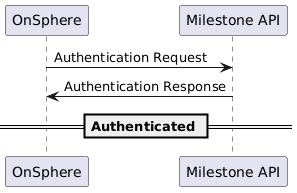
The following diagram represents an authentication process. This process is automatically run for every server you define in the configuration during module initialization sequence, and every time the token expires.
Trigger Events
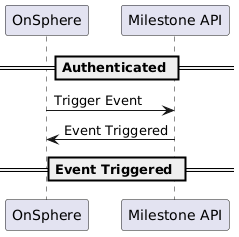
This sequence creates a POST request on the Milestone server triggering an event.
Environment Variables
All modules env variables
Variable Name |
Default Value |
Usage |
|---|---|---|
PROMETHEUS_PORT |
9100 |
The internal port used for Openmetrics exposition. |
DISPATCHER_HOST |
modules_configuration-dispatcher_main |
The hostname on which the modules can fetch the configuration. |
DISPATCHER_PORT |
10000 |
The port used by the module to listen for configuration request. |
USE_LEGACY_RESTART |
Not set |
When this flag is enabled, the container will terminate itself whenever a restart is needed (for example, after a configuration change). This is the legacy restart (before version 2.1.0). Otherwise, the system will simply restart the process running inside the container. |
CUSTOM_JVM_OPTIONS |
Not set |
Allow to inject JVM options. See Configuration changes for more information. |
ALLOW_VERSION_MISMATCH |
Not set |
Allow to disable the version check when a new configuration is published to a module. By default, a module will not be restarted if its configuration does not match its version. |
Dedicated variables
None