Import certificate
Auto-generated certificate
During the initial setup of the stack, the configuration dispatcher generates a new CA and a certificate with a key for each module specified in the configuration.
Whenever a new module is added, a new certificate is created and added to the docker orchestrator secrets system.
Hint
If needed, you can stop the stack and upload other certificates in place of the auto-generated ones. Just ensure that the format and naming are correct.
Incorporated trust store
The path of the configuration /certs/external is always pushed on all the modules. This path is used as an additional trust store.
Warning
Modifying the /certs/external path does not trigger a configuration reload to prevent unnecessary restarts of all the modules.
It’s mandatory to restart the module either by changing his configuration or by docker command
External resources certificate
Some external resources might require certificates to be able to interact with them.
Adding certificates inside configuration
To provide certificates inside OnSphere, the usage is to add them to the configuration in the certs/external/ path.
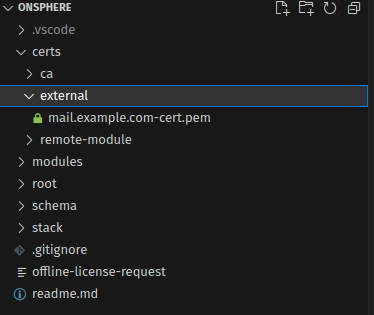
Warning
This modification does not trigger a modules restart, so a manual restarting operation is needed
Note
If you use a hierarchy on the external folder, it will be flatten when injected on the module.
Supported format list :
PEM (.pem, .crt, .cer, .key)
DER (.der, .cer)
PKCS#7 (.p7b, .p7c)
PKCS#12 (.pfx, .p12)
Note
Certificates will be converted internally to PEM format and given to modules via the configuration. Only the PEM will be transferred.
When a chain is given, the conversion will generate two file for the module. For example, chain.crt will generate chain-1.crt and chain-2.crt for the module.
If the full chain is needed, you can use the resource to inject it on the module.