Scripting
Capabilities
Capability |
Support |
Comment |
|---|---|---|
Back-pressure |
|
Controls what happens when executions arrive faster than the script can process them. Supports |
Priority scheduling |
|
Scripts competing for the same execution pipeline are dispatched in priority order (lower value = higher priority). Scripts sharing the same priority are dispatched in strict arrival order (FIFO). See Priority scheduling. |
Execution validity (TTL) |
|
A maximum age can be set on pending executions. Executions that have been waiting longer than the configured duration are silently discarded, preventing stale runs after a backlog or burst. See Priority scheduling. |
Concurrent execution limit |
|
The maximum number of simultaneous executions of the same detached script can be bounded, preventing overload on external services that do not support parallel sessions. See Priority scheduling. |
Per-trigger independent queuing |
|
Detached scripts triggered by multiple independent value sources can assign a separate queue and concurrency slot to each distinct trigger, avoiding head-of-line blocking between unrelated sources. See Priority scheduling. |
Read/update values |
|
Scripts can read any value from the hierarchy and write back computed results. Owner (value) scripts expose the bound value through the |
Logging |
|
Scripts can emit structured log entries at configurable severity levels, visible in the OnSphere log console. See Logging. |
Milestone trigger event |
|
Scripts can publish milestone events to mark significant points in time on the hierarchy, usable for auditing and dashboards. See Milestone. |
Importing script |
|
Scripts can import reusable modules written as |
Scheduling executions |
|
Scripts can be executed on a recurring schedule using Quartz cron expressions, independently of any value trigger. See Scheduled executions. |
Interact with alarms |
|
Scripts can create, acknowledge, and query alarms on the hierarchy programmatically. See Alarms manipulation. |
Interact with collections |
|
Scripts can read and write to OnSphere collections, enabling persistent storage of structured data across script executions. See Collections. |
Validate data with filters |
|
Scripts can apply filter expressions to validate or transform data before processing. See Alarm or collection filter. |
Sending notification (SMS/EMAIL) |
|
Scripts can send SMS and email notifications through the OnSphere communications service. See Communications. |
Get the list of users |
|
Scripts can query the list of OnSphere users, for example to resolve notification recipients dynamically. See Keycloak users. |
Format JS dates |
|
Scripts have access to a timestamp controller providing formatting and conversion utilities for JavaScript date values. See Date converter and formatter. |
Generate random UUID |
|
Scripts can generate unique identifiers on demand, useful for creating records in external systems or collections. See Generate UUIDv4 ids. |
Sending SNMP TRAP |
|
Scripts can emit SNMP TRAPs to external management systems. See Sending SNMP TRAP. |
Replaying SNMP TRAP |
|
Scripts can replay a previously received SNMP TRAP, for example to forward it to another NMS. See |
HTTP request |
|
Scripts can perform outbound HTTP and HTTPS requests to interact with external REST APIs or web services. See HTTP requests. |
Ping request |
|
Scripts can issue ICMP ping requests to check the reachability of network hosts. See Network. |
Analytics request |
|
Scripts can query the OnSphere analytics engine to retrieve aggregated or historical data for use in computations. See Analytics. |
Javascript auto-completion (composer) |
|
The OnSphere Composer provides IntelliSense-style auto-completion for the scripting API, reducing errors and speeding up development. See script auto-complexion. |

Concepts
Overview
The osp-scripts plugin provides the ability to execute scripts written in Javascript and to interact with hierarchy elements and external systems.
Behavior
The osp-scripts provides a Javascript engine based on GraalVM, on which scripts are run on transient contexts, meaning that they do not have persistent state on their own (setting a value to a variable defined in the global scope of the script will be forgotten in the next script execution).
Scripts come in two forms :
Value scripts : Those scripts are bound to a value in the hierarchy and their result is used to generate the value content. They provide a way of computing a complex state and provide it to the hierarchy.
Detached scripts : Those scripts are detached from the hierarchy. They provide a way to execute actions on the hierarchy or on external systems.
Scripts executions follow the following constraints :
A script is guaranteed to have the view of the hierarchy as it was when it was triggered, independently of potential execution delays
If a value triggers the execution of multiple scripts, all scripts are guaranteed to have the same hierarchy view
Executions of different scripts are always run in parallel
Executions of the same value script are always run sequentially, for coherent update of their value
Executions of the same detached script are always run in parallel
Script execution
The script execution use a shared pool of threads, this pool must fit the need of the current installation with a tradeoff between :
Memory usage
Context switching
I/O duration
Warning
In general, the number of threads should be increased in case of a high number of scripts running at the same time. The more scripts are idle (like waiting on an external system), the more threads can be increased to increase throughput. But there is a drawback, each thread consumes memory and in case of too many context switches, the overall performance of the system can be affected.
Concurrency
The values.scripts and detached.scripts are not executed in the same manner.
Values scripts
These are executed sequentially by values. This means that if the value root.value-A changes multiple times, the scripts will run one after another in order. However, if two values are modified simultaneously, both scripts may run concurrently.
Warning
If multiple script modules are used, the execution process can run in parallel, as the sequential triggering protection is managed locally within each module.
Detached.scripts These are executed only when triggered. If multiple scripts are triggered simultaneously, they run in parallel.
Handle concurrency The integrator is responsible for managing concurrency issues. When multiple scripts or processes are executed simultaneously, it is up to the integrator to ensure proper synchronization, avoid race conditions, and maintain data consistency. By implementing appropriate concurrency controls, the integrator guarantees that parallel executions do not lead to conflicts or unexpected behaviors.
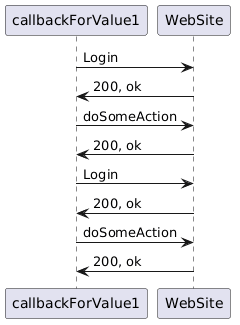
Below are two examples. The first example illustrates logging into a service that does not support multiple simultaneous login processes. It shows a scenario where the same value is triggered twice. The executions are performed sequentially, ensuring everything works as expected.
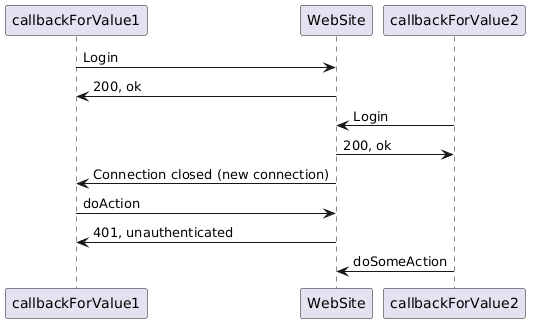
In the second example, the scripts are triggered by two different values, allowing the logins to occur simultaneously, which can result in an error, when the first scripts will be logged off.
Backpressure and buffering
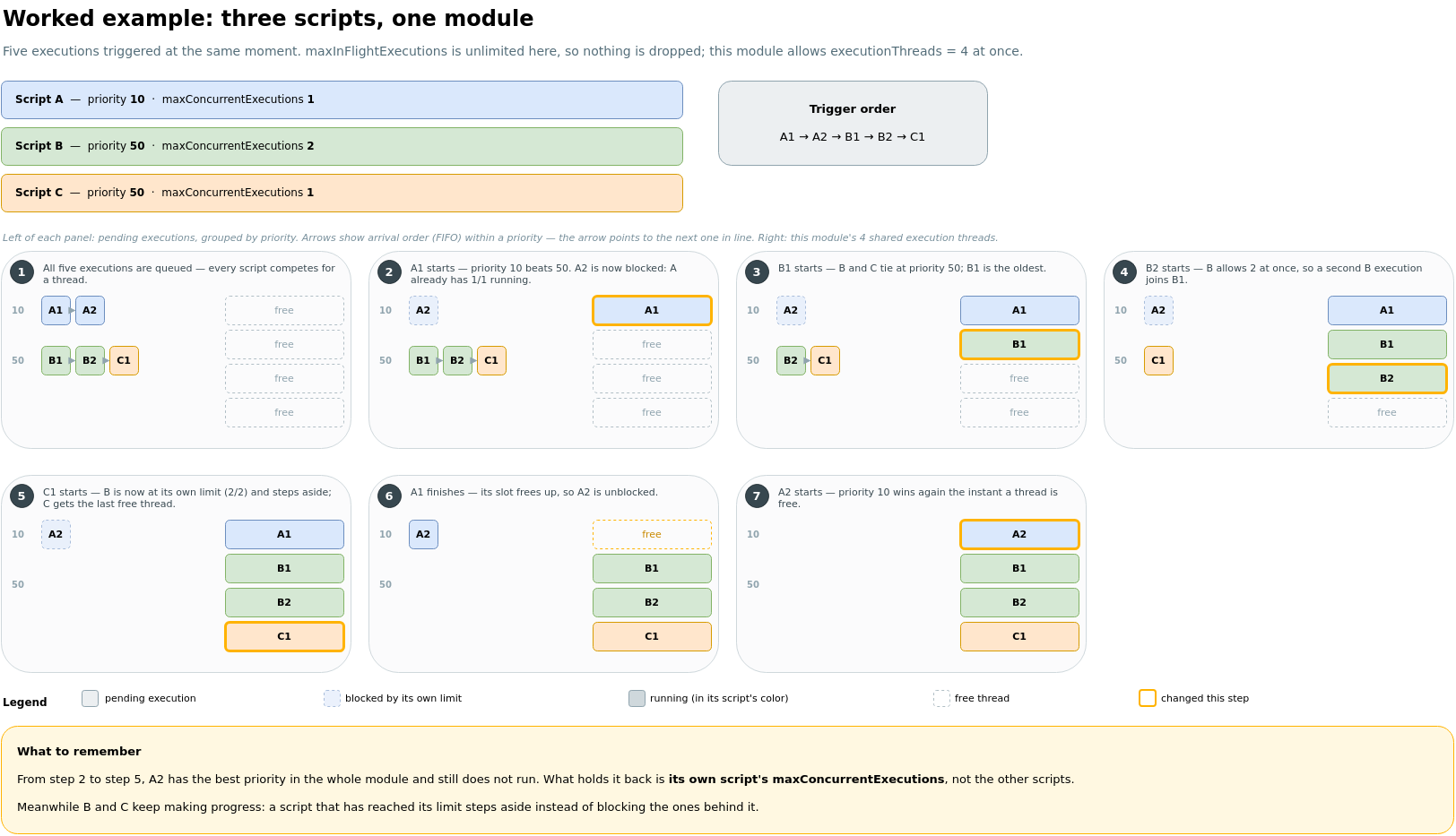
Each script execution is dispatched to a shared thread pool. When executions arrive faster than they can be processed, pending executions are queued per script.
The maxInFlightExecutions parameter controls how many executions (queued and running combined) are kept in memory for a given script:
-1— unlimited. Every incoming execution is accepted. Use with care on high-frequency triggers to avoid unbounded memory growth.0— disabled. All executions are unconditionally rejected (kill-switch to pause a script without removing its configuration).> 0— bounded. Whenpending + runningreaches the limit, thebackpressureStrategydetermines what happens to the excess execution.
When the limit is reached, one of two strategies applies:
DROP_OLDEST(default) — discards the oldest pending execution to make room for the new one. If the queue is empty (all slots are occupied by running executions), the incoming execution is dropped instead.DROP_LATEST— discards the incoming execution, keeping the existing queue intact.
Configure both parameters in owner.scripts and detached.scripts.
Priority scheduling
Scripts sharing the same execution pipeline compete for thread-pool slots according to a priority-based scheduler.
priorityScheduling priority relative to other scripts in the same pipeline. Lower values run first. Scripts with equal priority are dispatched in strict arrival order (FIFO). Default:
50. Minimum:0.validityMaximum age of a pending execution. If an execution has been waiting in the queue longer than this duration, it is silently discarded when the scheduler attempts to run it. Useful to prevent stale executions from running after a burst or a pause. If not set, pending executions never expire.
maxConcurrentExecutions(detached scripts only)Maximum number of executions of the same detached script running simultaneously. Default:
1. Use values above1with care when the script interacts with external services that do not support concurrent sessions.useTriggerAsId(detached scripts only)When
true, the scheduling key is composed of the script name and the trigger id instead of the script name alone. This gives each distinct trigger value its own independent queue and concurrency slot within the shared pipeline. Default:false. Use this when the same script is triggered by several independent value sources that should be queued separately.
Note
maxConcurrentExecutions and useTriggerAsId do not apply to owner (value) scripts, which are always executed sequentially per value by design.
Trigger information
Scripts can access the reason that triggered their execution by global variable trigger (trigger.id, trigger.content, …).
A trigger has the following structure :
id : the id of the value (string)
name : the name of the value (string)
description : the description of the value (string)
content (nullable) : the content of the value, can be null in case of reading errors (boolean, number or string depending on the type field)
error : the error in case of error, empty otherwise (string)
type : BOOLEAN, INTEGER, DECIMAL, TEXT (string)
timestamp : the timestamp attached to the value (integer)
Note
For detached scripts executed manually (i.e., not from callbacks, like an explicit call to scripts.run()), trigger only provides following fields :
id : always contains internal.manual, useful to determine if script was triggered manually or by a callback (string)
parameters : parameters list that were provided to the script (string[])
Warning
Owner script can only be triggered by callbacks. Manual actions like Actions can’t trigger an owner script.
myself object
Value scripts can access the myself object (detached scripts cannot). It contains the value linked to the script. Using the myself object is equivalent to using values.get(<value_id>) and has the same methods available:
Import scripts
Inside your scripts you may need some additional modules or functions. This section explain how to import them in your configuration. Here are some restrictions:
You need the source code you want to include (no package importation).
Only scripts with
.mjsfile extension can make use of theimportkeyword (it will be ignored if the extension is simply.js).Objects or functions you want to import have to be marked with the
exportkeyword.
Warning
All import are relative to root/.
Note
If you have a script with .js extension, you can freely rename it to .mjs.
A script can be imported with the following step
Add you library in your configuration directory.
...
├── certs
├── keys
├── modules
├── root
│   └── lib
│       └── my_lib.mjs
├── schema
├── stack
...
... ├── certs ├── keys ├── lib │ └── my_lib.mjs ├── modules ├── root ├── schema ├── stack ...
Add an
importstatement in your script:
import { my_function } from "lib/my_lib.mjs";Note
The path to your script can be relative or absolute. We recommend to use absolute path as they will be static when the script is moved.
import { my_function } from "lib/my_lib.mjs";
Add an entry in the file :
modules/scripts/<module_script>/module.resources:
"resources": [ { "source": "root/lib/", "destination": "root/lib/" } ]"resources": [ { "source": "lib/", "destination": "root/lib/" } ]
Configure
tsconfig.jsonto enable the auto-completion:
This configuration indicate the js lint where to find the source to enable the auto-completion.
{
  "extends": "./tsconfig.onsphere.json",
  "compilerOptions": {
    "paths": {
      "*": ["./root/*"]
    },
  }
}
{ "extends": "./tsconfig.onsphere.json", "compilerOptions": { "paths": { "*": ["./root/*"], "lib/*" : ["./lib/*"] }, } }
Scheduled executions
Scripts executions can be scheduled periodically using cron expressions. The precision of those expressions is at the second, for example * * * * * ? * will schedule a script every second.
The expected format is <Seconds> <Minutes> <Hours> <Day of month> <Month> <Day of week> <Year>.
For example, the following expression schedule one execution every:
seconds:
* * * ? * * *10 seconds:
0/10 * * ? * * *monday at 13:00:
0 0 13 ? * MON *every hour at 0 and 30 minutes:
0 0,30 * ? * * *every first day of each month:
0 0 0 1/1 * ? *
The / can be used to specify a start time and an interval (every x seconds starting at y second).
The , can be used to define the multiple execution points (At 10, 25, 45 seconds).
The ? is only used for the field Day of month and Day of week because they are mutually exclusive.
For example, setting an execution on the first day of every month and every Monday on the same expression is not valid, so one of them will have a ? instead.
Schedule execution is setup in either owner.scripts or detached.scripts with scheduledExecutions key.
There is some good resources online for helping you generate cron entries Quartz generator help
Note
When loading the cron expression generator, the default expression is define to 0 0 0 ? * * *. To create a expression to execute every seconds, the tab Seconds, Minutes, Hours must be edited.
Examples
See Visualize queries data within charts for the usage of scripts to generate random text at fixed rate